* Add qemu for arm builds on flatpak
* Increase timeout-minutes
Mainly meant to retrigger GitHub actions (free GitHub actions runners have a max runtime of 6 hours)
* Change arm64 flatpak to build barebones, rather than through emulation
This new addition is highlighted in GitHub's new blog post:
https://github.blog/changelog/2025-01-16-linux-arm64-hosted-runners-now-available-for-free-in-public-repositories-public-preview/
* Rename from arm64 to aarch64
* Potental fix for gst-plugins-good compilation
* Initial appimage arm64 builds
* Add inputs.arch variable
* Temporarily completely isolate arm64 and x86 dependencies
* Fix mesa download link and remove temp comments
* Disable libunwind in gst-plugins-good
* Revert changes in build_check_cache.yml
* Disable nls & static options in gst-plugins-good
* Rebase on main
* Re-add flatpak arm build
* Update gst-plugins-good to 1.24.10
This should be the version that received complete arm64 support
* Trying a solution
* Revert "Update gst-plugins-good to 1.24.10"
This reverts commit b416dcd0ae.
* Remove previous build-options
* Try installing the proper arch version of Meson
When building on a local arm64 device it runs properly.
* Remove sudo commands
* Use dnf rather than apt-get
* Try installing meson before the flatpak builder
* Change flatpak runner
This uses a more experimental version of the flatpak runner provided by Flathub
* Temporarily enable artifact upload
* Resolve merge conflicts
* Add arch variable into flatpak name
* Revert to using Gnome 46, rather than Gnome 47
* Add curl dependency
* Revert "Add curl dependency"
This reverts commit 888a0c4a75.
* Clean up
* Define ubuntu version
Seems to be needed due to the arm version still being in public beta
* Add SV06 high-speed settings which were incomplete earlier
Signed-off-by: Apoorv Parle <19315187+apparle@users.noreply.github.com>
* Remove SV06 PLA filament and use Generic filaments. Also enable other types of filaments.
Signed-off-by: Apoorv Parle <19315187+apparle@users.noreply.github.com>
* Merge branch 'main' into sv06_high_speed
* ImGuizmo: Comment out unused code
* 3DNav: Avoid gimbal lock by using polar coordinates
* 3DNav: Make sure top and bottom are oriented correctly
* Add auto perspective
* Add options
---------
Co-authored-by: SoftFever <softfeverever@gmail.com>
* Introduce option to control number of skirt walls after first layer
* Merge branch 'main' into Introduce-option-to-control-number-of-walls-on-skirt-after-first-layer
* Merge branch 'main' into Introduce-option-to-control-number-of-walls-on-skirt-after-first-layer
* One wall draft shield options refactor
* Merge remote-tracking branch 'upstream/main' into Introduce-option-to-control-number-of-walls-on-skirt-after-first-layer
* Merge branch 'main' into Introduce-option-to-control-number-of-walls-on-skirt-after-first-layer
* Renamed to single loop draft shield
* Merge branch 'main' into Introduce-option-to-control-number-of-walls-on-skirt-after-first-layer
* Merge branch 'main' into Introduce-option-to-control-number-of-walls-on-skirt-after-first-layer
* Update Artillery Genius & Sidewinder profiles
- Fixed bed-size of Genius (Pro) profile.
- Fixed default retraction values for the Artillery Genius (Pro) 0.4 profile,
which were set too high for this direct-drive machine.
- Slightly increased default retraction value for Sidewinder X1 & X2, to match
the Genius profiles. Tested values on all machines.
- Matching minimum layer height for Genius & Sidewinder profiles.
- Fixed line endings & indentation.
* Check for air filtration support on the printer level before emitting air filtration gcode command
* Merge branch 'main' into Check-air-filtration-support-at-the-printer-level-too
* Removed expand factor from IOI as it was incorrectly causing perimeter failing to observe IOI reordering.
* Merge branch 'main' into Bug-Fix-IOI-re-ordering-failing-to-reorder-in-certain-edge-cases
* Update Italian translation
* Fix Italian translation
* Fix Italian translation
* Fix Italian translation
---------
Co-authored-by: Noisyfox <timemanager.rick@gmail.com>
The default build plate model for Creality K2 Plus is heavy (516kB) and has a lot of visible artefacts - like diagonal "stairs". I found this a bit annoying. So I redrew the file - to a simple flat stl - 16kb.
* fix alignments for tab and sidebar icons
* minimize code changes
* minimize code changes
* minimize code changes
* Align config label with group title
* minimize changes
* Update Plater.cpp
* Update spacing after titlebar text and comments
* Update Plater.cpp
* Update OG_CustomCtrl.cpp
* Use class to control values from one place
* fix error
* Update Plater.cpp
* update
Move init sys font into GUI_App, after logging has been set up properly (#8603)
This avoid annoying messagebox if somehow failed to load font on windows, and write the message into log files instead
* Fix pt-BR translation of "raft" and "draft"
* Fix the pt-BR translations of "bridge"
* Fix the pt-BR translations of "skirt"
* Fix the pt-BR translations of "fuzzy skin"
* Fix the pt-BR translations of "pellets"
* Fix and uniformize the pt-BR translations of "bed" and "plate"
According to https://eigen.tuxfamily.org/dox/TopicPitfalls.html one
should just avoid using `auto` as the type of an Eigen expression.
This PR fixes most of them I could found in the project. There might be
cases that I missed, and I might update those later if I noticed.
This should prevent issues like #7741 and hopefully fix some mysterious
crashes happened inside Eigen calls.
* Fix the pt-BR translation of "extruder" e "multi-material",
* Fix pt-BR translation of "prime tower"
* Fix translation of "wall", "perimeter" and "shell"
* Add files via upload
Added Lulzbot Taz 6 profile, and supporting files images to add other printers in the future.
* Add bed model and image for Taz Pro
* Filament name clarifications and prep for GFL
* Changes to align with GFL
* GFL Integrated
* Update version # to reflect changes to use GFL
* format cleanup
* cleanup format
* cleanup format
* correct discrepancy on max acceleration label/value
---------
Co-authored-by: SoftFever <softfeverever@gmail.com>
* Revert "fix more Flashforge issues"
This reverts commit 6e473fd5fa.
* Revert "Fixed an issue that some Flashforge filament profiles don't' have compatible_printers defined which cause filament selection dialog didn't filter properly"
This reverts commit f8c0cdfb11.
* Revert "Merged Orca-Flashforge 1.3 branch (Added AD5X & G4P) + fixes & optimizations (#8461)"
This reverts commit b8e4ce75e0, reversing
changes made to be8bf54884.
* Fix OCCT and OpenCV patching during build
The inclusion of the `--directory` flag here isn't necessary because of
how `PATCH_COMMAND` applies patches. In fact this causes issues when
trying to build from an archive, `--directory` seems to imply `--index`
and thus this patch only succeeds if you're inside an initialized git
repo. If you simply use the archive without a git repo the build fails
at the patch step.
* Alter patch command based on git repo status
`git apply` has different behavior when inside a git repo vs not. If
we're in a git repo we need to fully quality the path for these patches,
otherwise we can omit the directory flag.
---------
Co-authored-by: Joe Palazzolo <joe@joepalazzolo.net>
* Misc fixes on the pt-BR translation
* Fix the pt-BR translation of "Wipe Tower"
* Fix the pt-br translation of "ooze"
* Fix pt-BR translations of "flip", "roll", "rotate"
* Fix translations of "preset", "profile", "template", "model"
* Fix the pt-br translation of "nozzle"
* Fix the pt-br translation of "overhang"
* Fix the pt-br translation of "threshold"
* Fix the pt-br translation of "scarf joint"
- Fix crash when selected bed type is not supported by current version.
This could happen if you downgrade Orca to old version that does not
have that bed type.
- For example, if you ever run 2.3.0-beta and having current bed type
set to the last one from the drop down, then if you use 2.2 again the
app will crash during startup.
- This PR fix this by falling back to default bed type if current value
is out of range.
- This PR also fixes issue that current bed type is changed after
upgrading to 2.3 from previous version, due to adding the supertack in
the wrong place in the enum.
and modify the overlap of wall and infill for wipe tower jira:none
cherry picked from commit
bambulab/BambuStudio@4db196b11f
Thanks BambuLab!
- Optimize the starting position of the printing wiper tower after
material change, the initial print on the wipe tower sometimes had
under-extrusion issues, and all layers of wipe tower have the same
starting position, increasing the risk of collision. This optimization
distributes the initial extrusion over four corners, reducing the
accumulation of defects.
- Reducing the rivet length between the wipe tower's outer wall and
infill to 0mm minimizes the risk of collision when switching between
printing infill and outer walls.

# Description
Fixed two regressions:
1. Total layer number was missing for BBL printers
2. M73 remaining info was wrong when ARC fitting is enabled.
# Screenshots/Recordings/Graphs
<!--
> Please attach relevant screenshots to showcase the UI changes.
> Please attach images that can help explain the changes.
-->
## Tests
<!--
> Please describe the tests that you have conducted to verify the
changes made in this PR.
-->
* Added Elegoolink connection
* Set Elegoo CC default bed to btPTE
* Friendly output of some error codes of PrintHost
* feat: Add elegoo centauri carbon profile
* fix: Fix the issue where the bed type in the printer configuration does not match the bed temperature settings when multiple bed types are not supported.
* feat: Modify the elegoo process parameters to disable slowdown_for_curled_perimeters.
* feat: Update comment to clarify plate visibility for multi bed support, BBL printer, and selected bed type.
* fix: Optimize ElegooLink upload; The code is clearer than before.
* feat: Format the ElegooPrintHostSendDialog code.
* fix: Remove the unnecessary instantiation attribute in the Elegoo process.
* fix: Flatpak compilation failed
---------
Co-authored-by: anjis <anjis.zhou@elegoo.com>
* Comprehensive Update in Traditional Chinese
* Update OrcaSlicer.pot & Update Traditional Chinese
* Update OrcaSlicer_zh_TW.po
* Fix Space
* Update the translation for the new features.
* Correction of full width symbols
* Correction of full width symbols
and modify the overlap of wall and infill for wipe tower
jira:none
Change-Id: I0d1355c718e2bd1efea6d898f793f5869476ab12
(cherry picked from commit 4db196b11f052d6a7a7c7a8aafe0d2b34a7d2d80)
the maximum diameter is changed to 20;
the diameter will not be reset;
jira:STUDIO-8497
GITHUB: #5048
Change-Id: I131305671ebc00dcf6b2972994879fe4ea768a36
(cherry picked from commit 3e9006e2d47c87da40e627034d0dc71c563e98ae)
Add minimum flow ratios for spiral vase transitsions
Currently when starting the spiral vase the extrusion rate is ramped
from 0 to 100% on the first layer and from 100% to 0% on the last layer.
In some cases it can lead to underextrusion at the beginning and end of
the spiral.
This change adds minimum flow ratio options for the beginning and the end
of the vase. This means that instead of ramping from 0% to 100% it
instead ramps from for example 20% to 100%.
This issue has been reported in SuperSlicer
https://github.com/supermerill/SuperSlicer/issues/4195
jira:[STUDIO-6649]
If the model comes from model mall, the name from the mall will be used when sending and printing. When there are special characters in the name, it will cause the sending to fail.
Change-Id: I324441cc7177e7062b79280c5d23afe9eeb5e4c2
(cherry picked from commit 1bcf30c39c648763952703c9060573baa2782f87)
Co-authored-by: tao wang <tao.wang@bambulab.com>
* Additional control over bridges
* Label updates
* Detect and handle layers over external bridges
* Label updates
* To-Do placeholders
* Filter out small external bridges
* Apply safety offset for internal bridge polygon intersections
* code comments
* Increase bridge offsets to 3 perimeters total (1.5 perimeter in each dimension)
* Filter out bridges based on perimeter counts to focus bridge on areas where bridge infill is actually generated in the end.
* Fixing bugs
* Convert tick boxes to drop down menu
* Additional geometry checks for second internal bridge to ensure no small polygons are left over.
* Minor code refactor for clarity
* Further refinements in polygon logic
* Polygon logic refinements pt3
* Further union operations to ensure clean geometry
* Fix compile error
* Clean up constructors
* Only create bridges on stInternalSolid areas, not sparse infill.
* Refactor internal second bridge logic to stand alone parallel for loop to avoid thread deadlocks
* Revert change to only consider stInternalSolid areas for second internal bridge layer.
This resulted in partly unsupported solid infill areas above as the remainder was too narrow to generate sparse infill
* Updated beta statements and tooltip changes
---------
Co-authored-by: SoftFever <softfeverever@gmail.com>
Make the "Open in Orca Slicer" button on Thingiverse work by informing
the system that Orca Slicer is the application to handle URLs with the
orcaslicer scheme.
This fixes this error message visible in Firefox' console when clicking
the button on the website:
Prevented navigation to “orcaslicer://open?file=https%3A%2F%2Fwww.thingiverse.com%2Fdownload%3A14134689” due to an unknown protocol.
See https://github.com/bambulab/BambuStudio/commit/62006bba30f39
PROBLEM
• Current color palette has many repeating or very similar colors
• Colors looks came from 80s and all raw colors like rgb(0,255,255)
• Black and White colors shows less details on surfaces due to shadows
and highlights
SOLUTION
• Picked more specific color tones. Tried to make every alternative to
easily identifiable
• Didnt used black, white or gray
QUESTIONABLE
• New colors follows given order and i used orca color as first. Maybe
orange one is better pick
• I can add, remove, or change order of colors
COMPARISON
before

after

old color set

new color set

as text if you want to experiment
`
wxColour("#00C1AE"),
wxColour("#F4E2C1"),
wxColour("#ED1C24"),
wxColour("#00FF7F"),
wxColour("#F26722"),
wxColour("#FFEB31"),
wxColour("#7841CE"),
wxColour("#115877"),
wxColour("#ED1E79"),
wxColour("#2EBDEF"),
wxColour("#345B2F"),
wxColour("#800080"),
wxColour("#FA8173"),
wxColour("#800000"),
wxColour("#F7B763"),
wxColour("#A4C41E"),
`
/run/build/BambuStudio/src/libslic3r/Support/SupportParameters.hpp: In constructor ‘Slic3r::SupportParameters::SupportParameters(const Slic3r::PrintObject&)’:
/run/build/BambuStudio/src/libslic3r/Support/SupportParameters.hpp:172:39: error: ‘warning’ was not declared in this scope
172 | BOOST_LOG_TRIVIAL(warning) << "tree support default to organic support";
| ^~~~~~~
/run/build/BambuStudio/src/libslic3r/Support/SupportParameters.hpp:172:21: error: ‘BOOST_LOG_TRIVIAL’ was not declared in this scope
172 | BOOST_LOG_TRIVIAL(warning) << "tree support default to organic support";
| ^~~~~~~~~~~~~~~~~
/run/build/BambuStudio/src/libslic3r/Support/SupportParameters.hpp:175:39: error: ‘warning’ was not declared in this scope
175 | BOOST_LOG_TRIVIAL(warning) << "tree support default to hybrid tree due to adaptive layer height";
| ^~~~~~~
/run/build/BambuStudio/src/libslic3r/Support/SupportParameters.hpp:175:21: error: ‘BOOST_LOG_TRIVIAL’ was not declared in this scope
175 | BOOST_LOG_TRIVIAL(warning) << "tree support default to hybrid tree due to adaptive layer height";
| ^~~~~~~~~~~~~~~~~
(cherry picked from commit a63070bd4cbe012315b9532f5c199f6d2664333a)
1. fix the issue that setting top z distance=0 not working
2. remove too small extrusions of tree support
jira: STUDIO-8578
Change-Id: I8c3face9d6a756698a6fab876fdb1acc0686647c
(cherry picked from commit 4d219266a1f520445bec6ac5a0274dcfec4050e8)
1. speedup organic tree support by using parallel for intersection of bed area
jira: STUDIO-8451
2. add extra wall for hybrid tree support's tall branches
3. disable circle fitting for tree support. This feature produces inconsistent
circles for tree supports.
4. expose the option tree_support_branch_diameter_angle. Tree supports'
strength can be improved by increasing this value.
Change-Id: If3688ca895df98a77f6ca538077daf8fe94e53f1
(cherry picked from commit 7697eb3dc8f87204d28e6be9adaf55dfcdadbc74)
The expansion was too large and may miss sharp tails near the object.
jira: STUDIO-8400
Change-Id: Iee5bd15cc7c23f16d30365d5f1c9fbcc0a632c19
(cherry picked from commit 05174d07063d8296241de1d35f5b4196bc33a353)
1. fix hybrid tree support may go outside plate
github: #4769
2. fix false alarm of empty layer warning
jira: STUDIO-8178
Change-Id: I7bcc3959b06184901cbec946e8840c7a94bc1cab
(cherry picked from commit 647bd4213c363eff6258992f5f607c1f03cbc482)
Change the behavior of "tree support wall count" option, let it control precisely.
0 means auto.
jira: STUDIO-8068
github: 4780
Change-Id: I6d1a64cff9b121f5c0a3e910c5ddbfe6db198687
(cherry picked from commit a557bbe758cd352fa9bb48323995ed2c90737577)
1. keep all polygon nodes in drop_nodes
2. prevent generating too small polygon nodes
jira: STUDIO-8107
Change-Id: I1311158ab15097eb10727a8d6884b0bcd8136ef1
(cherry picked from commit 038b92a536a56568b1c6f385ce19ff36331cd46a)
this function crashes if there are empty elements in entities.
jira: STUDIO-7975
Change-Id: I0dbeb6b1151dd089be7617ebc3271691f64ac61e
(cherry picked from commit df30728617a89891c68e36cce771fb6380355b82)
(cherry picked from commit e42aabebb16253b0172fb80a58f58953aec8dda7)
Previously painting support enforces on vertical faces doesn't work, as projecting the facets downwards will give empty polygons.
Now we use a different mechanism to enable vertical paint-on enforces, by directly adding contact nodes.
Note: this feature only works with tree support as only tree support has contact nodes.
jira: none
Change-Id: Id171b1665566d142a6427285baccb40c0aa00949
(cherry picked from commit 9c882f61eb37350a4486df58de48f0ae489f2d15)
(cherry picked from commit 68625a6e601e2feef8e56693da1f58372b27b560)
1. do not add interface for small overhangs so supports are easier to
remove
2. calculate avoidance more accurately using real layer height
jira: STUDIO-6285
3. hybrid nodes won't collide with lower layers
4. calculate max move more accurately
5. do not increase radius if next layer has collision
jira: STUDIO-2296, STUDIO-7883
6. rewrite plan_layer_heights to prevent support layers overlap.
Now the tree support layers are completely independent to object layers.
6. increase collision areas for interface. The top layers may be too
close to interface with adaptive layer heights and very small overhang angle
Change-Id: I052c3f66e68afb7663e2d70c846dd09ed7086071
(cherry picked from commit aca511caebfdeec270d4fc0ec6bbbadde77cddc9)
(cherry picked from commit f2fc996652b3b204b4e554f57afed8519feb0397)
1. add rectilinear interface pattern for organic support
jira: STUDIO-7181
2. add tree support optgroup
Change-Id: I94882bc34a61c6adc06b8ecbc9f2323f9b039aac
(cherry picked from commit a8142ab3f37e0bd140a31a7e635b8475f471d7e3)
(cherry picked from commit 69cf816b9431bc21ca0187c7db1148e2d2e898ab)
To fix this we have to expand the enforcer areas just like organic support.
jira: STUDIO-7538
Change-Id: I8e4e3fd18b0e77db9beb57347d8da895fc83f4b0
(cherry picked from commit 319b3e2247e01e545bb9e4cebea7950d875cd89a)
The top z gap should be split if it's too large.
Also we use same logic for both synced and independent support layer.
jira: STUDIO-7232
github: #4191
Change-Id: Idca792e8fa51a83c2a09441ecac64d40b91d6390
(cherry picked from commit c262a7ea137db09e453c157115b3d5417a32886d)
The raft gap layer should only exist if there are raft layers.
jira: STUDIO-7184
Change-Id: Ia4d2a5b7ddf873fb4ef16c7087648214e6bde806
(cherry picked from commit f13144d6a9c20cfbad11c6907c30b10447d8f8a3)
This bug causes supports difficult to remove.
Rule to remmeber:
never decrease the top z distance, you can only increase it SLIGHTLY.
jira: STUDIO-7103, STUDIO-7001
Change-Id: I24f71cd67d182d4e2c0902f244a8ca8f4c3ee982
(cherry picked from commit 461af9e8f6f98a8e0b363436276f225183365998)
also change default style to tree organic
jira: STUDIO-6801
Change-Id: Iab1d8c6117139c9a7a4c1fa71de0a13bcb356dd5
(cherry picked from commit d2c4efad58f16b23bef49bd47d3b70bf322d6f55)
(cherry picked from commit cd9305e3e061b67903ed8f5cd05d0136d608ee01)
Previous parallelization has a bug where two adjacent nodes may be deleted at the same time.
jira: none
Change-Id: I99a29dae9f72aa74ed2721eea4421b15eec10732
(cherry picked from commit 91efe67d723652d3f7e4484dd3cdf31638f769a4)
(cherry picked from commit 734a70b493b0347870dc955021b0f7055c76f84b)
1. sharp tails are supported by a sparse set of contact points which are
easier to remove than previously dense surrounding support.
Organic tree support also has this feature, including all other smart
overhang detection techniques (small overhang and cantilever detection),
with the cost of slightly longer time to detect overhangs.
2. improve supporting overhang contours by adding contact points along
contours.
jira: STUDIO-3876
2. remove some redundant data structure.
Change-Id: If7f595348506a14aba2d0132d23f97d3539c1e1f
(cherry picked from commit e3cce09b9db12ced2841045ffd337b1f35494e6c)
(cherry picked from commit 507345deb193d895d0813fc913f00b0def7e62f9)
1. speedup detect_overhangs by skipping sharp tail and cantilever detection if there are too many overhangs.
jira: STUDIO-3584, STUDIO-2592
2. drop_nodes with precalculation of avoidance and tbb parallel_for_each for all nodes in each layer.
jira: STUDIO-1814, STUDIO-2381, STUDIO-2639, STUDIO-5020,
3. don't show too many progress messages
Change-Id: Ia4897089c69c235fb7cd8e5fdcf4690086048b31
(cherry picked from commit 9c08e28b5b5342dfdde2c939fc953f143a42a59b)
(cherry picked from commit 9de69035a029374be477b74e67c96dd8235daafa)
1. reduce unnecessary small parts of tree supports
jira: STUDIO-6506
2. fix the bug that zero height tree support may be generated with synced support layer height.
3. fix the bug that tree nodes' radii may change abruptly
jira: STUDIO-6326
Change-Id: I38153d136e46bf9d797881cc6ca8803767f46736
(cherry picked from commit 59af0a6c2643169463cf18010ffd75f3aa19b704)
(cherry picked from commit 47440f040cae70f79e430b02d44f6093208ac066)
1. raft under organic trees are not generated
2. Studio may crash when generating organic supports for some objects.
jira: STUDIO-6407
Change-Id: I6e7ff2423b9fee95e4a4a85ccc2844549142f0c8
(cherry picked from commit 00db6c241270f5524bf1618109a2b45872073fd0)
(cherry picked from commit c7d12b703e23a83840f480e2cbb3a80fb00e059d)
1. reduce the gap between blade-shape overhang and support
github: #3667
2. improve sharp tail detection of blade-shape overhangs by introducing
lslices_extrudable.
github: #2786, #3367
jira: STUDIO-5065, STUDIO-6038
Change-Id: I4e899eace1aa28b100a6f4ce2b8d740c317f5530
(cherry picked from commit 08328b848e39c345b6c7b64021d1e0f04df24d08)
(cherry picked from commit 22056d5f7e7bef5574b53fc0453781cd365bf0e1)
1. Raft was not generated when tree support is selected but enable_support is false.
2. Raft angle and density of tree support was incorrect
github: #3675
Change-Id: Ifd78bf619a28eb03a908e75ad56af4934b6b08b7
(cherry picked from commit 2a448095a2fb4a2abebb0a5c8082a2ddbb635f16)
(cherry picked from commit e7ffe31cb3c6b526268adb4c2349a2623b181c53)
Only early stop detect_overhangs if support is disabled AND not checking support necessity.
jira: STUDIO-6158
Change-Id: I2d9662231d941827d6392d57344f7d911f641e09
(cherry picked from commit b811a6031d1afe0e7b1cb73050fe6391a65411ef)
(cherry picked from commit fa61ee6abdb4b04a2141b3f8ea9e2e8a789b7881)
1. accurate top z distance for tree support
Also fix a bug that bottom z and top z distances are misused.
jira: STUDIO-3000, STUDIO-5990
github: #1827
2. Change interface pattern to interlaced rectilinear when using
support material.
2. clean up tree support code
Change-Id: Icc8ce1b6844c841a6fbd1d623df707fdc8ed0f7b
(cherry picked from commit da7412a48dfb5767918ef125b9d0fb9718c03a61)
(cherry picked from commit 39ae64fc53abec794d740e36baaa13fd6fb35849)
The bottom interface layers were not right when "independent support layer height" is enabled.
This commit ensures there are always 2 bottom interface layers and the gap
is not less than specified. However, the gap may be slightly larger.
Jira: STUDIO-3842, STUDIO-2138
Github: #2127
Change-Id: Ifd8fbc4c7bc6dd92f2534fdd0179458a9e93c79a
(cherry picked from commit edcdad162e)
For tree support, use lslices as tree support island when generating brim,
as this is faster and more accurate.
For normal support, still use "support_fills.polygons_covered_by_spacing()" as support island when generating brim;
Jira: studio 4332
Change-Id: Ibfadd3a166606f824e5780b57112fff221470aaf
(cherry picked from commit 64960b19818c7029eaaaf3d8a89804aeaa26f11d)
(cherry picked from commit 181b05c236)
1. interlaced rectilinear interface pattern not working with tree supports
2. infill overlaps with walls when wall count>1
3. support blockers can't block sharp tail detection in normal support
jira: STUDIO-5663
4. bottom z distance=0 not working for normal support.
jira: STUDIO-5676
github: #3203
Change-Id: I025eff2aaad90ad565661aa656c59c82ff969bbf
(cherry picked from commit 5aaf7ead0fd697043f673161e0ede0145ec49f4d)
(cherry picked from commit f3bd5ff87021b5c26794751a1f1da4349b603102)
There is no raft generated when only raft enabled but no support needed.
jira: none
Change-Id: Ic0c9269e2f98038d85c9bc54e4a85f892dc5d764
(cherry picked from commit 1106ff8253)
We must ensure when independent support layer height is enabled, the
support layers are strictly synced with object layers. Otherwise, the
wipe tower toolchange may be messed up.
Jira: STUDIO-4097
Change-Id: I6208653f9665b15d028940d5e130c9e895629fc2
(cherry picked from commit 41d35c8af152c91cb356a68d88a879a115b44778)
(cherry picked from commit 2b593ce378)
1. open support wall count for normal support
Enabling this option makes normal support stronger and gives
better overhang quality, but also more difficult to removal.
Jira: STUDIO-5192
2. fix a bug where tree support (hybrid style) may get overlapped
extrusions near the walls.
3. fix a bug where raft layers can't be 1 in tree support
Jira: STUDIO-5261
Change-Id: Iadc0c67a9b50b5b221c8e83d5aa22ed282018cf8
(cherry picked from commit c0bb0084e386cb70ed6e16edf93190e4b38f5b90)
(cherry picked from commit bf93fd02fb)
First layer support can't be top interface, and
min brim width of auto mode should be larger
than 0.
Jira: STUDIO-5010
Change-Id: I02f8b017b535f8a47965387e8679f692b1966e04
(cherry picked from commit 3e7d54abe352e8ab5f9d6492b5a86a96f9067f94)
(cherry picked from commit 7efebe6bc6)
We decide to set brim width of all objects to MAX_BRANCH_RADIUS_FIRST_LAYER if there is an object with tree support after discussion.
Jira: MAK-2009
Change-Id: I4c4940800632c433235966b01c44ac910e33a51c
(cherry picked from commit bambulab/BambuStudio@2bd6b11505)
Co-authored-by: Arthur <arthur.tang@bambulab.com>
1. Improve generation speed by removing unnecessary get_avoidance.
2. Fix a bug of hybrid support's interface (Jira: STUDIO-4878,
STUDIO-4726, Github#2614)
3. Fix a bug of tree support pass through objects (Jira: STUDIO-4252, STUDIO-4608
STUDIO-4298)
4. Fix a bug with first layer + Arachne (Jira: STUDIO-4281, Github #2423)
Change-Id: I40978c93ab93fa6964483514dad552d73a66c710
(cherry picked from commit 2ccbbe49c74d4aab4f086e79a6f8262b7fc80f15)
(cherry picked from commit bambulab/BambuStudio@d7a4623380)
Co-authored-by: Arthur <arthur.tang@bambulab.com>
1. add a hook inside tree branches for improved strength
2. fix the issue that interface may fly as a mess (delete the logic
where gap nodes can skip dropping down)
3. fix the issue that base nodes may fly as a mess (smoothing should
skip polygon nodes, see Jira:STUDIO-4403)
Change-Id: Ie9f2039813c2ca3127ed8913304cc455fec8e7ee
(cherry picked from commit 83cef5f91d49ff3d275a89ec3df8b5f0fd573f8c)
(cherry picked from commit bambulab/BambuStudio@76f876a3c6)
Co-authored-by: Arthur <arthur.tang@bambulab.com>
* Whitespace cleanup in Prusa profile
```
$ diff -u Prusa.json <(jq --indent 4 < Prusa.json) | wc -l
0
```
* Add Prusa MK4S profiles
There were generated from the PrusaSlicer profiles[0] using some scripts
which try to faithfully convert the profiles[1]. The high flow nozzle
settings have been modeled as a separate printer model.
A few things I'm aware of that haven't been converted:
- Filament multi-material settings (eg loading speeds)
- High-flow and abrasive nozzle check in gcode, which, as far as I
know, isn't available in the current firmware anyways
I've also found that disabling z-hop on layer change in OrcaSlicer seems
more similar to the behavior in PrusaSlicer (which allows travel
distance limitations to override that setting), so I've disabled that.
Fixes#7391
[0]: 0bca90da13/resources/profiles/PrusaResearch.ini
[1]: https://github.com/rcloran/SuperSlicer_to_Orca_scripts/tree/20d2881
**The latest download link can be found from the "Checks" tab above or
[here](https://github.com/SoftFever/OrcaSlicer/pull/8256/checks). There
should be an "artifact" dropdown on top of that page once the build is
completed.**
This PR solves the following problems:
- Bind printers in different subnet
- Binded LAN printers are not automatically connected when switching to
Device tab


Few improtant things to know:
The automatic printer info detection (ie, the step in the first image)
doesn't work on MacOS, when you click "Connect" you will immediately be
prompted to the second image to enter the printer details. (I don't know
why but Bambu does not provide this capability on MacOS for their
network plugin)
AFAIK, P1 series do not support automatic printer info detection (as
tested by @SoftFever and myself), so the first step is gauranteed to
fail, which is unfortunate but expected. Simply click the "Manual Setup"
button (which will appear after clicking the "Connect" button then wait
for a while) and enter the printer detail and you should be good to go.
If anything entered wrong, you could simply unbind the printer and do it
all over again.
I know current binding flow is not very user-friendly, but consider how
rare this will be used, I think it's OK. Given the current situation
this is the best I could do with the closed-source Bambu network plugin.
I only have a P1 so I couldn't throughly test this PR. Please if you
have different printers and home network configurations, your feedback
are valuable to help validating and improving this PR, thanks in
advance!
Fix#6169Fix#8097
Calculate toolbar icon size the same way as it done on windows:
manipulate icon size, not toolbar scale.
Scaling icons this way makes images sharper since they getting
rasterized to a target size rather than being rasterized for 40px and
scaled to a desired size later.
Addresses #8275 by adding time lapse gcode
The profile was missing the time lapse gcode. I ported the time lapse gcode from Qidi Studio's layer change for this profile.
Co-authored-by: Noisyfox <timemanager.rick@gmail.com>
addresses #8093 by using proper placeholder
The original setting was using `hot_plate_temp_initial_layer` which doesn't respect the various build plate temperatures. `bed_temperature_initial_layer_single` does.
Co-authored-by: Noisyfox <timemanager.rick@gmail.com>
* glcanvas: add modifiers to mouse events logging
* glcanvas: workaround for touchpad nav on Win
Releasing ALT on windows platform result in GLCanvas losing focus.
Because of this mouse movements not being processed by on_mouse() event
handler and camera rotation have not cleaned up.
Make a workaround for Windows to cleanup camera rotate state on
releasing ALT modifier.
The following Bambu filaments have been added:
- Bambu PLA Wood
- Bambu PLA Silk+
- Bambu PC FR
- Bambu PETG Translucent
Additional variants for the above filaments have also been added, including versions for different nozzles and printers.
The filament vendor for Fiberon PA612-CF has been corrected from "Bambu Lab" to "Polymaker."
This PR ported the following changes based on BBS 1.10.1 codebase:
- The ability of binding printers via IP (Fix#8099)
- The ability of setting AMS filaments during print (Fix#7882)
- Some other related fixes and improvements
Thanks BambuLab for those improvements!
~~Please note: with this update, we will no longer be able to streaming
the live camera through cloud, only through Lan (even if the printer is
not in Lan mode). At least that's what I saw with this PR and also
#8103, more tests & feedbacks on this are needed.~~ Update: nvm, I
missed a commit that fixes the remote live view. It's working now.
Unfortunately even with this update you still cannot bind the printer in
a different subnet, which is an inherent problem from BBS:
https://github.com/bambulab/BambuStudio/issues/4512
https://github.com/bambulab/BambuStudio/issues/5070
https://github.com/bambulab/BambuStudio/issues/5833
and more...
* Add support for perlin noise fuzzy skin
* Support multiple types of coherent noise
* Updated tooltips for more clarity.
* Reorder options as suggested by @discip
* Fix accidental removal of &
* Move libnoise to deps
---------
Co-authored-by: SoftFever <softfeverever@gmail.com>
* Gcode Statistics Panel - Persist open/close state
Bug: On slicing a model, the Statistics Panel would be reset to being open (regardless of if the user had shut it earlier)
Fix: Now on app open the Statistics Panel will be open, but if the user closes it, its state will persist (regardless of slicing again)
https://github.com/SoftFever/OrcaSlicer/discussions/6021
* Gcode Statistics Panel - fold/unfold button width fix
Issue: The fold/unfold button width is too wide (It seems CalcTextSize is making the button wider than necessary)
Fix: Set the width to a correct fixed value
* Update Anycubic Kobra 0.4 nozzle.json
Fix incorrect parameters for M204 in start gcode
* Update Anycubic Kobra end_gcode and travel speeds
* Update Anycubic i3 Mega S start and end gcode
* FIX:update custom_texture when new_shape=false
Jira: STUDIO-5287
Change-Id: I3add95f9f9345c14a48cc7467513d1b3ce95f4c9
(cherry picked from commit 9ce7de10f4)
* FIX: correct the bed model to the print area origin point
Change-Id: Ieb856dff421d39694966e3c13c519f4ffa3da5c2
(cherry picked from commit 32892514ff)
* Avoid unnecessary copy of `position` parameter
* Merge branch 'main' into bugfox/plater-y
* flatpak: install translations in flatpak
Note: you also need to update flatpak config to add desired locales to
flatpak environment via `flatpak config --set languages='en;ru'; flatpak update`
or `flatpak --user config --set languages='en;ru'; flatpak --user update`
* flatpak: mesa-20.x tarball has been moved, fix the url
It's now under older-versions/20.x directory
# Description
1. Implement a centralized Orca filament library. Previously, OrcaSlicer
required that filament profiles be contained within a printer vendor's
profiles, making it impractical to add printer-vendor-independent
filament profiles. With this new implementation, Orca now supports a
centralized filament library, accommodating all filament vendors for any
printer, or offering specialized versions for specific printer models.

2. Support the reuse of filaments across various vendors and machines
Users can now share any personal filament and print configurations
across all printers.
https://github.com/user-attachments/assets/5c324d07-7bbf-4913-8abf-2506a255759f
<!--
> Please provide a summary of the changes made in this PR. Include
details such as:
> * What issue does this PR address or fix?
> * What new features or enhancements does this PR introduce?
> * Are there any breaking changes or dependencies that need to be
considered?
-->
# Screenshots/Recordings/Graphs
<!--
> Please attach relevant screenshots to showcase the UI changes.
> Please attach images that can help explain the changes.
-->
## Tests
<!--
> Please describe the tests that you have conducted to verify the
changes made in this PR.
-->
* Initial DM2 Profiles
Add profiles for DeltaMaker 3D printers
* Made changes to machine/fdm_machine_common.json and process/fdm_process_common.json to validate successfully using the Orca profile validator
* Update DeltaMaker 2.json
Corrected the capitalization of the file name.
---------
Co-authored-by: Noisyfox <timemanager.rick@gmail.com>
Co-authored-by: SoftFever <softfeverever@gmail.com>
Co-authored-by: Christian Coleman <christianlanecoleman@gmail.com>
Fix issue `Preset name "0.20mm Speed @MK3S 0.4" was marked as renamed from "0.20mm Standard @MK3S", though preset name "0.20mm Detail @MK3S 0.6" was marked as renamed from "0.20mm Standard @MK3S" as well.`
During the printer connection cycle, each Filament and slot is only judged once
When deleting custom filaments or modifying the temperature of custom filaments, re evaluate
Jira: XXXX
Change-Id: If495a343efdb1be6f46d11dd20f6ec7934266e87
(cherry picked from commit e5dab1487188d744c732568232b32666e5f2cc5c)
only use the same path as binary for current path
JIRA: STUDIO-7875
Change-Id: I5523e3b7e20b0f24de50c8d295f54b984693165a
(cherry picked from commit 62b98f783dcee8900da034b384167817155a3e59)
JIRA: STUDIO-7534
Change-Id: I0b5d3764ebf61735238207adc2053ad45ce5ec1a
Signed-off-by: Stone Li <stone.li@bambulab.com>
(cherry picked from commit babda59caa2cb83ae993bfe87c865d7f61c6ab4b)
(cherry picked from commit ff22a8651580a637e42a6839ae364552354781e1)
JIRA: STUDIO-5195
Change-Id: Ida3cd5c60b25d1eff4f04e324a74d63394a9ffeb
Signed-off-by: Stone Li <stone.li@bambulab.com>
(cherry picked from commit 6b6787b30736f87491171237a36c6badc8e51878)
(cherry picked from commit acfdcadac09f05f2e008340d485c4781744c95f9)
A trivial amendment to the initial graphics location to correct it from that of another fork, plus some trivial text edits to smooth reading.
Added a small text to encourage others to report spammy sites to the engines to have them eventually culled.
* Update build_deps.yml
Fixes "Build on Windows" so an error isn't thrown if the working directories already exist.
* Update build_deps.yml
* Update build_deps.yml
Compare the custom gcode z to `0.5*(layer_z[n] + layer_z[n+1])` instead of `EPSILON`
to compensate float rounding error during gcode processing (SoftFever/OrcaSlicer#7834)
* Fix style preview size per resolution
(cherry picked from commit b67c4785f0d300b5615126ea1df1d518dd6d00b0)
* Align font preview to left. (closer to font name)
(cherry picked from commit eb9b8c0c2b112f0f7649e58f4f6d7977380b8442)
---------
Co-authored-by: Filip Sykala - NTB T15p <Filip.Sykala@Prusa3D.cz>
Field: SpinCtrl: Removed code that was relevant for wxSpinCtrl, but not for the new SpinCtrl.
(fix for SPE-2050)
(cherry picked from commit 555193f6ec477d4107f8998c7a3c441cde72382c)
Co-authored-by: YuSanka <yusanka@gmail.com>
* Make sure the `m_extrusion_quality_estimator.set_current_object()` is called after regional config has been applied (SoftFever/OrcaSlicer#7946)
* Init `m_extrusion_quality_estimator` based on region config
* Revert "Make sure the `m_extrusion_quality_estimator.set_current_object()` is called after regional config has been applied (SoftFever/OrcaSlicer#7946)"
This reverts commit d13d4a47b7.
* Call `m_extrusion_quality_estimator.set_current_object` regardless, because that doesn't hurt
* Add a comment
* Revert "SPE-1950: Optimization of computation complexity of perimeter ordering for Arachne generator."
This reverts commit 47ec9b9b06.
* Revert "SPE-1963: Improve ordering of perimeters with Arachne perimeter generator"
This reverts commit babb84c70a.
Fix issue that the contact layer is printed in wrong filament when interface layer number is set to 0
Cherry-picked from prusa3d/PrusaSlicer@ca5f6da08d
Co-authored-by: Vojtech Bubnik <bubnikv@gmail.com>
Some portions of GCode (like BTT_TFT thumbnails) has to be CRLF in
order to work correctly. However, gcode post processor was ignoring
input line endings style emitting '\n' (LF) into post-processed output.
* enabled dependency setting for filament and process
* Add information about inheritance back to Dependencies tab
* Merge pull request #1 from michmela44/Add_inherits_to_dependencies
Add information about inheritance back to Dependencies tab
* Merge branch 'main' into feature/enable_profile_dependencies
* Update OrcaSlicer.pot
Made sentence a bit clearer.
* Update PrintConfig.cpp
Made sentence a bit clearer.
* Update OrcaSlicer.pot
corrected previous expression
* Update PrintConfig.cpp
corrected previous expression
* fix: tray_exist_bits != tray_exist_bits comparison
* fix: title == GetTitle() == title comparison
* fix: possibly dangling reference to a temporary
```
OrcaSlicer/src/libslic3r/calib.cpp:456:17: warning: possibly dangling reference to a temporary [-Wdangling-reference]
456 | const auto &w = bed_ext.size().x();
OrcaSlicer/src/libslic3r/calib.cpp:456:45: note: the temporary was destroyed at the end of the full expression ‘((Eigen::DenseCoeffsBase<Eigen::Matrix<double, 2, 1, 2>, 1>*)(& Slic3r::BoundingBoxBase<PointClass>::size() const [with PointClass = Eigen::Matrix<double, 2, 1, 2>]()))->Eigen::DenseCoeffsBase<Eigen::Matrix<double, 2, 1, 2>, 1>::x()’
456 | const auto &w = bed_ext.size().x();
```
* fix: mixup of | and ||
in this case I think it actually does not change the semantics it just means that both comparison have to be evaluated.
* fix: multi-character character constants need "
OrcaSlicer/src/slic3r/GUI/MediaPlayCtrl.cpp:392: warning: multi-character character constant [-Wmultichar]
392 | if (auto n = tunnel.find_first_of('/_'); n != std::string::npos)
OrcaSlicer/src/slic3r/GUI/MediaPlayCtrl.cpp: In member function ‘void Slic3r::GUI::MediaPlayCtrl::Stop(const wxString&)’:
OrcaSlicer/src/slic3r/GUI/MediaPlayCtrl.cpp:392: warning: overflow in conversion from ‘int’ to ‘char’ changes value from ‘12127’ to ‘95’ [-Woverflow]
* fix: missing paranthesis - skips null check
* NFC: Remove this check it can never be false
* NFC: fix warning: statement has no effect
* Update 0.25mm Quality Speed @RatRig V-Core 4 HYBRID 0.4.json
it's HYBRID not HYBIRD
* Update 0.25mm Quality Speed @RatRig V-Core 4 HYBRID 0.5.json
it's HYBRID not HYBIRD
* Update 0.25mm Quality Speed @RatRig V-Core 4 HYBRID 0.6.json
it's HYBRID not HYBIRD
* Add files via upload
Adding process files for the 0.8 nozzle
* Add files via upload
machine profiles for 0.8 nozzle
* Update Ratrig.json
Added support for 0.8.nozle
* Add files via upload
Added filament profile for the more and more popular PCTG
* Update Ratrig.json
Add filament PCTG
* Update Ratrig.json
Filament setting for big (>0.4) nozzles
* Add files via upload
Filament setting for big (>0.4) nozzles
* Filament setting for big (>0.4) nozzles
Filament setting for big (>0.4) nozzles
* Optimized layer and extrusion values
Optimized layer and extrusion values
* New set of profiles for RatRig V-Core 4 - 400 IDEX
New developed set of profiles for RatRig V-Core 4 - 400 IDEX with virtual copy and mirror printers (with appropriate smaller build plates and idex commands)
* New set of profiles for RatRig V-Core 4 - 400 IDEX
New developed set of profiles for RatRig V-Core 4 - 400 IDEX with virtual copy and mirror printers (with appropriate smaller build plates and idex commands)
* New set of profiles for RatRig V-Core 4 - 400 IDEX
New developed set of profiles for RatRig V-Core 4 - 400 IDEX with virtual copy and mirror printers (with appropriate smaller build plates and idex commands)
* Profiles V-Core4 IDEX 300 + 500
Added profiles for Ratrig V-Core4 IDEX bedsize 300 and 500
* Profiles V-Core4 IDEX 300 + 500
Added profiles for Ratrig V-Core4 IDEX bedsize 300 and 500
* Complete profile sets for V-Core 4 - IDEX
Now the profile sets for V-Core 4 IDEX - size 300+400+500, all with copy and mirror mode, are completed.
(profiles are tested in real prints for V-Core 4 IDEX 400 including copy and mirror, 300+500 only calculated)
* Complete profile sets for V-Core 4 - IDEX
Now the profile sets for V-Core 4 IDEX - size 300+400+500, all with copy and mirror mode, are completed.
(profiles are tested in real prints for V-Core 4 IDEX 400 including copy and mirror, 300+500 only calculated)
* Updated Filament for large nozzles (>=0.6)
Added missing TPU for big nozzles
---------
Co-authored-by: SoftFever <softfeverever@gmail.com>
* Fix start gcode setting bed temp to nozzle temp for Raise3D Pro3 Plus left nozzle
Edited Raise3D Pro3 Plus 0.4 nozzle (Left).json
Replaced S{nozzle_temperature_initial_layer[0]} with S[bed_temperature_initial_layer_single] for M140 and M190
* Fix start gcode setting bed temp to nozzle temp for Raise3D Pro3 left nozzle
Edited Raise3D Pro3 0.4 nozzle (Left).json
Replaced S{nozzle_temperature_initial_layer[0]} with S[bed_temperature_initial_layer_single] for M140 and M190
* Update Raise3D Pro3 Plus 0.4 nozzle (Left).json
---------
Co-authored-by: SoftFever <softfeverever@gmail.com>
* added change g-code
* adjusted change_filament_gcode for all k2 profiles
* Merge branch 'main' into 7607-k2plus-filament-change-gcode
* Merge branch 'main' into 7607-k2plus-filament-change-gcode
* Merge branch 'main' into 7607-k2plus-filament-change-gcode
* Merge branch 'main' into 7607-k2plus-filament-change-gcode
* Merge branch 'main' into 7607-k2plus-filament-change-gcode
* Merge branch 'main' into 7607-k2plus-filament-change-gcode
* Merge branch 'main' into 7607-k2plus-filament-change-gcode
* removed extra space on new line characters. to exeactly match creality print
* Merge branch 'main' into 7607-k2plus-filament-change-gcode
* Merge branch 'main' into 7607-k2plus-filament-change-gcode
* disabled filamanet ramming and cleared Single Extruder Paramaters
* Merge branch '7607-k2plus-filament-change-gcode' of https://github.com/brandonfhall/OrcaSlicer into 7607-k2plus-filament-change-gcode
* Merge branch 'main' into 7607-k2plus-filament-change-gcode
* Merge branch 'main' into 7607-k2plus-filament-change-gcode
# Description
<!--
> Please provide a summary of the changes made in this PR. Include
details such as:
> * What issue does this PR address or fix?
> * What new features or enhancements does this PR introduce?
> * Are there any breaking changes or dependencies that need to be
considered?
-->
# Screenshots/Recordings/Graphs
<!--
> Please attach relevant screenshots to showcase the UI changes.
> Please attach images that can help explain the changes.
-->
## Tests
<!--
> Please describe the tests that you have conducted to verify the
changes made in this PR.
-->
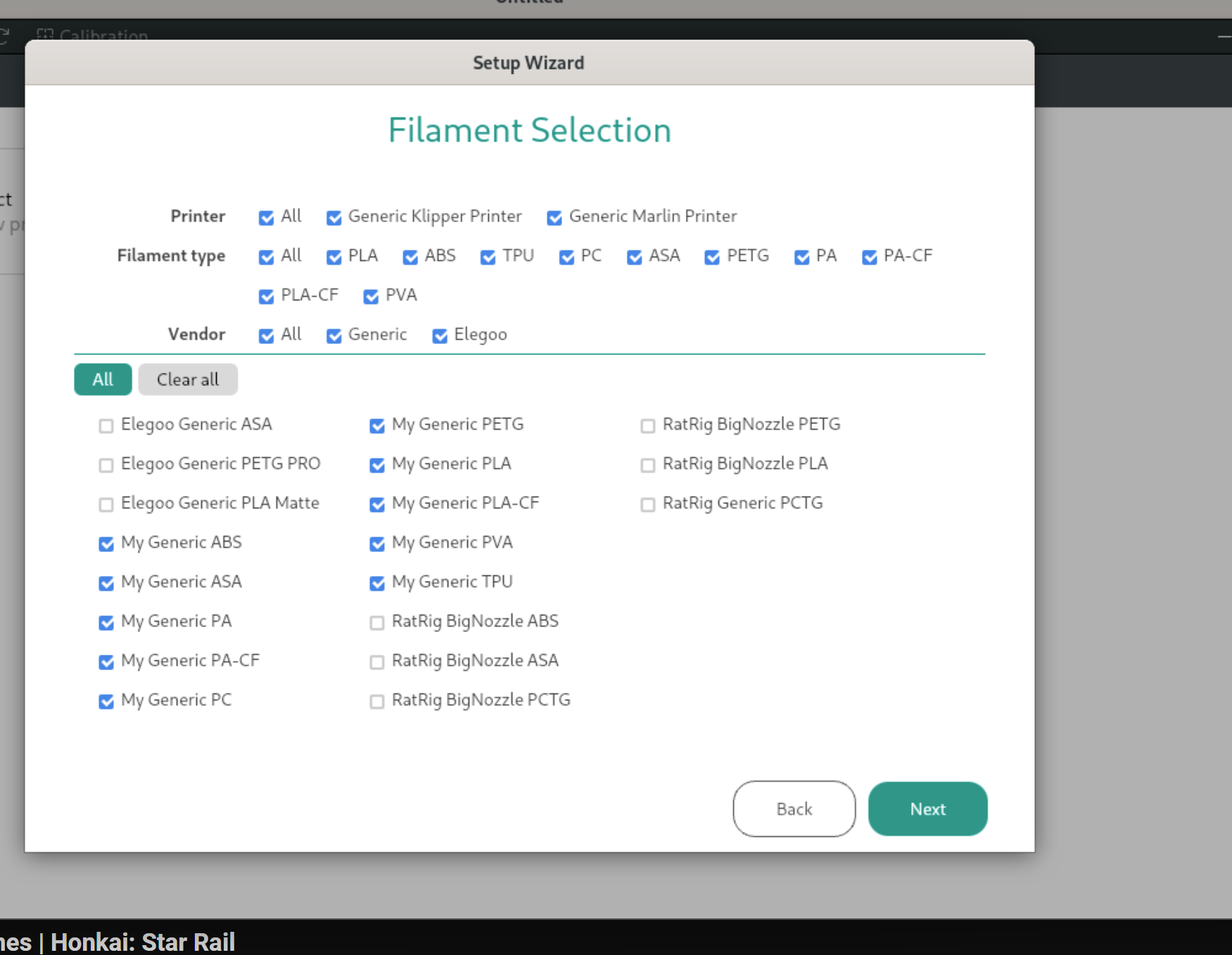
# Description
Filaments that don't have compatible printers defined will invalidate
filter in filament selection UI
This PR:
1. Fix profiles with missing compatible printers attributes
2. Change code logic so that we don't show such filaments
# Screenshots/Recordings/Graphs
## Tests
<!--
> Please describe the tests that you have conducted to verify the
changes made in this PR.
-->
Enhancement: ERS segment length - convert to float
To allow splitting of line segments down to 0.5mm for improved external surface finish.
Co-authored-by: SoftFever <softfeverever@gmail.com>
* Option to limit ERS to external perimeters and overhangs only
* Label name
* Label update
* Merge branch 'main' into Limit-ERS-to-external-perimeters-and-overhangs
* Merge branch 'main' into Limit-ERS-to-external-perimeters-and-overhangs
* Merge branch 'SoftFever:main' into Limit-ERS-to-external-perimeters-and-overhangs
* Merge branch 'SoftFever:main' into Limit-ERS-to-external-perimeters-and-overhangs
* Merge branch 'main' into Limit-ERS-to-external-perimeters-and-overhangs
* Merge branch 'SoftFever:main' into Limit-ERS-to-external-perimeters-and-overhangs
* Merge branch 'main' into Limit-ERS-to-external-perimeters-and-overhangs
* Merge branch 'SoftFever:main' into Limit-ERS-to-external-perimeters-and-overhangs
* Merge branch 'main' into Limit-ERS-to-external-perimeters-and-overhangs
# Description
<!--
> Please provide a summary of the changes made in this PR. Include
details such as:
> * What issue does this PR address or fix?
> * What new features or enhancements does this PR introduce?
> * Are there any breaking changes or dependencies that need to be
considered?
-->
# Screenshots/Recordings/Graphs
<!--
> Please attach relevant screenshots to showcase the UI changes.
> Please attach images that can help explain the changes.
-->
## Tests
<!--
> Please describe the tests that you have conducted to verify the
changes made in this PR.
-->
* SPE-1950: Reimplement algorithm for filtering vibrating extractions inside the ensuring infill to make it less computation complex.
Cherry-picked from prusa3d/PrusaSlicer@b3510ac808
Co-authored-by: Lukáš Hejl <hejl.lukas@gmail.com>
* Remove unused file
---------
Co-authored-by: Lukáš Hejl <hejl.lukas@gmail.com>
* Update DockerBuild.sh
Ensure that the X11 server allows connections from the Docker container.
* Update DockerBuild.sh
Removed fix for X11. Will add to DockerRun.sh
* Update DockerRun.sh
Added help comment to fix and ensure that your X11 server allows connections from the Docker container.
* linxu build with docker in readme
Add build on linux with docker section
* Update README.md
* Update README.md
* Update README.md
remove low ram thing
* Update Dockerfile
---------
Co-authored-by: samthebest699 <106000727+samthebest699@users.noreply.github.com>
Co-authored-by: SoftFever <softfeverever@gmail.com>
The previous implementation during the grouping of perimeters using depth-first searches unnecessarily searched nodes that had no impact on grouping, which significantly increased the search space.
Cherry-picked from prusa3d/PrusaSlicer@86309ba939
Co-authored-by: Lukáš Hejl <hejl.lukas@gmail.com>
Especially in cases when the object is composed only of 2 external perimeters and 1 or 2 internal perimeters, the order of perimeters wasn't optimal and differed from the Classic perimeter generator. That caused unnecessary long travels before the external contour was printed.
The ordering of perimeters is slightly inspired by the latest changes in CuraEngine.
Cherry-picked from prusa3d/PrusaSlicer@10875082de
Co-authored-by: Lukáš Hejl <hejl.lukas@gmail.com>
* Arachne: Fix an arithmetic overflow that causing extra points outside the plate (SoftFever/OrcaSlicer#7321)
* Better way of avoiding overflow, works in Release mode as well
* Fix debug build
* Fix build
# Description
<!--
> Please provide a summary of the changes made in this PR. Include
details such as:
> * What issue does this PR address or fix?
> * What new features or enhancements does this PR introduce?
> * Are there any breaking changes or dependencies that need to be
considered?
-->
# Screenshots/Recordings/Graphs
<!--
> Please attach relevant screenshots to showcase the UI changes.
> Please attach images that can help explain the changes.
-->
## Tests
<!--
> Please describe the tests that you have conducted to verify the
changes made in this PR.
-->
# Description
This PR updates the profiles for BambuLab to the versions shipped in
[01.10.01.50](https://github.com/bambulab/BambuStudio/releases) (which
at time of writing is the latest version).
These includes new profiles for:
- BambuLab ASA-CF
- BambuLab TPU for AMS
- Polymaker Fiberon PA12-CF
- Polymaker Fiberon PA6-CF
- Polymaker Fiberon PA6-GF
- Polymaker Fiberon PA612-CF
- Polymaker Fiberon PET-CF
- Polymaker Fiberon PETG-ESD
- Polymaker Fiberon PETG-rCF
- multiple new generic filaments
And additionally also changes for there Bambu Cool Plate SuperTack
* Update fdm_process_common.json to use slower jerk settings to prevent belt tooth skipping
* Update fdm_process_anker_fast_common.json for faster jerk settings
* Update Max Jerk limit to be in line with real world machine limits
---------
Co-authored-by: Noisyfox <timemanager.rick@gmail.com>
Using my Ender 3 V3 SE I noticed weird printing behaviour. Searching for
the cause, I found that the default layer height for a 0.2mm nozzle for
the printer was set to 0.08mm min and 0.32mm max, which are the default
20%/80% values for a 0.4mm nozzle. This commit changes the values for
all Creality printer which had not a reasonable default value for 0.2mm,
0.6mm and 0.8mm nozzles to 20% min and 80% max.
Co-authored-by: SoftFever <softfeverever@gmail.com>
Accessing a moved object.
Also this method create an unused "out" variable by removing from the parameter.
I guess It should update the parameter object?
Anyway, seems very wrong
(cherry picked from commit 534792e249da3efb83a62279f532b6690d028592)
Co-authored-by: Merill <merill@free.fr>
PrintObject.cpp references tbb::spin_mutex, thus it needs to include
tbb/spin_mutex. Otherwise compilation fails with:
error: ‘spin_mutex’ is not a member of ‘tbb’
Supersedes #7057
* Update 0.25mm Quality Speed @RatRig V-Core 4 HYBRID 0.4.json
it's HYBRID not HYBIRD
* Update 0.25mm Quality Speed @RatRig V-Core 4 HYBRID 0.5.json
it's HYBRID not HYBIRD
* Update 0.25mm Quality Speed @RatRig V-Core 4 HYBRID 0.6.json
it's HYBRID not HYBIRD
* Add files via upload
Adding process files for the 0.8 nozzle
* Add files via upload
machine profiles for 0.8 nozzle
* Update Ratrig.json
Added support for 0.8.nozle
* Add files via upload
Added filament profile for the more and more popular PCTG
* Update Ratrig.json
Add filament PCTG
* Update Ratrig.json
Filament setting for big (>0.4) nozzles
* Add files via upload
Filament setting for big (>0.4) nozzles
* Filament setting for big (>0.4) nozzles
Filament setting for big (>0.4) nozzles
* Optimized layer and extrusion values
Optimized layer and extrusion values
---------
Co-authored-by: SoftFever <softfeverever@gmail.com>
* Patch wxWidgets to automatically select dark theme variant (taken from
Bambu slicer flatpak manifest)
* Drop python script that selected dark theme
* Add a patch to fix libslic3r build
Avoid collisions with previous extrusions in the same layer when moving Z down in an XYZ move.
This happens for example when starting a scarf joint after another perimeter was already printed.
Fixes SoftFever#7191
Co-authored-by: SoftFever <softfeverever@gmail.com>
* Add BLOCKS RD50, ProS100 and RF50 printers
Add printer configurations and profiles for Blockstech printers to OrcaSlicer
* Update RF50 thumbnail
Added the definative thumbnail for the RF50 printer model.
* pa calib: print flow value and acceleration
Print flow value and acceleration for PA pattern calibration.
This should help keep track during adaptive PA calibration.
* pa pattern: fix legent section too wide in some cases
Rework pa pattern legent generation to correctly estimate
width of the legend section.
Current flow value now has variable length which is a longest of
PA value and the acceleration for a given test.
Few examples:
1. PA value are 4 characters: 0.04
Acceleratioion 3 chars: 400
Flow value will be 4 chars long: 7.98, or 11.3
2. PA: 0.018
Accel: 1000
Flow: 12.35, or 6.345
3. PA: 0.04
Accel: 15000
Flow: 34.34, or 4.567
Rework number-to-string conversion flow to correctly round values at
given precision.
Fixed Clipper library (our own fork of it) when working with Z coordinate:
The Eigen vector type compares all components, while the ClipperLib
own IntPoint type compared x and y only.
Fixed by overriding the ==/!= operators to compare just x and y components
for Eigen types.
Cherry-picked from prusa3d/PrusaSlicer@0202eec4b7
Co-authored-by: Vojtech Bubnik <bubnikv@gmail.com>
If layer starts with a color change, the full layer time will be much longer, which will trick the slicer to think this layer has enough cooling time.
However the actual filament extrusion time (the real "printing" part) won't necessarily have enough time to cool down, so if we don't do extra slowing down
before starting next layer, the filament could still be soft and lead to worse surface quality.
# Description
Re-Creation of Pull Request #6964 with X1E changes pulled.
OrcaSlicer includes exhaust fan settings for each filaments, however
these settings do not take effect on Bambu Labs machines that include
chamber temperature regulation fans.

Further investigation into the g-code files produced reveals that the
filament start g-code is responsible for using the air filtration
setting and sending the appropriate `M106 P3
S{during_print_exhaust_fan_speed_num[current_extruder]}` command to the
printer. However, this command, even with the setting enabled, is never
written to the final g-code file.
By default, Bambu Lab's filament profiles wrap this command up in` {if
activate_air_filtration[current_extruder] && support_air_filtration}`
clause, which always evaluates to false. As it turns out, the printer's
have the `support_air_filtration` flag set to `0` in the
`fdm_machine_common.json` file.
This change updates that value to `1` in the .json files for the X1,
X1C, X1E, and P1S 0.4mm nozzles. This is then inherited to other nozzle
sizes and user generated profiles. This is done by simply adding a line
` "support_air_filtration": "1",` to the .json to override the inherited
setting.
<!--
> Please provide a summary of the changes made in this PR. Include
details such as:
> * What issue does this PR address or fix?
> * What new features or enhancements does this PR introduce?
> * Are there any breaking changes or dependencies that need to be
considered?
-->
Fixes#6066
# Screenshots/Recordings/Graphs
N/A
## Tests
Updated this flag in a custom user config for the printer than tried
generating the code file with Air Filtration enabled and set to 70%
The appropriate `M106 P3 S178 ` appears in the filament start gcode
section of the file.
<!--
> Please provide a summary of the changes made in this PR. Include
details such as:
> * What issue does this PR address or fix?
> * What new features or enhancements does this PR introduce?
> * Are there any breaking changes or dependencies that need to be
considered?
-->
# Screenshots/Recordings/Graphs
<!--
> Please attach relevant screenshots to showcase the UI changes.
> Please attach images that can help explain the changes.
-->
## Tests
Updated this flag in a custom user config for the printer than tried
generating the code file with Air Filtration enabled and set to 70%
The appropriate `M106 P3 S178 ` appears in the filament start gcode
section of the file.
# Description
Added support for Creality Print (E.g. Orca can upload and print
directly to Ender 3 V3 KE)
# Screenshots/Recordings/Graphs
Video: https://www.youtube.com/watch?v=ONzaMJhj_Hk
## Tests
Tested in the video above on a Macbook Pro, Ender 3 V3 KE.
It should also be tested on Windows but I don't have a windows computer.
# Description
fixed#6987
# Screenshots/Recordings/Graphs
<!--
> Please attach relevant screenshots to showcase the UI changes.
> Please attach images that can help explain the changes.
-->
## Tests
<!--
> Please describe the tests that you have conducted to verify the
changes made in this PR.
-->
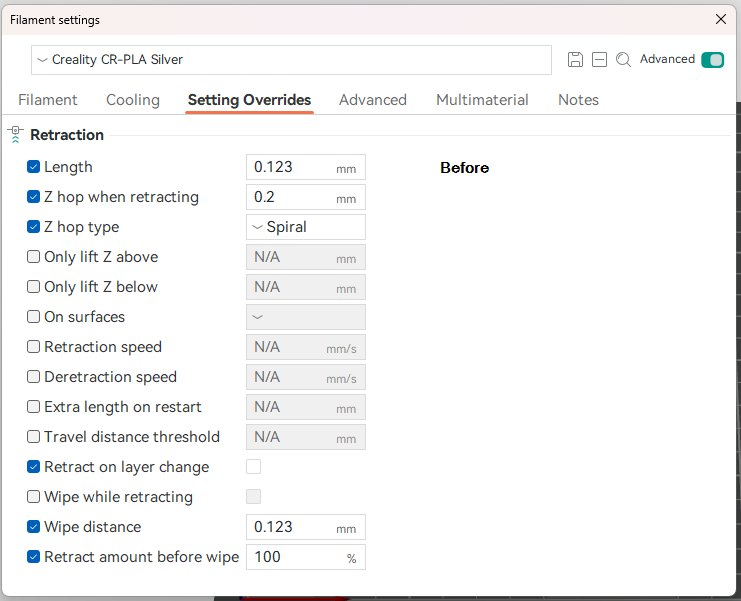
# Description
The idea behind this PR is to make it easier for the users to tweak
filament setting overrides i.e. reduce number of times users have to
switch between the printer and filament settings to compare the values.
# Screenshots/Recordings/Graphs



## Tests
I've done some manual testing to confirm:
* Override setting with the same value as extruder is still shown as a
change.
* Resetting unsaved override setting back to original value still works
as expected.
* Override settings are shown correctly on the next load after a save.
* Extruder settings changes are reflected on Settings Overrides page.
## Other
I have discovered a strange behaviour between `Filament Settings` and
`Printer Settings` windows. On a fresh load of application opening
`Filament Settings` window, navigating to `Settings Overrides` tab and
then closing the window results in `Filament` tab being opened the next
time `Filament Settings` window is opened. But if you open `Printer
settings` window, navigate to `Extruder` or `Motion ability` tabs then
the application changes the behaviour to open the last visited tab by
the user for both of the windows. I'm mentioning this because when this
happens the flow of events in the application changes and causes my
change to break until the user changes a tab. As far as I can tell for
some reason ConfigOptionsGroup's `reload_config` method is starting to
get called (second time?) after TabFilament's
`update_filament_overrides_page` method which wipes out the values set
by me. I'm not sure which is the correct behaviour, so I left that for a
discussion here. If last visited tab is the correct behaviour, then I
would need help to figure out how to fix this problem.
This PR moves the code around without any functional changes, so that all code related to supports now placed at the same location & structure as BambuStudio.
This makes merging updates from BambuStudio much easier in the future.
Resolves#5932
**The following changes made are made to all V-Core 4 versions**
- Improved cover's quality

- Added RatRig's PunkFil ABS, PETG, and PETG CF filaments
- Added PETG-CF10 filament type & RatRig to filament vendors
- Increased max z speed to 200 from 50 and max acceleration travel to
10,000 from 9,000
- Enabled wipe and z hop, as well as, increased retract before wipe to
70% from 0%
- Improved layer change G-Code
- Fixed pause G-Code
- Added extruder clearance parameters
*Almost all of these changes come from @nameisCruzCruz in #5932
…
# Description
This update, along with #6934, resolves the remaining issues with the
wipe tower.
The GCode class will no longer maintain its own Z height information
(m_nominal_z). Instead, it will utilize the Z height from GCodeWriter's
m_pos. This approach is less error-prone.
This PR also fixes#6755.
It also enforce "Enable Filament ramming" option
@igiannakas It should fix the wipe tower crashing issue
# Screenshots/Recordings/Graphs
<!--
> Please attach relevant screenshots to showcase the UI changes.
> Please attach images that can help explain the changes.
-->
## Tests
<!--
> Please describe the tests that you have conducted to verify the
changes made in this PR.
-->
* Russian translation update
The next russian translation update OrcaSlicer V2.1.1 Official Release.
The work done to improve translation, corrected errors.
Thx.
* Russian translation update
The next russian translation update OrcaSlicer v2.2.0-beta2.
The work done to improve translation, corrected errors.
Thx.
* Russian translation update
The next russian translation update OrcaSlicer V2.2.0-beta2 + 3 lines in text.js
The work done to improve translation, corrected errors.
Thx.
* WIP:only works after saving and then reloading
* working version of move plate to the front
* added icons for move to front
* removed a commented line
* fixed the move to front function to behave correctly with undo/redo actions
* Merge branch 'main' into feature/move_plate_to_the_front
* One top wall fixes
* Use one wall threshold set in GUI without limiting
* Updates to one wall top perimeter to address splitting top surface against too small segments and lettering overlap.
* Fix precise wall
* Merge branch 'main' into one-top-wall-fix-pr
* Merge branch 'main' into one-top-wall-fix-pr
* Pass all compatible regions to perimeter generator
* Simplify & unify fuzzify detection
* Simplify `to_thick_polyline`
* Group regions by fuzzy skin settings
* Initial code structure of multi-regional fuzzy skin
* Determine fuzzy type by all compatible regions
* Add fuzzy region debug
* Implement the line split algorithm
* Do splitted fuzzy in classic mode
* Disable debug macros
* Fix infinit loop issue when segment points are out of order
* Fix path connection
* Implement splitted fuzzy in Arachne mode
* Translation of missing phrases into Russian. Part 1
* Translation of missing phrases into Russian. Part 2
* Returned special terms that do not require translation and corrected an error
* Update localization/i18n/ru/OrcaSlicer_ru.po
* Some fixes
* Removed unnecessary format check rules
ENH: support spiral lift with timelapse gcode
The existing implementation did only read the new Z position from the injected timelapse_gcode and flagged the position as unsafe because of this.
This change reads X, Y and Z pos from the timelapgse_gcode and will keep the position state correct to enable safety checks required for using spiral Z hop.
Because of this, spiral Z hop can be used everyhwere now. The same pattern is also applied for layer_change/toolhead gcode injection.
The set_current_position_clear method is unused but will be kept in implementation for future scenarios.
Co-authored-by: Simon ziehmon@users.noreply.github.com
* Fix issue that github action windows build could not find win10sdk (SoftFever/OrcaSlicer#6724)
* Another attempt to fix the build issue
* This should work now
* Delete Readme.txt
Not in use
* Update SECURITY.md
Formatted and little changes made
* Update README.md
Improved format and texts, insert image at the top
* Added `duplicate plate` feature.
This the initial commit and this still needs work.
* [#2025] Fixed the SEGFAULT, apparently an icon id=6 needed to be updated to id=7 as we have one more plate icon.
[#2025] Removed the `printf` statements.
* [#2025] Plate duplication is now fully implemented.
* [#2025] Updated icons for plate duplicate funcctionality.
* [#2025] Added toolbar icon fro "Duplicate Current Plate" action.
* [#2025] Revert changes for `toolbar_add_plate_dark.svg`.
* [#2025] Removed the `BBS` label in the code that is not written by BBS.
* [#2025] Updated `.gitignore` to ignore VSCode workspace file.
* [#2025] Fixed the instances not transforming in global space when the plate is duplicated.
* [#2025] Removed the Duplicate Plate action from the plate actions and the toolbar.
* [#2025] Added the `Duplicate Current Plate` functionality to the `Edit` menu.
* [#2025] Addressed review comments.
* [#2025] Addressed review comments.
* [#2025] Removed unused icons related to the previously introduced "Duplicate Plate" functionality.
* Fix issue that `fuzzy_skin_first_layer` not respected by classic wall generator
* Fix issue that Contour / Contour and hole mode not working properly (SoftFever/OrcaSlicer#6414)
* We have `is_contour`, so need for complicated hole detection
Including a marathon of resolving merge conflicts due to PRs today.
We should abolish multi-line msgids :-)
# Description
This looks like a huge PR, but it is only fixes for typos and grammar.
On the previous PR #6638 I mistakenly used _en.po as the reference
instead of the .pot.
It caused missed strings in the source and other .po files.
This around I triple checked again to make sure the msgids are in sync
with the L"" strings in the code.
Comments, variable names and non-English translation strings were
excluded.
I learnt that typos were "fixed" before by using translations. After
this PR, those translations are no longer relevant and can be cleaned
up.
Hopefully this sets a new baseline which will last us a while. :-)
<!--
> Please provide a summary of the changes made in this PR. Include
details such as:
> * What issue does this PR address or fix?
> * What new features or enhancements does this PR introduce?
> * Are there any breaking changes or dependencies that need to be
considered?
-->
# Screenshots/Recordings/Graphs
<!--
> Please attach relevant screenshots to showcase the UI changes.
> Please attach images that can help explain the changes.
-->
## Tests
The code compiled and ran successfully.
The translation files were verified with ./run_gettext.sh
I did not se any issues when running ./run_gettext.sh --full
Please confirm it again, before the merge.
<!--
> Please describe the tests that you have conducted to verify the
changes made in this PR.
-->
Profile created based on information contained in the printer's firmware and profiles recommended by the manufacturer for Cura. It has been tested on various parts including 3DBenchy with more than satisfactory results.
* Update OrcaSlicer_es.po
* Update OrcaSlicer_es.po
* Upodate OrcaSlicer_es.po
* Update OrcaSlicer_es.po
* Update OrcaSlicer_es.po
* Add new translations and update existin from merged PR 6543
* Small fix in new msgid in OrcaSlicer_es.po
* Fix string start and termination quotes
* Fix string length?
* Update check_locale.yml
* testing with turkish translation
* test format
* fix format issues
* Ported filament shrinkage compensation from Prusa Slicer. Updated logic to be 100 = no shrinkage to be consistent with orca definitions
* Code comments update
* Merge branch 'main' into Filament-Shrinkage-compension---port-from-Prusa-slicer
* Merge remote-tracking branch 'upstream/main' into Filament-Shrinkage-compension---port-from-Prusa-slicer
* Merge branch 'main' into Filament-Shrinkage-compension---port-from-Prusa-slicer
* Kingroon KLP1 profiles
* Kingroon KP3S V1 profiles
* Make cover png file size more reasonable
* copy/paste error in the profile name
* Merge branch 'main' into kingroon-klp1-profiles
- add Breakaway Support filament
- add preheat params for Snapmaker Dual/IDEX printers
- update the check bounds code in start-gcode, which is now off by default
* Make sure the speed tab is properly hidden when toggle off advance mode
* Clear each page before clearing the parent, otherwise the child pages will be destroyed twice
* Fix crash if current selected tab is positioned after the removed tab
* Fix issue that sometimes the printer config first page is not displayed
* Fix issue that the wrong tab item get bold if the number of tabs changed
* update flow rate calibration tests
* more tweaks
* add YOLO linear flow rate calibration
* update name
* revert line_width changes
* Make it 2mm thick and change some text
* Update YOLO test:
Normal YOLO for 0.01 step
Perfectionist YOLO for 0.005 step
* add space
* Wiki home page fix links and readme update to link to wiki
* Update README.md
* Fixed developer reference links
* Update linkage from slicer settings to Wiki for layer height, line width and seam settings
* adaptive PA documentation
* Update adaptive-pressure-advance.md
* updated screenshots
* formatting
* Update adaptive-pressure-advance.md
* Update adaptive-pressure-advance.md
* Update adaptive-pressure-advance.md
* Include adaptive PA link
* Fix crash due to the wrong window get returned in `PointCtrl` (SoftFever/OrcaSlicer#6261).
`getWindow()` must return the control itself, not its child control; otherwise the child control will be destroyed twice when the tab container is destroyed.
* Fix another crash on Linux caused by unused undo button
* Fix build with CGAL 5.6
Surface_mesh iterators no longer return references, so it's necessary to
use const references or copies when iterating.
This was previously merged in #3045 but isn't references in the
current main branch anymore. No idea where why it is gone, but the issue
still persists thus the patch should still be added.
* Fix linux deps debug build
* Use the same DL_CACHE for release build when building debug version of deps on Linux.
This prevents downloading the same source packages twice, and avoid downloading again after deleting the build dir.
* Fix debug build
* Fix warnings "loop variable creates a copy from type" and "loop variable binds to a temporary constructed from type"
* Improvements in Inner Outer Inner wall ordering logic
* Updated to BFS algorithm, made ordering more robust and corrected edge cases
* Doc updates
* Refinements in perimeter sorting
* Removal of touch threshold and code debugging to improve sequencing
* Code cleanup
* Code refinements on perimeter distance thresholds
* Extend perimeter re-ordering to more than inset index 2, to reduce travel moves when printing neighbouring features
* Refinements to IOI perimeter re-ordering algorithm to improve travel scenarios where multiple external perimeters are contained in the same island.
* Documentation updates
* Removed unnecessary code
* Removed bespoke to_points function and replaced with ExtrusionLine member already present. Removed squaredDistance and replaced with Eigen library call.
* Refactor code to move distancing functions to the multipoint class. Renamed for more clarity on their purpose.
* Added SBS to filament_info.json
* Added SBS to Print.cpp
* added SBS to PrintConfig.cpp
* Added SBS to BBL
* Added SBS Template and also specified SBS as type in fdm_filament_sbs.json
* Updated settings for SBS in filament_sbs_template.json
* Applied SBS settings to fdm_filament_sbs.json
* added settings to Generic SBS @base.json
---------
Co-authored-by: Duan Gauche <duan.gauche@pdsvision.com>
Co-authored-by: SoftFever <softfeverever@gmail.com>
* Revert "Fix #3311: filament Load / Unload time was not used in time estimation (#3706)"
This reverts commit 252788419b.
* revamp tool/filament change time
* tweak message
* Use more readable data types for storing triangle splitting information.
* fix build errors
* SPE-2063: Determine correctly which extruders are used when the object is painted by the multi-material painting gizmo.
During the serialization of TriangleSelector and also during reading serialized painting data from 3MF, we cache all used states in the painted triangle mesh.
Based on this information, we can quickly determine which extruders are used and which don't.
* Fixed an bug that filament list was not updated properly
---------
Co-authored-by: Lukáš Hejl <hejl.lukas@gmail.com>
* Fix z hop performed after retraction in PA pattern calibration. Fix zhop config value not used
* Updated gathering of z hop value method for consistency
* Fix -Wsubobject-linkage warning
Having tk::spline header-only implementation included from
SmallAreaInfillFlowCompensator.hpp makes
SmallAreaInfillFlowCompensator::flowModel have separate (albeit the
same) implementation in each translation unit.
In order to fix this issue, SmallAreaInfillFlowCompensator::flowModel
converted to opaque 'pimpl'
* spline: remove anonymous namespace
Remove outer anonymous namespace from splice.h to make
forward declaration for tk::spline possible.
* fix gizmo bar wobbling
Gizmo bar is wobbling at specific application window width range.
This comes from a bar scaling calculations method:
- new scale calculated for already scaled bar
- scale stored as application settings loosing precision
Rework gizmo bar resizing code to remove feedback:
- calculate scale factor based on unscaled bar size
* rework gizmo bar scaling
Unify scaling implementation across platforms (MacOS, Win, Linux).
Now all platform scale bar setting icon size.
Toolbar scale is used for high-DPI displays scaling only.
* Add comments, reorganize changes to minimize diff
* Fix crash when filling very tiny (1-5nm) gaps (#6279)
Cherry-picked from prusa3d/PrusaSlicer@8784ca0ecf
Co-authored-by: Lukáš Hejl <hejl.lukas@gmail.com>
* SPE-2256: Fix the issue that we used the old Voronoi graph during the detection of invalid Voronoi diagrams.
This happens because we didn't set a modified flag that is required to be set before we use the new Voronoi graph.
Possibly related to #12385
Cherry-picked from prusa3d/PrusaSlicer@2de1f3aa45
Co-authored-by: Lukáš Hejl <hejl.lukas@gmail.com>
---------
Co-authored-by: Lukáš Hejl <hejl.lukas@gmail.com>
* Supress warnings on unused functions an variables
Compilation of OrcaSlicer produces 3056 warnings.
Nearly half of them related to unused functions and variables.
It is unlikely we going to clean them up since we may want to
keep code base as close to the BBS as possible
* initialize class member with correct value
* Fix memset arguments order
* Merge multiple statemensts into single
* fix -Wpessimizing-move
* Increase granularity of extrusion move splitting for small line segments ending in an overhang
* Parameter tweak
* Increase granularity of estimation for curled perimeters
* Adjust parameters following experimentation with overhang prints
* Updated overhang segmentation logic
* Cleanup code comments
This PR:
- Updates translation template to include new messages from #6009 and
updates <s>existing translation files</s> Korean translation file
accordingly
- Updates Korean translation, including new translations for #6009
# Description
Copied files from BambuStudio after downloading updated profiles.
Add support for BambuLab PETG-HF and Support for ABS. Fixes#6182
Also contains some changes to the default infill from crosshatch to
gyroid, and updated start g-code for A1.
# Tests
Copied all files to resources directory on install, and started.
Profiles showed up.
flush_length variable is now provide correct value based on the flush
matrix set by the user.
pesudo code in Change filament gcode:
```
...
T1
; Park head to the purging location
G1 X0 Y-5 F12000
; Purge certain amount of filament into waste bin
G1 E[flush_length] F600
...
```
This PR is based on the WIP tool changer branch #6087Fixes#4194#5937#5912
# Description
Add support of tool changer printers.
A new printer model has been added: `Generic ToolChanger`
Currently only support tool changer printers like `TapChanger` and
`StealthChanger`.
~Support for Prusa XL is still WIP.~ Prusa XL is supported now
~~⚠️WARNING⚠️ : please proceed with caution. It hasn't been tested on an
real printer yet. Please double check with g-code before printing it.~~
🚀GOOD NEWS🚀: Multiple successful prints have been reported; it should be
safe to try [Discord
Thread](https://discord.com/channels/1137181739773603922/1258993224018821160).
**For bugs, please kindly help by logging issues with details and sample
projects, then label them as ToolChanger. This will help me track
them.**
# Screenshots/Recordings/Graphs
https://github.com/SoftFever/OrcaSlicer/assets/103989404/bd518f77-5cc1-4b3a-ba76-7ead75494365
# Test
Feedback is welcomed!
For Mac users, please ref to this instruction:
https://github.com/SoftFever/OrcaSlicer#how-to-install
- [x] Occasionally crashes when change printer settings
- [x] Prusa XL profiles and custom gcode
- [x] Ooze prevention bug
- [x] Prusa XL z offset issue when prime tower is used
- [x] Preheat nozzle(temporary solution)
- [x] infinite(tall) skirt when both ooze prevention and skirt are
enabled
- [ ] skirt/purge cone overlap
- [ ] Document about custom variables
Implement #5943#2050#5079
* Fix calls to depreciated wxPen constructor
* Fix use of wxTimerEvent
* Fix unrecognized character escape sequence
* Fix signed/unsigned mismatch
At least as much as possible without significantly altering parts of the application
* Clean unreferenced variables
* fix mistyped namespace selector
* Update deprecated calls
* Fix preprocessor statement
* Remove empty switch statements
* Change int vector used as bool to bool vector
* Remove empty control statements and related unused code
* Change multi character constant to string constant
* Fix discarded return value
json::parse was being called on the object, rather than statically like it should be. Also, the value was not being captured.
* Rename ICON_SIZE def used by MultiMachine
By having the definition in the header, it causes issues when other files define ICON_SIZE. By renaming it to MM_ICON_SIZE, this lessens the issue. It would probably be ideal to have the definitions in the respective .cpp that use them, but it would make it less convenient to update the values if needed in the future.
* Remove unused includes
* Fix linux/macOS compilation
* Hide unused-function errors on non-Windows systems
* Disable signed/unsigned comparison mismatch error
* Remove/Disable more unused variables
Still TODO: check double for loop in Print.cpp
* Remove unused variable that was missed
* Remove unused variables in libraries in the src folder
* Apply temporary fix for subobject linkage error
* Remove/Disable last set of unused variables reported by GCC
* remove redundant for loop
* fix misspelled ifdef check
* Update message on dialog
* Fix hard-coded platform specific modifier keys
* Remove duplicate for loop
* Disable -Wmisleading-indentation warning
* disable -Wswitch warning
* Remove unused local typedefs
* Fix -Wunused-value
* Fix pragma error on Windows from subobject linkage fix
* Fix -Waddress
* Fix null conversions (-Wconversion-null)
---------
Co-authored-by: SoftFever <softfeverever@gmail.com>
* Fix crossing max x axis & rise max print height of Ender-3 V3 KE
* Merge branch 'main' into ender-3-V3-KE-4
* Merge branch 'main' into ender-3-V3-KE-4
* Adaptive Pressure advance options setup
* Dynamic PA - PCHIP interpolator code and tests
* Integrate dynamic PA with slicing code - emit new PA values per speed change
* Link adaptive PA to role change instead of speed change
* Adaptive PA - Alpha 2
Reduce the frequency of requested PA changes by introducing a "state" variable.
Implement user toggle for adapting PA for external walls for overhangs
* Hide adaptive PA for overhangs
* Convert Adaptive PA to use volumetric flow model and start preparing for converting to Gcode post processor
* Converted Dynamic PA to a post processing filter. Reverted changes in GCode cpp and created tagging mechanism to allow filter to apply PA changes.
* Removed adaptive PA for overhangs
* Foundations for two dimensional adaptive PA based on acceleration and volumetric flow speed
* Minor code cleanup and updating of tooltips
* Renaming files for better clarity and generate classes documentation
* Update src/libslic3r/PrintConfig.cpp
Co-authored-by: ElectricalBoy <15651807+ElectricalBoy@users.noreply.github.com>
* Update src/libslic3r/PrintConfig.cpp
Co-authored-by: ElectricalBoy <15651807+ElectricalBoy@users.noreply.github.com>
* Update src/libslic3r/PrintConfig.cpp
Co-authored-by: ElectricalBoy <15651807+ElectricalBoy@users.noreply.github.com>
* Introduce average mm3_mm over the length of a multipath for adaptive PA
* Updates for multipath handling part 2
* Introduce average mm3_mm over the length of a multipath for adaptive PA
* Trigger PA evaluation more frequently to catch edge cases where speed changes across islands of the same feature type.
* Updates for multipath handling part 2
* Adaptive PA: Implement average flow estimation on loops
* Code formatting
* Fix adaptive PA not adapting for small disconnected external wall line segments.
* Updated to take max print speed of upcoming feature to calculate new PA value.
This is to resolve issue of incorrect PA value used when starting a new feature at an overhang.
* Code clean up
* Performance tuning
* Further performance tuning by reducing use of regex commands in the nested loops and fix bug preventing gcode line output
* Further performance tuning and tweaks to stop searching for max speed after the first travel move.
* Reduce debug information
* Updated debug info
* Fix an issue on seams on specific models when wipe before external perimeter was enabled. Also cleanup documentation and add new to-do's
* Prepare for adaptive PA for overhangs, fix wipe bug & clean up code and comments
* Initial commit for adapting PA when extruding fully overhanging perimeters
* Ignore wipe command when identifying current print speed
* Option to evaluate adaptive PA on overhang regions in preparation for Klipper experimental option testing
* Update to issue PA changes for varying flow conditions within the same feature
* Fix bug where adaptive PA was enabled erroneously for role changes and ignoring user's preference.
* Refactored some code
* More refactoring
* Some bug fixes and enabled comments only when verbose g-code is enabled
* Introduced dedicated PA option for bridges
* Code refactoring to optimise initialisation of PA processor (making it faster). Fix a bug where PA was not always set after a toolchange. Improve general error handling and robustness.
* Updates to adaptive PA tooltips
* Bridging PA check with Epsilon instead of 0.
* Adaptive PA: addressing comments
---------
Co-authored-by: ElectricalBoy <15651807+ElectricalBoy@users.noreply.github.com>
removed imgui.set_requires_extra_frame(), this line causes Slic3r::GUI::GLCanvas3D::render() to be called repeatedly when 'Filament' or 'Speed' is selected for preview panel
* Flushing volumes button background color for active state
* Sliced plates bar > Use different colors on plate numbers for light / dark theme
* Remove 3D navigator background
* Device & Project Tab > Sidebar > Selected tab background color
* Merge branch 'SoftFever:main' into color-fixes-3
* Correct sidebar button color for light mode for bbl monitor / calibration and project page
* Homepage fixes
* Fix parameters group title color too bright on dark theme
* Search popup hovered item background color
* Sidebar > Search box > match border color with other input/combo boxes
* fix indents
* Add descriptions to statecolors
* Paint gizmos > remove background of non active Tool / Brush buttons on dark mode
* Merge branch 'SoftFever:main' into color-fixes-3
* Top bar / Main tab bar button hover background
* Fix broken color change from last merges
* Gizmos selected text background
* Keyboard shortcuts window selected tab bg color
* About page link color
* Project page fixes
* match disabled text color on combo boxes with input boxes
* Use better background color for disabled elements on dark mode
* match all colors for disabled elements
* BBL > Monitor tab > Add printer text and icon not visible on dark theme
* even darker bg color for homepage thumbnails
* Sidebar arrow not visible
* Better bg color for row highlighting
* match style of gizmo combo box
* Merge branch 'SoftFever:main' into color-fixes-3
* Revert changes for main tab bar background color of button while hover
Fix override that cause segfault and EGL initialization error
When user built Mesa from GIT and load it using env variables
LD_LIBRARY_PATH and LIBGL_DRIVERS_PATH
it override LD_LIBRARY_PATH inside AppImage but other variable
LIBGL_DRIVERS_PATH not override and it cause EGL init error.
* Flashforge-06-12: gcode and filament mapping
* 06-27 Add Chuanying x1 printer profiles
* 20240702-Flashforge Guider 2s process fix
* [07-10 Flashforge]: Add more layer height options for AD5M and more nozzles for G3U etc.
* Update fdm_klipper_common.json
* Update fdm_machine_common.json
* add new nozzle type
* add new nozzle type with filaments
* add new nozzle type with mechine files
* add new nozzle type with process files
* Update InfiMech.json
add new nozzle type
* Update InfiMech.json
* Update 0.08mm Extra Fine @InfiMech TX.json
* Update 0.12mm Fine @InfiMech TX.json
* Update 0.16mm Optimal @InfiMech TX.json
* Update 0.20mm Standard @InfiMech TX.json
* Update 0.24mm Draft @InfiMech TX.json
* added Prusa Mini with Input Shaper to profiles
* Merge branch 'SoftFever:main' into main
* refactoring to more reusable settings
* Merge branch 'SoftFever:main' into main
* added more processes, changed settings
* Merge branch 'main' of https://github.com/koppensb/OrcaSlicer
* Update 0.15mm Speed @MINIIS.json
* Update 0.10mm Speed @MINIIS.json
* changed to cubic because of speed
* Merge branch 'main' of https://github.com/koppensb/OrcaSlicer
* further changes after reviewing prusa slicer settings
* simplified machine settings
* retraction speeds according to prusa slicer
* Merge branch 'SoftFever:main' into main
* changed max flow according to prusa slicer
* Merge branch 'main' of https://github.com/koppensb/OrcaSlicer
* after clearification at the prusaslicer repository M900 got removed
* Merge branch 'SoftFever:main' into main
* precise wall per default
* Merge branch 'main' of https://github.com/koppensb/OrcaSlicer
* enable reverse overhang on odd by default
* added settings from prusa slicer
* changed cooling setings
* Merge branch 'SoftFever:main' into main
* changed default to inner-outer-inner wall
inner-outer-inner gives pretty good overhangs with better surface
* new profiles for bigger nozzles, changed some cooling settings according to prusaslicer
* profiles for different nozzles sizes, better speed settings
* initial layer height was wrong
* wrong initial layer height
* set the correct accelerations
* Merge branch 'main' of https://github.com/koppensb/OrcaSlicer
* changed firmware version number
* using pressure advance UI setting instead of custom filament g-code
* Merge branch 'SoftFever:main' into main
* Update Prusa Generic PC.json
* Update Prusa Generic PC.json
* changed max flow for PC
* added PVA filament profiles
* bug fix in filament loading
* Merge branch 'SoftFever:main' into main
* Merge branch 'SoftFever:main' into main
* changed line width according to prusa slicer
* Merge branch 'main' of https://github.com/koppensb/OrcaSlicer
* Merge branch 'main' into main
* changed heatbed temperature for Minis capabilities
* Merge branch 'main' of https://github.com/koppensb/OrcaSlicer
* Merge branch 'main' into main
* Merge branch 'SoftFever:main' into main
* set default support to snug
* changed default filament setting to the correct value
* Init port of Cura's MM interlocking
* Refactor a bit
* Fix crash when bottom surface is multi-color
* Fix crash when boundary avoidance is 0
* Add config
---------
Co-authored-by: SoftFever <softfeverever@gmail.com>
* creating settings for printer and some UI changes work
* related filament diameter and pellet flow changes to each other
* UI name change to turn Filament to Material
* updated the flow coefficient to filament diameter formula
* updated the preset for the configuration wizard
* configuration changes for the final release
* config changes and preset bundle sync removed
* start gcode change for ginger machines
* added explanation of relationship between pellet_flow_coefficient and filament_diameter
* Added tooltip. Fixed Ginger machine configuration, Added docs
* add missing includes
Building without precompiled header support revealed some missing
includes that are added with this change for code health purposes.
Those missing includes were hidden by precompiled header support due to
the fact that the precompiled header file provides some definitions
despite not being defined in directly or indirectly included header
files.
Linux distros started removing libwebkit2gtk-4.0 libriry from their
repos. Ubuntu Noble (24.04) is one of them.
Modify debian/ubuntu deps to install libwebkit2gtk-4.1 if
no libwebkit2gtk-4.0 available
* Flashforge-06-12: gcode and filament mapping
* Merge branch 'SoftFever:main' into main
* Merge branch 'SoftFever:main' into main
* 06-27 Add Chuanying x1 printer profiles
* Update printer profiles
* Fix accelerations
* Fix z hop
* Small fixes
* Update layer height according to printer data sheet
---------
Co-authored-by: SoftFever <softfeverever@gmail.com>
add some series of printer parameter configurations. 15 Geeetech printers, including 3 series models.
Thunder series. A high-speed printer and the maximum printing speed can reach 300 mm/s. Mizar series. A machine that has very exquisite print quality and ultra quiet printing. Other Geeetech printers.
---Request from Geeetech offical .
Co-authored-by: SoftFever <softfeverever@gmail.com>
* Do not use get_scaling_factor then construct the matrix again, because it cannot properly handle situations that contains negative scale (mirror) / shear (SoftFever/OrcaSlicer#5578)
* Do not use get_scaling_factor then construct the matrix again, because it cannot properly handle situations that contains negative scale (mirror) / shear (SoftFever/OrcaSlicer#5578, SoftFever/OrcaSlicer#4719)
* Fix regression, always create SmallAreaInfillFlowCompensator model
small_area_infill_flow_compensation is per-region parameter, it's not necessary to iterate though all regions to check whether to create a model.
* Make SmallAreaInfillFlowCompensator robus.
1. handle spaces/tabs/new lines etc
2. don't throw expection, fall back to no-op instead if parsing failed
* Fixing an issue that changing small_area_infill_flow_compensation per modifier didn't take effect
* Fix check_url_association return value
* Update Web Link Association Preferences
Uses a checkbox in place of button to show if the current instance is registered at a quick look
New function is added to build the link association item
Current association line shows "None" for no app associated, "Current Instance" if the current instance is associated, and the formatted path to the registered app (Removes quotes and other extra chars)
* Update to use localization
* Fix Linux Build
---------
Co-authored-by: SoftFever <softfeverever@gmail.com>
* Allow using BBL's device tab when 3rd party print host is used
* Add option to open SimplyPrint panel in device tab after uploading
* Fix default print host for prusa connect
* Do not set api key in device view when SimplyPrint is used
* Sending 3mf file to SimplyPrint when using BBL printers
* Fix file extension when uploading 3mf
* Prepare for large file uploading
* Implement chunk upload
* Fix file uploading exceeding content size
* Fix wrong field type
* Add `temp=true` to all chunk upload calls
* Add macro to enable test api
* Merge branch 'main' into dev/simplyprint-improve
* Fix another missing `temp=true`
* Add delete token
* Try fixing build error on *nix systems
* Merge branch 'main' into dev/simplyprint-improve
* Merge branch 'main' into dev/simplyprint-improve
* Merge remote-tracking branch 'remote/main' into dev/simplyprint-improve
# Conflicts:
# src/slic3r/GUI/BackgroundSlicingProcess.cpp
* Move the `bbl_use_print_host_webui` option to print host dialog. Also make it a derived option of `print_host_webui` instead.
* Merge branch 'main' into dev/simplyprint-improve
# Conflicts:
# src/slic3r/GUI/MainFrame.cpp
# src/slic3r/GUI/Plater.cpp
* Merge branch 'main' into dev/simplyprint-improve
# Conflicts:
# src/slic3r/GUI/Plater.cpp
* Use a more generic option instead of SimplyPrint specific
* Merge branch 'main' into dev/simplyprint-improve
* Merge branch 'main' into dev/simplyprint-improve
* Update OrcaSlicer_es.po
* some changes
* Some fixes
* More fixes
* More fixes and improves
* More fixes
* Update OrcaSlicer_es.po
* Update OrcaSlicer_es.po
Cambiado punto por coma
* Update Spanish Language
* Updated strings
* Update OrcaSlicer_es.po
* Update OrcaSlicer_es.po
* Fixed Spanish Strings in English
Fixed a lot of string whose are translations were english to english.
* Some spanish strings improved
* Update Spanish Strings in RC
* Add translation for "Don't slow down outer walls" in Korean
* Update existing/missing translations in Korean
* Make "Don't slow down outer walls" translation more natural
* Catalan language updated to 2.1.0 beta
Catalan language updated to 2.1.0 beta
* added catalan translation at text.js file
Added new language "ca_ES" but loading "en" by default. Catalan language should be shown at preferences as "Català" instead of "Catalan". Please, solve these issues
---------
Co-authored-by: SoftFever <softfeverever@gmail.com>
* POC - Do not slow down external perimeters to meet minimum layer time
* POC - Do not slow down external perimeters to meet minimum layer time - rework
* Revert "POC - Do not slow down external perimeters to meet minimum layer time"
This reverts commit d84ff93f90.
* Dont slow down external perimeters to meet layer time target v2
* Reverted previous implementation
* UI fixes for dont slow down for layer cooling
* Update dont slow down outer walls naming convention
---------
Co-authored-by: SoftFever <softfeverever@gmail.com>
* Change G-Code
* Change config to closely match prusa profile
The profile can be found at https://forum.prusa3d.com/forum/prusaslicer/looking-for-a-dremel-3d45-profile-for-prusa-slicer-help-me-help-my-students/
* Use original build plate model
* Change printable area
* Update machine settings
* Change bed model naming
* Prevent future conflicts
* Update values
* Fix error
* Disable firmware retraction
* Enable reduce infill retraction
* Fully disable relative e distances
* Fix filename format
* Revert "Fix filename format"
This reverts commit b95e76a57a.
* Forgot this one
* Clean up
* Update OrcaSlicer_es.po
* some changes
* Some fixes
* More fixes
* More fixes and improves
* More fixes
* Update OrcaSlicer_es.po
* Update OrcaSlicer_es.po
Cambiado punto por coma
* Update Spanish Language
* Updated strings
* Update OrcaSlicer_es.po
* Update OrcaSlicer_es.po
* Fixed Spanish Strings in English
Fixed a lot of string whose are translations were english to english.
* added Prusa Mini with Input Shaper to profiles
* refactoring to more reusable settings
* added more processes, changed settings
* Update 0.15mm Speed @MINIIS.json
* Update 0.10mm Speed @MINIIS.json
* changed to cubic because of speed
* further changes after reviewing prusa slicer settings
* simplified machine settings
* retraction speeds according to prusa slicer
* changed max flow according to prusa slicer
* after clearification at the prusaslicer repository M900 got removed
* precise wall per default
* enable reverse overhang on odd by default
* added settings from prusa slicer
* changed cooling setings
* changed default to inner-outer-inner wall
inner-outer-inner gives pretty good overhangs with better surface
* new profiles for bigger nozzles, changed some cooling settings according to prusaslicer
* profiles for different nozzles sizes, better speed settings
* initial layer height was wrong
* wrong initial layer height
* set the correct accelerations
* changed firmware version number
* using pressure advance UI setting instead of custom filament g-code
* Update Prusa Generic PC.json
* Update Prusa Generic PC.json
* changed max flow for PC
* added PVA filament profiles
* bug fix in filament loading
* changed line width according to prusa slicer
* changed heatbed temperature for Minis capabilities
* set default support to snug
* changed default filament setting to the correct value
* changed line with to the correct values according to prusaslicer profiles
* Update Prusa MINIIS 0.4 nozzle.json
updated firmware version
* updated firmware version
* changed first layer height according to optimal value of the respective nozzle size
* changed wall loops to 2 for bigger nozzles
* Update fdm_filament_abs.json
Modification based on chamber temperature
* Update fdm_filament_asa.json
Modification based on chamber temperature
* Update QIDI ABS-GF25 @Qidi Q1 Pro 0.4 nozzle.json
Modification based on chamber temperature
* Update QIDI ABS-GF25 @Qidi Q1 Pro 0.6 nozzle.json
Modification based on chamber temperature
* Update QIDI ABS-GF25 @Qidi Q1 Pro 0.8 nozzle.json
Modification based on chamber temperature
* Update QIDI ASA @Qidi Q1 Pro 0.2 nozzle.json
Modification based on chamber temperature
* Update Qidi Generic ABS.json
Modification based on chamber temperature
* Update Qidi Generic ASA.json
Modification based on chamber temperature
* Update QIDI ABS-GF25 @Qidi Q1 Pro 0.4 nozzle.json
Sorry, there is still a parameter that needs to be modified for this type of consumable
* Update QIDI ABS-GF25 @Qidi Q1 Pro 0.6 nozzle.json
Sorry, there is still a parameter that needs to be modified for this type of consumable
* Update QIDI ABS-GF25 @Qidi Q1 Pro 0.8 nozzle.json
Sorry, there is still a parameter that needs to be modified for this type of consumable
* Update Qidi Q1 Pro 0.4 nozzle.json
Parameter modification
* Update fdm_qidi_x3_common.json
Parameter modification
* Update Qidi Q1 Pro 0.4 nozzle.json
Gcode Change
* Update fdm_qidi_x3_common.json
Gcode Change
* Merge branch 'main' into main
* Prevent Cmd-Shift-M from minimizing on Mac EXCEPT on "Home" sub-screen
The problem is that hitting "Cmd-Shift-M" on mac always minimizes the app, even though it should only minimize on "Cmd-M", and not on "Cmd-Shift-M".
The code that minimizes (using the WXWidgets "Iconize()" call) happens in MainFrame.cpp keyboard event loop. The code that's checking, looks for "Cmd-M" but does not check for any other keyboard modifiers, so I added a check to ignore the event if Shift is pressed along with "Cmd-M".
There's a secondary issue that isn't really relevant to this bug in that the app will still minimize when pressing "Cmd-Shift-M", but ONLY on the "Home" sub-screen. (all other sub-screens work as they should).
I'm not sure why, but when the "Home" sub-screen is selected, the keyboard event loop (MainFrame.cpp, line 609), is called TWICE when "Cmd-Shift-<any key>" is pressed:
* Once where the event's wxKeyModifier (retrieved via `evt.GetModifiers()` is set to `wxMOD_CONTROL` AND `wxMOD_SHIFT`. (this is correct)
* Once where the event's wxKeyModifier is **ONLY** set to `wxMOD_CONTROL` (this is wrong).
Again, this double-event (with the wrong modifiers) only happens when the user is on the "Home" sub-screen. For the context of this bug the 3DConnexion preferences dialog isn't needed on the "Home" sub-screen so this secondary bug doesn't matter. But it does make the UX odd where Cmd-Shift-M will minimize the app when the user is viewing the "Home" sub-screen, but not minimize the app when the user is viewing any other sub-screen.
* Merge branch 'main' into spacemouse_dialog
fixes includes:
1. 0.6 and 0.8 nozzles are not displayed
2. Some filaments are not enabled for 0.6 0.8 nozzle
3. version number
4. change default sparse_infill_pattern to crosshatch
5. change top_surface_pattern to monotonicline
* Potential fix for other layers bed temperature not applied
* Merge branch 'main' into Potential-fix-for-other-layers-bed-temperature-not-applied
* Merge branch 'main' into Potential-fix-for-other-layers-bed-temperature-not-applied
Fixes InfimechTx Start Gcode
- Current start gcode for InfimechTx has the wrong index for Y when creating the purge line
- Updated start gcode to use right index for the Y value
Having spent a few days working on the translation into Ukrainian language for yourself, you would like to share the result! Please let the reader of this translation come!
* Update fdm_filament_abs.json
Modification based on chamber temperature
* Update fdm_filament_asa.json
Modification based on chamber temperature
* Update QIDI ABS-GF25 @Qidi Q1 Pro 0.4 nozzle.json
Modification based on chamber temperature
* Update QIDI ABS-GF25 @Qidi Q1 Pro 0.6 nozzle.json
Modification based on chamber temperature
* Update QIDI ABS-GF25 @Qidi Q1 Pro 0.8 nozzle.json
Modification based on chamber temperature
* Update QIDI ASA @Qidi Q1 Pro 0.2 nozzle.json
Modification based on chamber temperature
* Update Qidi Generic ABS.json
Modification based on chamber temperature
* Update Qidi Generic ASA.json
Modification based on chamber temperature
1. Change default ensure_vertical_shell_thickness value back to ensure_all as suggested by @igiannakas
2. Change default sparse_infill_pattern vaule to ipCrossHatch
* Parameter improvements
• Added "Layers" side text for
Bottom shell layers
Number of slow layers
Top shell layers
• Added "Layer" side text for
Full fan speed at layer
• Added "x" side text for ratios. This one looks nice imo
Internal bridge flow ratio
Bridge flow ratio
Top surface flow ratio
Bottom surface flow ratio
Flow ratio
Scarf joint flow ratio
• Added "mm" side text for
Mesh margin
Minimum wall length
• Added "°C" side text for
Softening temperature
• Converted these to spin boxes. Currently it combines combo box and input box and it has weird usage. Using spin boxes better because other layer related input boxes uses this too
Top interface layers
Bottom interface layers
* Fix for combo boxes without arrows
* Add icon files for Point input boxes
* Add side text for Point controls
* Update width of point controls
* Use TextInput for PointCtrl
* Use TextInput for PointCtrl
* Update style of Point Control
* Better Background color for Disabled elements on dark mode
* Use same color for disabled text on combo boxes
* Use Slightly darker text color for disabled text elements
* Revert changes for Top / Bottom interface layers parameter boxes
* fix build error
* update point control icons
* Remove "x" side text from flow ratio related parameters
* revert color related fixes
---------
Co-authored-by: SoftFever <softfeverever@gmail.com>
* Initial commit for the builder
* fix wx, use hack to install into /app
* add some workarounds for /usr/local
* fix up rest of paths
* attempt to fix wxwebview undef
* figure out why wxwidgets isnt getting its patches applied
* do "proper" patching of wxwidgets
* Flip the flag
* actually append the /usr/local
* restrict package finding to flatpak only
* Update the destdir stuff for mpfr, gmp
* Transfer over all the _destdir, again
* update patch command for all other plats
* initial ci check
* what even happened
* clear ci image
* I doubt this will do anything
* do cleanup after running each step
* remove build objects for flatpak ci
* compress debug info
* Fix MacOS build
* Try saving space after building deps
* No debug info for now
* Do debug info, use thin static archives
* use BSD flag, not --thin
* try building with lto
* Use release, no debug info
* remove lto
* Revert the last 5 commits
* It might require write perms
* Revert "It might require write perms"
This reverts commit 44cec58a57.
* Import fixes for merge
* remove some patch stuff
* the worst hack!
* remove uneeded patches
* Initial commit for the builder
* note to self, go back to regular wx
* attempt to fix wxwebview undef
* do "proper" patching of wxwidgets
* update patch command for all other plats
* what even happened
* -ldep_name-NOTFOUND is still here
* concat patches
* Build wx with flatpak
* more wx shenatigans
* fix a missing import
* build wx with proper flags
* fix imports and libs
* trigger ci
* try fixing mac and windows ci
* remove duplicate definition of freetype
* curl may not have openssl for a dep
* has openssl been found?
* force building
* build images on apple
* cleanup for review
* cleanup cmake files
---------
Co-authored-by: SoftFever <softfeverever@gmail.com>
This uses the BBS project name from the `Project` tab which could be
susceptible to upstream changes removing this feature.
The project_name template only works when you open a 3MF file. If you
create a new project and set the project name `Model.model_info` is
always null whether you save the project or not. If you save the current
project, switch to a new project/different project, then re-load it then
the template works as expected.
The plate number is assumed to always be <100 which matches the
formatting of the plate number in the UI.
Relates-To: https://github.com/SoftFever/OrcaSlicer/issues/3816
Setting slow_down_layers to 2 or more results in wrong number of slowed
down layers.
Do not increment layer_id since bottom layer (#0) handled separately.
* Replace M109 S[material_print_temperature_layer_0] with M109 S[first_layer_temperature]
* Change line width to match nozzle
* Change line_width for Ender-3 S1 Plus
* Update creality_cr10se_buildplate_model.stl
* Change line width to match nozzle size (Ender3v3SE)
* Fix Ender-3 S1 Plus 0.8 bed size
* Enable Z-hop for Ender-3 S1 Plus
* Trying something
* Update creality_ender3s1plus_buildplate_model.stl
* Fix CR-10 SE print size
* Various Flying Bear fixes
* Try fixing error
* Revert "Try fixing error"
This reverts commit e42e016e4a.
* Add minor Ender-3 V3 KE improvements
* Maybe this will fix the error?
* Revert "Maybe this will fix the error?"
This reverts commit 5e7873251b.
* Revert "Various Flying Bear fixes"
This reverts commit babca572dc.
* Fix CR-10 SE G-Code
Recommended by @bkonosky
* Minor changes to Ender-3 V3 KE
* Probe when bed is heated (Ender-3 V3 KE)
* Minor changes to Ender-3 V3 KE
* Fix oozing (Ende-3 V3 KE)
* Change retraction settings
* Use different retraction settings
* Revert "Use different retraction settings"
This reverts commit 854decf848.
* try this
* Remove "role_based_wipe_speed": "0",
* Add changes from CR-10 SE Config #4966
* Add "role_based_wipe_speed" : "0",
* Up retraction speed
* Missed this
* Resolve merge conflicts
* Resolve merge conflicts
* Change retraction & wipe speed
* Revert line removal
* Change wipe_speed to 200mm/s
* Forgot the 0.16mm
* Add BED_MESH_CALIBRATE PROBE_COUNT=6,6
* Improve for Matte PLA
* Compensate for fan speed
* Fix CANCEL_PRINT bug
* Move SET_VELOCITY_LIMIT ACCEL_TO_DECEL=2500 to start g-code
* Disable infill combination for 0.2 & 0.24
* Fix end G-Code
* Disable arc fitting
This fixes the merge conflict
* temp
* Revert "temp"
This reverts commit 4bbc028ade.
* Enable ability to open `prusaslicer://` links
* Add needed function to miniz
* Import Zip Functionality
Allows zip file to be drag and dropped or imported via the menu option
Based on prusa3d/PrusaSlicer@ce38e57 and current master branch files
* Update dialog style to match Orca
* Ensure link is from printables
* add toggle option in preferences
doesn't actually control anything yet
* Add Downloader classes
As-is from PS master
* Create Orca Styled Variant of Icons
* Add Icons to ImGui
* Use PS's Downloader impl for `prusaslicer://` links
* Implement URL Registering on Windows
* Implement prusaslicer:// link on macOS
* Remove unnecessary class name qualifier in Plater.hpp
* Add downloader desktop integration registration and undo
* Revert Info.plist
* register prusaslicer:// on user request only
* fix build error
* fix single instance problem
* format
* add orcalicer:// handler for Mac
Attempt to add Linux support but seems not working
---------
Co-authored-by: Ocraftyone <Ocraftyone@users.noreply.github.com>
* Enable ability to open `prusaslicer://` links
* Add needed function to miniz
* Import Zip Functionality
Allows zip file to be drag and dropped or imported via the menu option
Based on prusa3d/PrusaSlicer@ce38e57 and current master branch files
* Update dialog style to match Orca
* Ensure link is from printables
* add toggle option in preferences
doesn't actually control anything yet
* Add Downloader classes
As-is from PS master
* Create Orca Styled Variant of Icons
* Add Icons to ImGui
* Use PS's Downloader impl for `prusaslicer://` links
* Implement URL Registering on Windows
* Implement prusaslicer:// link on macOS
* Remove unnecessary class name qualifier in Plater.hpp
* Add downloader desktop integration registration and undo
* Revert Info.plist
---------
Co-authored-by: SoftFever <softfeverever@gmail.com>
* Sidebar > Height range > Add / Delete range icons
* Add icon for Object list > Layers (Height Range)
* Add icon for Object list > Range (Hight Range item)
* Add icon for Object list > Support / Color painting
* File Renamed for Calibration Tab
* Update Sidebar icons
* Add icon for CrossHatch fill pattern
* Delete leftover icons from previous commit
* Update Filament Settings icons
* Update Machine Settings icons
* Update plaholders editor icons
* Fix for Printer Setting > Extruder icons and Add support for icons for its tabs
* Update undefined category icon on compare window with low res compatible one
* Update toolbar > variable layer height icon
* Fix warning icon on Emboss & SVG gizmo
* Delete leftover icons from previous commit
* Gizmos > Keyboard cheat sheet icon resolution fix
* Combo box arrow resolution fix
* Delete leftover icons from previous commit
* Update plate & toolbar icons
* Fix: ComboBox > Dropdown menu checkmark not visible on light theme
* Delete leftover icons from previous commit
* Restore icons for plate rename
* Swap directions of notification expand / collapse icons
* Mixed
• Increases contrast of icons on light theme
• Removes opacity from edit, delete, search... icons
• Fixes different color for advanced toggle on dark mode
• Fixes checkboxes not aligned with other boxes
• Style fixes for checkboxes
* Fix some colors not changing
* Slightly changed color paint icon
Spray icon is now taller and fits better with brush icon on seam / support paint
* Minor changes on seam and support related icons
* Fix blurry icons that vertically centered on gizmos
* Update warning icon on dialogs
* Fix plate icons rendering issue
* Update icons for Gap fill and Fill on color paint and add icon for Skirt
---------
Co-authored-by: SoftFever <softfeverever@gmail.com>
* preview: home/end to move to start/end step of the layer
Add HOME and END key action to preview tab which moves horizontal slider
position to a first and last position respectively
* preview: cross-layer gcode inspection
Automatically advance gcode preview to the next layer when pressing
right at the last step of the layer. Same for the first step of the
layer: pressing 'left' will switch preview to the previous layer
Added a deactivate() function to Tab so when switching tabs it hides the active contents. Also removed clearing of the pages so it's not destroyed each time.
Co-authored-by: SoftFever <softfeverever@gmail.com>
* fixed logic error in PLA jamming gcode for P1S
* Fix use after free bug in LinesBucketQueue::emplace_back_bucket
I found a use after free bug in LinesBucketQueue::emplace_back_bucket. This was found by enabling address sanitizer.
The LinesBucketQueue class has two related members:
std::vector<LinesBucket> line_buckets;
std::priority_queue<LinesBucket *, std::vector<LinesBucket *>, LinesBucketPtrComp> line_bucket_ptr_queue;
line_bucket_ptr_queue holds pointers into line_buckets. However, since items are inserted into line_buckets one at a time, existing pointers that were stored inside line_bucket_ptr_queue become invalid. Specifically:
void LinesBucketQueue::emplace_back_bucket(ExtrusionLayers &&els, const void *objPtr, Point offset)
{
auto oldSize = line_buckets.capacity();
line_buckets.emplace_back(std::move(els), objPtr, offset); <--- Causes a reallocation, making previous pointers invalid
line_bucket_ptr_queue.push(&line_buckets.back()); <-- priority queue compares against old, now invalid pointers
...
The proposed fix is to calculate the required number of entries in ConflictChecker::find_inter_of_lines_in_diff_objs, and then calling line_buckets.reserve(count). This ensures that sufficient buffer is allocated up front and the pointers are stable as items are added.
* Updated to fix the handling of the capacity change, and removed the code I previously added to reserve upfront since it is not really needed
* Remove accidentally added whitespace
* Removed unused method
* ENH:add mz_zip_reader_extract_to_file_w api
to solove plugin install failed problem by special wide char
jira: none
Change-Id: Ic7d3efe3fdf852387650abf9df65803da9e46a60
(cherry picked from commit b68ad03717a63675fef2f3ef73d4058bf311adea)
* FIX: PrinterFileSystem report real connect error
Change-Id: I99d6ff7f6dcb1f53ccf59854f5f19d0bd39fa9fc
Jira: none
* rename preference name
* FIX:Relax restrictions on importing obj files
jira: none
Change-Id: I61a0156a8424a5f59922956918d37d38e2c3306a
* FIX: [6469] popup dialog too mach when reload object
Jira: 6469
Change-Id: I4097e3a3b018c7a676fea93bf63f8f778bb3148b
* FIX:fixed incorrect display of printer options page on Linux
jira:[STUDIO-6220]
Change-Id: Id1f084658b0b340b7f17ab97ba82c0fd3ae83fae
* FIX: handle exception of dividing by zero in arranging
jira: none
Change-Id: I0d20464dbe81a80293539100f06d72dee456a27b
(cherry picked from commit 94746ae9bf7f467243849570450567b4fdc78e3a)
* ENH:delete no use code
jira: none
Change-Id: I40e7ffa7ea47bb3cd4039eef9f6c28c604eb3abc
* FIX: PrinterFileSystem::FileRemoved
Change-Id: I891aaa8d58ff379dc1ebd8581064865a33388f74
* FIX: resend ttcode to printer on -90 error
Change-Id: I96dc45102a2759a9f1a0002f42c3a91b2c6b2d75
Jira: STUDIO-5947
(cherry picked from commit 97d687b7c88f8cd51b8eddd39120349d8eac42b1)
* FIX: fix some issue in multi machine
JIRA: STUDIO-6934 STUDIO-6888
1. Fix the issue of incomplete display caused by excessively long file names
2. Fix the issue of icon display being too large
3. Fix the issue of garbled Chinese characters in the task list
Change-Id: I36bc10bf2067f44aaa7e3651b58e526ea323c8ad
* FIX: Incorrect multiplier, when the multiplier is set to below 1
github: #3987#3805
1. In some languages that use commas as decimal points, setting multiplier below 1 will resolve to 0
2. Unable to save multiplier correctly
Change-Id: I62bc55e270929ebb5e910eb79c6f97106e842b93
* Arrange
* FIX: wrong wipe tower when open 3mf file
1.wipe tower pos in 3mf was overwritten by default pos when opening 3mf
with a different printer profile.This patch fix it
jira: STUDIO-5890
Signed-off-by: xun.zhang <xun.zhang@bambulab.com>
Change-Id: I12e5d4b80a0ad86194db0682c1763ba4a9492521
* ENH: update A1 machine gcode
1.Adjust the y position of the A1 extrusion compensation line
jira:NEW
Signed-off-by: xun.zhang <xun.zhang@bambulab.com>
Change-Id: Iea690a0184ae10a47f53e1532272c31fc0a04cfa
* FIX: minor spelling mistake in gcode
github:#3477
Signed-off-by: xun.zhang <xun.zhang@bambulab.com>
Change-Id: Id3201bf8b8125ce060e2cac102ab2525877e27c1
* FIX: slice crash with height_range
github: 3917
Change-Id: Icdf83013213b47935b7a795ed75cc3d49057665d
* FIX: ERROR_RES_BUSY text
Change-Id: Ifde1a7b0c6ab915eb226c2072c46edd40f60cf9a
Jira: STUDIO-6436
* ENH:Unable to send printing without selecting a device
jira:[STUDIO-6850]
Change-Id: Ic537579727fd1618af364db93fce8fbbe4cd635a
* FIX:add exit_gizmo before slice model
jira: STUDIO-5531
Change-Id: Icddc9d73b3d91bb68e9768d13e48cbae0680e58e
* FIX: PrinterFileSystem report real connect error
Change-Id: Id6750cfa2a98fe8325ba677dabb606a0a701b495
* FIX: add can slice judgement in slice all plates processing
jira: STUDIO-6325
Change-Id: Ic7fb8cef000c03210bb77289a570ee6b60b6083e
* FIX:Fixed error in displaying the name of Bambu filaments
Change-Id: Ib42194c07b6eefe793eec81a588debc9d622d951
* FIX: text hidden in calibration tab
jira: STUDIO-6264
Change-Id: I24fbc590638a3213d948a973422e010486113923
* FIX: logic error in PLA fan control
github PR: #3948
Signed-off-by: xun.zhang <xun.zhang@bambulab.com>
Change-Id: I28e4a673e590e83d151e92cc82caab45012aeabe
* FIX:upgrade cluster algorithm to remove duplicate labels
jira: none
Change-Id: I4d68d8cd8e080932c7c308bc8f69e27546ffe309
* FIX: can not parse json float in ES on macOS
jira: STUDIO-5889
Change-Id: I622f4b474c378d77b0e43d67a320f023be2d5811
* ENH:Clear the value of the previous nozzle type
jira:[for nozzle check]
Change-Id: I9a932b833fb07de6cb0a91abe6372b0e91f273f1
* ENH: update A1 gcode
1.Modify the width of extrusion compensation line
jira:NEW
Signed-off-by: xun.zhang <xun.zhang@bambulab.com>
Change-Id: I90543758c866d74f2154e3135d7569109def84b8
* FIX: the height range is not valid in assemble object
github: 3876
Change-Id: Id38672bbf0c01bc9b9f0a3e2bf1052d945b45131
* FIX: calibration page text hidden in linux
jira: STUDIO-6264
Change-Id: If210abf64057eb2e9c2c5b11d41fa33f18684c72
* ENH:clear nozzle information
jira:[STUDIO-7050]
Change-Id: I15ca4973d09132ddb5cb5a56bedd795ba6976b27
* update plugin version
---------
Signed-off-by: xun.zhang <xun.zhang@bambulab.com>
Co-authored-by: afriede <me@afriede.dev>
Co-authored-by: Momin Al-Ghosien <momin@sanestudios.com>
Co-authored-by: zhou.xu <zhou.xu@bambulab.com>
Co-authored-by: chunmao.guo <chunmao.guo@bambulab.com>
Co-authored-by: maosheng.wei <maosheng.wei@bambulab.com>
Co-authored-by: tao wang <tao.wang@bambulab.com>
Co-authored-by: Arthur <arthur.tang@bambulab.com>
Co-authored-by: Kunlong Ma <kunlong.ma@bambulab.com>
Co-authored-by: xun.zhang <xun.zhang@bambulab.com>
Co-authored-by: zhimin.zeng <zhimin.zeng@bambulab.com>
Co-authored-by: liz.li <liz.li@bambulab.com>
* Add base files & 3D20
* Add Dremel 3D20, 3D40, and 3D45
* Used the wrong name
* Let's see if this fixes the crashes
* test
* Limit variables and trying something
* Forgot to remove these,,,
* Tweaks
* Re-add Dremel files and fix several format errors
* Add Dremel 3D40 & 3D45 and process
* Temp bed model/texture
* Forgot to add the actual files
* Revert "Forgot to add the actual files"
This reverts commit 9190ca3d0e.
* Revert "Temp bed model/texture"
This reverts commit 6e873f8e72.
* Update fdm_process_dremel_common.json
* Add bed models
* Improve upon build plates
* Attempt at fixing error
* Didn't work
* Attempt at a fix
* Revert "Attempt at a fix"
This reverts commit 1e06ea355c.
* Try changing order of process_list
* Remove gcode_flavor from process
* Add fdm_filament_pla to Dremel.json
* Add Dremel Generic PLA
* forgot this...
* Change to dremel
* Fix buildplate model naming
* Try this
* Revert "Try this"
This reverts commit 851f355c2e.
* Fix issues that it won't load on Linux/Mac OS
---------
Co-authored-by: SoftFever <softfeverever@gmail.com>
* Add spacing between icons of node on objects list if node has multiple icons
* Fix usage of operators and move comments to separate line
* Simplified condition and comments
* simplify conditions
* Make sure all icons & toolbars have sizes & locations in whole number pixels, so icons won't be blurry
* Make every size even so it scales well on screen
* gui: improve RichMessageDialog
Current implementation of RichMessageDialog creates and pushes
extra checkbox widget into button button sizer which already filled in
with wxEXPAND items. That pushes position of newly added checkbox to the
left-most position which makes it invisibe for some users.
Optimize implementation of RichMessageDialog using m_checkbox_dsa of
MessageDialog instead of creating a new one. As a result, position of
the checkbox is right below the main text section.
* e3v3se: remove jerk settings from processes
Remove jerk settings from Ender3 V3 SE processes to prevent emission of M205 into gcode.
This is due to E3 V3 SE does not use jerk, but has junction deviation
enabled instead. Those two modes are mutually exclusive according to
marlin configuration page:
https://marlinfw.org/docs/configuration/configuration.html#default-acceleration-https://marlinfw.org/docs/configuration/configuration.html#junction-deviation-
Based on M503 output, E3V3SE hase junction deviation enabled:
echo:; Advanced: B<min_segment_time_us> S<min_feedrate> T<min_travel_feedrate> J<junc_dev>
echo: M205 B20000.00 S0.00 T0.00 J0.10
"M205" emitted into gcode is useless since setting jerk settings via
"M205 Xn Yn Zn" does not have any effect on the stock V3 SE firmware.
* e3v3se: update machine retraction settings
Set retraction speed to 40 mm/s as recommended by Creality
Source: https://wiki.creality.com/en/ender-series/ender-3-v3-se/quick-start-guide/user-manual
Set retraction acceleration to 500 mm/s2 to prevent extruder clicking on retraction.
* e3v3se: update start gcode
* Set and wait for bed temperature to stabilize prior to homing.
Bed mesh calibration is done with the bed temp set to 60C.
Performing G28 with bed at room temperature will not compensate
for thermal deformation introduced by heated bed if there are any.
* Remove explicit mesh levelling enable (M420).
Creality FW auto enables M420 once homing (G28) is complete:
"M420 S1 Z10.00"
* RatRig machines which use Klipper don't use M601 but "PAUSE" for pause command
RatRig machines which use Klipper don't use M601 but "PAUSE" for pause command
* Add "Add Model" on plate and background context menu
* Fix icon usage if its not windows os
* Update item name with an existed translation "Add models"
* added Prusa Mini with Input Shaper to profiles
* refactoring to more reusable settings
* added more processes, changed settings
* Update 0.15mm Speed @MINIIS.json
* Update 0.10mm Speed @MINIIS.json
* changed to cubic because of speed
* further changes after reviewing prusa slicer settings
* simplified machine settings
* retraction speeds according to prusa slicer
* changed max flow according to prusa slicer
* after clearification at the prusaslicer repository M900 got removed
* precise wall per default
* enable reverse overhang on odd by default
* added settings from prusa slicer
* changed cooling setings
* changed default to inner-outer-inner wall
inner-outer-inner gives pretty good overhangs with better surface
* new profiles for bigger nozzles, changed some cooling settings according to prusaslicer
* profiles for different nozzles sizes, better speed settings
* initial layer height was wrong
* wrong initial layer height
* set the correct accelerations
* changed firmware version number
* using pressure advance UI setting instead of custom filament g-code
* Update Prusa Generic PC.json
* Update Prusa Generic PC.json
* changed max flow for PC
* added PVA filament profiles
* bug fix in filament loading
* changed line width according to prusa slicer
* changed heatbed temperature for Minis capabilities
* Update plate name & number colors
* Update sliced plates selected item border color and "All Plates Stats" text color
* Simplify gizmo update slider thumb and text color
* Update confirm button hover color
* Fix assembly info titlebar not compatible with dark mode
* Update selected tab color on set filaments to use window
* Update gCode viewer text colors
* Update color of selection rectangle
* Update gcode view slider value text color
* Paint gizmos update colors for tool / brush buttons
* Update colors of gizmo radio buttons
* Update combined slider thumb color for gizmos
* Update header color for gizmos
* Update titlebar buttons background color while hover
* Fix side bar header background not uses correct color for dark theme
* Update background colors of focused Combo box and checked item on Dropdown
* Revert changes for gCode Window text colors
* Revert changes for plate name / number text color
* Update background color of Sliced Plates list > Scrollbar
---------
Co-authored-by: SoftFever <softfeverever@gmail.com>
* Fix issue that plate icons are rendered outsied the window
* Fix the mouse hover detection when list is scrolled
* Make sure the plate list do not overlap the 3d navigator
* Changed Most of Icons
* Updated Tab Bar icons
Replaced with wider and a bit bigger ones
• Used a bigger toolhead for printer icon on device tab
* Tab Bar
• Device icon > slightly increased nozzle size
* Bed Plate images
• Bed plate > Lock Enabled (Dark & Light Mode) > Hover > Used brighter background color
• Bed plate > Settings (Changed status) (Dark & Light Mode) > Hover > Used brighter background color
* Modifiers & Notification icons
• Redesigned modifier icons
• Added some of notification icons
* Mixed imrovements
• Added Sidebar collapse button with simpler design
• Sidebar Printing Preset Section > Added "Advanced" Icon with atom like design
• Sidebar Printing Preset Section > Improved "Support Filament" Icon .filaments tip supports an object now
• Notifications > Corrected image sizes
• Notifications > Corrected icon placements
* Mixed improvements
• Updated warning dialog icon
• added plate stats images for multiple plate slicing
• added icon for info dialog
* Mixed improvements
• updated volumetric speed icon
• improved readability of preset compare button
* Mixed improvements
• Updated paint height range icon
• Added paint triangle icon
• Added multi material paint icon for toolbar
* Mixed Improvements
• updated titlebar file icon as square to increase similarity with other icons
• redesigned toolbaar icons for painting (support, seam, color) they are sharing same design language now
• updated sidebar icons wall, top/bottom shell, seam, support
• added icons for compare window. (equal, not equal, spool, undefined, node_dot,cog,support)
• Added confirm button icon for search boxes for toolbar popups
* Mixed Improvements
• Added new icons for project page
• Added a loading icon to all sliced plates stats icon while slicing process continues
• Updated lock and plate setting icons for plate buttons
• Added new icons for cut modifier (cut_ / cut_connector)
* Mixed
• Updated notification icons (notification_preferences, notification_right, notification_eject_sd, notification_documentation)
• Added missing original resources from my folder
* Mixed improvements
• Reworked network / wifi icon
• Reworked bed adhension icon
• Reworked raft icon
• Reworked layer height and width icons
• Added new icons to replace generic / missing icons on sidebar (param_overhang, param_bridge, param_wall_surface, param_overhang_speed, param_jerk)
• Updated Edit, Save, Delete, Search icons on sidebar
• Used a brighter color for all icons. they are more visible now on dark mode. #949494() color has better balance between dark / light theme
• Sidebar > Improved readability of Support Material icon
• Sidebar > Improved readability of compare icon. again
* Mixed improvements
• Added height_range_modifier.svg for context menu
• Edited Placeholder > Lock icons. just increased heights to match with other icons
• Edited slowdown for overhangs
• Edited Object sinking icon
• Reworked Add copies button
• Updated add button
* Mixed
• Updated placeholder tempeture icon
• Added new image for placeholder time icon - custom-gcode_time.svg . Added new one because i dont want to mess with other time icons
• Restored original file model_time.svg
* Mixed improvements
• Updated Sidebar > Temperature icon
• Reworked image of about page
* Reworked about page
• Updated orca slicer logo with custom made font
* Readded Optimizsed PNG files
Branch has not in sync with original branch. so i added manually
Original commit https://github.com/SoftFever/OrcaSlicer/pull/4294
* Mixed Improvements
• Updated Sidebar > Flush volumes icon
• Updated Toolbar > Emboss & Measure icon (Shifted them 1 px to fixing minor placement mistake)
* About Page
• Minor change on L letter on logo
• Slightly changed proportions on text
* Mixed
• Updated Tab bar > Device icon with added a tiny pixel for presenting fan.
• Updated Sidebar > Device icon with bigger toolhead. added a tiny pixel for presenting fan. it matches with tab icon now
• Updated Sidebar > Overhangs icon
• Added new icons for missing placeholder items. Quality, Strenght, Other, Setting Overrides, Multi Material and many others. added them to tasklist
* Mixed
• Added new icons for missing filament setting items. Toolchange added to tasklist
• Added new icons for missing printer setting items. Toolchange, Printable Space, Extruder Clearence, Adaptive Bed Mesh, Accesory, Multi Material, Size, Position, Lift Z Enforcement
* Mixed
• Reworked support enforcer and blocker icons. they are much better now
• Slightly changed modifier icons
• Updated Object sinking icon. added a wave intead of straight line. Will try too add waves more places to improve aqua effect
• Used same revert icon for lock_normal.svg to increase UI constinency. added an cube icon as badge to indicate its spesific to object. Icon used in object list
• Toolbar > Popup windows > Keyboard cheet sheet icon > Updated icon. changed resolution. tried many resolution but i couldnt fix blur on icon. So added it to task list for coding side fixes
• Updated Sidebar > Compare icon
• Updated Sidebar > Nozzle size icon
* Removed misnamed files
• Removed some unnecessary files caused by misnamed on illustrator
* Mixed
• Updated design of Context Menu > Reinforce support and Block support again
• Updated design of Toolbar > Emboss > now it shares same design language with add object. Also using 3D shape for letter presents better emboss function
• Updated design of Toolbar > Color paint > Added some waves and bubbles :)
• Updated design of Toolbar > Paint > Brush types
• Updated design of Toolbar > Auto Orient / Lay on Surface > Moved asteriks to middle of object and added an target icon for lay on surface. I choose target because lay on surface is selective function
• Updated design of Toolbar > Auto Arrange > All shapes highlighted instead of one while hovering. this makes sense because it arranges all objects. Added different shapes to increase indication of works with multiple different objects / shapes.
• Updated design of Toolbar > Add Plate > Added few plates to back to make it looks like a bit smaller. its now fit better with other icons
• Updated design of Sidebar > Overhang Speed > Changes snail to turtle. its much more related with ocean
• Updated design of Sidebar > Prime Tower > Used a light house to present tower
• Updated design of Modifiers > Height range
• Updated notification and dialog type icons. Added a wave and orca to improve branding
• Updated Plate icons with new auto arrange and auto orient icons
• Added 2 new images for object list to support lower resolutions. objlist_support_painting and objlist_seam_painting. added this change in tasklist
• Many minor fixes
* Updated object list icons
• Updated object list icons for painting functions
* Updated object list icons
• Improved readability object list icons for painting functions
* Mixed
• Updated design of Toolbar > Emboss > Removed 3D design because its makes it hard to identify. Used a simplified 3D effect to present emboss function
• Updated design of Toolbar > Add Plate > Removed + badge because it makes design a bit complicated and second/third plate on back already presents button related with multiple plates
• Updated design of Toolbar > Auto Orient & Lay on Face > Changed bed shape to a single line. Icon fits better with other designs now
• Updated design of Toolbar > Variable Layer Height > Used lines to present layer instead of rectangles. Icon fits better with other designs now. Also this change will improve design consistency with height range menu item icon
• Updated design of Toolbar > Split to objects / parts > Increased gap between object to increase visibility of dashed line
• Reduced opacity of edit, delete preset, search icon fot reducing contrast on sidebar
• Updated icon of return icon (assemble_return.svg)
• Updated all lock / Unlock icons
• Updated Plate name edit icons. Used same line width with other plate icons and used same icon on other edit buttons
• Found new icons to redesign in svg import popup. Updated files & designs
> Refresh (refresh.svg)
> Mirror on X (reflection_x.svg)
> Mirror on Y (reflection_y)
> Dropdown Menu > Bake / Forget the File Path (burn.svg)
> Dropdown Menu > Change File (open.svg)
• Found new icons to redesign in create printer. Updated files & designs
> step_1.svg
> step_2.svg
> step_2_ready.svg
> step_is_ok.svg
> create_success.svg
* Mixed
• Updated Plate icons > Lock / Unlock > icon now shows opposite state while hover
• Updated Plate icons > Auto orient > Changed bed shape to 1px line. now matches with toolbar icon
• Fixed some opacity related issues on edit, delete, search buttons
* Mixed
• Found new icons to redesign on slided object > layer slider
> im_slider_delete.svg > Used red color on this to reduce accidental usage
> im_gcode_custom.svg > Changed backround to turquoise. Made icon pixel perfect and now easier to identify
> im_gcode_pause.svg > Changed backround to turquoise. Made icon pixel perfect and now easier to identify
• Reworked all plate normal and hover colors. Their background color not changes on hover. Only border and icon changes on hover now. Now it feel more naturally
• Updated design of all preferences icons
• Found new icon to redesign on SVG popup window. it appears when shape has not filled path
> exclamation.svg > Made icon pixel perfect and now easier to identify. used filled shape like other dialog icons. Used orange color as warning color
• Changed colors of object sinking to orange because its a warning
* Mixed
Logo Usages
• Updated icons on dialogs. i will update all icons if design approved
> OrcaSlicer.svg (Used on Most dialogs)
> OrcaSlicer_192px_grayscale.png (Used on file not found error. connection error etc..)
Bamboo Lab Related icons
• Sidebar > Filament Titlebar > AMS Filament sync (ams_fila_sync.svg) > Made pixel perfect with minor changes
• Bamboo Lap Printer > Print Plate >
> print-time.svg > Made pixel perfect
> print-weight.svg > Made pixel perfect and used a scale which fish are weighed. Orcas need fish not ingots :)
> ams_editable.svg > Made pixel perfect and used same pen icon on other edit icons
> ams_editable_light.svg > Made pixel perfect and used same pen icon on other edit icons
> ams_arrow > Made pixel perfect
> enable_ams.svg > Made pixel perfect and used same question mark on other related icons
• Added Calibration Tab icon for Bamboo Lab printer. Thanks @KrisMorr for coding fixes
* Mixed
• Updated design of printer_in_lan.svg
• Placeholders > Quality > Improved readability
• Plate Icons > Used slightly lighter color for dark theme. It improves readability of preferences and lock button while they are at active status
• Titlebar > Undo / Redo > Used slightly shorter arrow. This will make difference between revert icon and presents better function 1 step forward / backward. Revert icon is much more "Put back to original place"
* Mixed
• Preview > Layer Slider > Custom Code Icon > Used a / instead of G letter. Its easier to read now
• Preview > Layer Mode Icon > Changed background color and changed single layer icon shape
* Mixed
• Re exported all images with better precision
• Updated design of SVG modifiers
• Notifications > Corrected preferences and next button resolution
• Notifications > Expand / Collapse buttons > Fixed color usages between dark/light theme
• Sidebar > Parameters > Minor change on speed / initial layer speed
• Sidebar > Parameters > Minor change on bridging
• Plate Setting > Filament order > Arrow > Made pixel perfect
• Object List > Minor changes on Paint icons
• Menubar > Increased size of all icons
• Tab bar > Added icon for Debug tab
• Added many icons related with bamboo lab monitor
> Mostly corrected their resolution made them pixel perfect. This problem caused by they created an artboard on illustrator at 0,5px then it spreads to most of other artboards. Artboards exported as 17x17 intead of 16x16 while this problem exist in project
> Matched design of some icons with designed ones to improve consistency on UI but keeped designs of Bamboo Lab spesific ones
> Mostly used pictures that shared by people to identify correct resolutions but need a dummy account for further testing
* Mixed
• Removed delete/remove/export/import related icons on Context menu
• Added new icon for printer settings > Extruder > Retraction when switching material
• Added new icon for filament settings > Filament > Print Temperature
• Added new icon for filament settings > Filament > Bed Temperature
• Added new icon for filament settings > Cooling > Cooling specific layer
• Added new icon for filament settings > Cooling > Part Cooling Fan
• Added new icon for filament settings > Cooling > Auxiliary part cooling fan
• Added new icon for filament settings > Cooling > Exhaust Fan
• Added new icon for process settings > Quality > Wall Generator
• Added new icon for question dialogs and used orange color for that because it mostly used critical dialogs (preset delete etc). Just found undefined icon on placeholder list uses this and added new icon for that
• Changed info dialog icon fill color to turquase. because its mostly positive information
• Updated design of Sidebar > Parameters > Overhangs and Overhang Speed
• Fixed warning icon usage
• Added new image for placeholders > undefined. this was sharing same icon with dialogs previously
* Update ObjectDataViewModel.cpp
Added new color and support painting icons for object list
* Added new icons for Sidebar, Filament and Printer Settings
• Added new icon for Sidebar > Process > Support > Tree Supports
• Updated /src/slic3r/GUI/Tab.cpp > Process > Added new / missing icons
• Updated /src/slic3r/GUI/Tab.cpp > Filament Settings > Added new / missing icons
• Updated /src/slic3r/GUI/Tab.cpp > Printer Settings > Added new / missing icons
Compiled from source and checked all changes
* Updated Placeholder icons
• Added new icons to placeholders window
• Updated slic3r\GUI\EditGCodeDialog.cpp
• Updated slic3r\GUI\Tab.cpp
• Changed copy code icon to add.svg instead of add_copy.svg
• Added new icon for Placeholders > Setting overrides
* Update AboutDialog.cpp
• Removed "Orca slicer" string to cleanup
• Removed "Based on". already writes on bottom
• Changed background color of version text to transparent
• Changed github link color to turquoise
• Aligned link text with other texts
* Compare window - Update GUI\UnsavedChangesDialog.cpp
• Updated icon for undefined category. question.svg is used for dialogs and not compatible with low res. used new icon undefined.svg
• Also updated process > tab icons started to show up in compare window. blank images was used for tabs in original files
* Added Height Range icons on Object List / Context Menu
• Added new icon for Object list > Layers > Layer
• Object list > Layers > Added Hight Range icon
• Context menu > Height Range icon
• Object list > Layers > Replaced icons of add / delete Height range buttons
* Update imconfig.h
• Fixes toolbar > measure > copy to clipboard icon uses "notification_arrow_right.svg" on dark theme instead of "copy_menu_dark.svg"
* Context Menu Icons
• Updated \GUI\GUI_Factories.cpp
• Updated icons of split sub menu
• Added new icons for modifier objects submenus. load, cube, cylinder, sphere, disc, torus, text, svg
• Added new icons for mirror sub menu items
* Fixed wrong warning icon usage on Emboss / SVG widgets
• Emboss and SVG popups uses exclamation.svg instead of obj_warning.svg . exclamation.svg used for dialogs and not supports low resolution
• Updated \GUI\Gizmos\GLGizmoEmboss.cpp
• Updated \GUI\Gizmos\GLGizmoSVG.cpp
* Toolbar > Emboss and Cut
Emboss \GUI\Gizmos\GLGizmoEmboss.cpp
• Added a small gap between vertical related and horizontal related text aligment buttons
• Used style dropdown and its title in same line to reduce vertical usage. This will also improves visual consistency with other dropdowns
• Used operation radio buttons and its title in same line
\GUI\IconManager.cpp
• Fixed blurry icons > Emboss > buttons near Style dropdown menu , bold / italic buttons and Text alignment buttons
\GUI\ImGuiWrapper.cpp
• Changed color of active radio button to turquoise. This will also improves visual consistency
* Update GLGizmoEmboss.cpp
* Fixed blurry tooltip icon on toolbar popup windows
• Updated icon design on hover state. It looks like its pressed now
• updated show_tooltip_information function in this. Set icon size as 30x22 intead of relative to font size and removed padding on icons
\GUI\Gizmos\GLGizmoCut.cpp
\GUI\Gizmos\GLGizmoFdmSupports.cpp
\GUI\Gizmos\GLGizmoMeasure.cpp
\GUI\Gizmos\GLGizmoMmuSegmentation.cpp
\GUI\Gizmos\GLGizmoSeam.cpp
\GUI\GLCanvas3D.cpp
* Mixed
Painting Tool / Brush icons
• Made Dark mode icons a bit more darker
\GUI\Gizmos\GLGizmoSeam.cpp
\GUI\Gizmos\GLGizmoMmuSegmentation.cpp
\GUI\Gizmos\GLGizmoFdmSupports.cpp
• Updated button shapes of brush type icons (used square shape with more radius)
• Updated margin between brush type buttons
• Updated paddings of brush type buttons
• Updated border color of brush type icons
• Used brush / tool buttons bigger to make them easier to select
• Fixed icons not uses colors on SVG files while using Light theme
\GUI\Gizmos\GLGizmoMmuSegmentation.cpp
• Fixed green border color on selected filament. now uses orca color
• Used radio buttons for free / vertical / horizontal. Works better for options, reduces vertical height, Easier to understand
\imgui\imgui_widgets.cpp > ImGui::ColorButton
• Updated function for making sure drawing pixel perfect rectangles. It draws filament colors / borders on color painting gizmo
\GUI\Gizmos\GLGizmoSeam.cpp
• Used radio buttons for free / vertical / horizontal. Works better for options, reduces vertical height, Easier to understand
\GUI\Gizmos\GLGizmoPainterBase.hpp
• Added m_free_only variable for new radio buttons
\GUI\ImGuiWrapper.cpp
• Added darker and lighter versions of orca color as variable
• Updated push_confirm_button_style for replacing BBS colors
• Slightly reduced horizontal window padding for gizmos
\GUI\IMSlider.cpp
• Slice > Layer and move slider text is now using turquoise color
• Fixed wrong resolution on some states of layer mode icon
\GUI\Gizmos\GLGizmoSimplify.cpp
• Object > Simplify model > Detail level slider is now using orca color
• Object > Simplify model > Hover state of apply button is now using orca color
\GUI\GLCanvas3D.cpp
• Sliced Plates Toolbar > All Plate Stats > Changed color of "All plate stats" text to orca
• Sliced Plates Toolbar > Changed button border color to Orca
• Sliced Plates Toolbar > Changed position of plate number text to closer to edges so it will not overlaps with thumbnails
* Mixed - Titlebar & Tabs & Search box
\GUI\BBLTopbar.cpp > Titlebar
• Updated icon background colors while hover / active states
• Used same color on border and fill color for more modern look
\GUI\Widgets\TabCtrl.cpp > Tabs on parameters / filament & machine window
• Updated line color under selected tab to orca color
\GUI\Tab.cpp
• Fixed > Sidebar > Global > Delete button visible while using search box
• Fixed > Sidebar > Global > Revert button visible while using search box
• Tabs > Disabled using bold font for active tab. Advantages; tabs always stays at same position, makes switching between tabs a bit faster
* \GUI\GUI_App.cpp > Splash Logo
* Reworked Emboss Gizmo
Reworked Icons
• Simplified them as much as possible to give modernish look
Reworked layout
• Moved style to top. Fitted to window width. Used title and imput box on same line to reduce window height
• Used height and depth at same line. Used icons for Height and Depth text to save some place
• Moved alignment to top and used at same line with bold / italic icons
• Used operation and its radio buttons on same line to recude window height
• Made many changes how it scales on different languages
Improvements
• Surface related values only visible if embos used as modifier
• Reworked stepper buttons. Looks more modern now
• Reworked advanced expansion. Simplified and removed text
• Hidden surface related settings if there is no relations with objects to save some vertical space
UI consistency improvements
• Used text > revert > input order for components line on sidebar
• Revert icon and title used orange color if values edited like on sidebar
• Used orca color on sliders, radio buttons
• Removed border and other decorations on edit buttons of sliders
Fixes
• Moved warning icon a bit up to prevent overlapping with text preview box border
Effects on other all widgets
• Updated selected text background to orca color
* Mixed
Overall
• All gizmos uses same paddings now. it will improve consistency between them. All uses padding value from push_toolbar_style
Combobox
• Removed paddings from combo box menu
• Fixed frame background highlighting on hover
• Used border for highlighting menu items instead of background color
Combo Box with Filter
• Now its shares very similar code with normal combo box. Used ImGui:ButtonBehavior in it to get hover effects properly
• Added support for border highlighting on hover
• Used border for highlighting menu items instead of background color
Combo boxes
• Made easier to manage styles for combo boxes
Input box with step controls
• Added support for border highlighting on hover or active
Sliders
• Added support for border highlighting on hover or active
• Used fully rounded grab and frame. now it looks much more like slider
Checkboxes
• Made them a bit smaller. Old one is looks like giant and not matches with sidebar style
• Updated hover effect to match with other components
• Updated icons of checkboxes to match style
Radio Buttons
• Made them a bit smaller. Old one is looks like giant and not matches with sidebar style
Gizmo > Painting tools
• Updated all sliders with new one to improve UI consistency
• Calculated slider start offset from maximum width of title of sliders to solve window width change between tool changes
Gizmo > Simplify
• Updated code for new radio buttons
Gizmo > Measure
• Used selection values with multiline. Window size highly reduced with this layout
• Moved restart selection to bottom. like on other gizmos mostly at bottom. this will also reduce vertical spacing
• Aligned measure type texts vertically to "copy to clipboard" button
• Updated style of copy to clipboard button
• Updated dimension value edit box on viewport. Values are much more readable now
Color Fixes
• Viewport > Plate Name / Number text colors > Updated them to orca color
Icons
• Updated keyboard cheat sheet icon on gizmos
* Titlebar Remove icon from File and Dropdown menu
* Sidebar and UI component improvements
New Feature
• Sidebar > Delete filament button only visible only if there is multi filaments
Sidebar
• Corrected most of aligment and spacing related problems. all icons has equal space between them and all elements has equal margin to frame
• Updated style of Global/objects toggle to match style
• Updated style of Advanced toggle. Updated SwitchButton.cpp and its not using vector images now
• All combo boxes uses same height now
• Slightly reduced vertical spaces on printer and filament sections. more vertical space for process section available now
• Process > Global > Search Bar > added search icon
UI component style updates
• Updated style of most of UI components. All uses 4px corner rounding instead fully rounded
• Updated some of old wxButtons with new buttons. still need too much work
Added new icons for
• param_default-pattern > Used for Support > Base Pattern
Fixes
• Converted these to step boxes
---- Sidebar > Support > Advanced > Top interface layers > this should not use drop down
---- Sidebar > Support > Advanced > Bottom interface layers > this should not use drop down
Color Fixes
• Dropdown focus / hold background color
• Disabled element background color
* Add missing side text for parameters
* Gizmo Improvements
All Gizmos
• Updated button styles on all gizmos
Arrange gizmo
• Updated slider style
Cut gizmo
• Removed hexagon shapes for upper / lower part. Used colored text instead
• Matched style of mode combo box
Move & Rotate gizmo
• Removed World axis text like on scale gizmo to reduce window size
Variable Layer Height
• Moved adaptive and smooth buttons to bottom
• Changed name of smooth to smooth radius to improve relation with slider
• Updated sliders style
• Fixed gizmo not closing when other toolbar buttons clicked
Assemble view
• Updated slider and button styles
• Used Assembly info window with vertical layout to reduce its size. This will also prevents overlapping with slider bar
Mesh Boolean
• Added new icons
• Updated style of elements
* Fix conflict
* Update splash screen
* Updated About Page
* Mixed
Sidebar
• Updated style of Object list search bar
• Updated Search list item background hover color
Keyboard shortcuts window
• Changed active tab color to orca color
Color fixes
• Disabled text color for UI components
• "Slice" button disabled background and foreground color
UI Component Styles
• Matched style of more buttons
--Progress dialog
--Release Notes window
* Update Toolbar icons
* Update style of single choose dialog
* Gizmo Improvements
Cut Gizmo
• Matched elements order with sidebar. Title > Revert button > Controller
• Moved "Cut to Parts" checkbox to same line with "After Cut". This reduces vertical height and seems logical
• Used slider for cut height controller
• Used regular text color for build volume, groove, connector
• Revert buttons only visible if value changed like on other UI sections
• Removed shapes for "Upper Part" and "Lower Part". Used colored text instead
• Matched radio button styles
• Matched slider styles
• Moved "Add Connector" and "Reset Cut" buttons to bottom to reduce vertical height
• Connectors > Used icons for shapes
• Connectors > Used regular button for "Remove connectors"
• Connectors > Used radio buttons for connector style instead combo box
SVG Gizmo
• Matched elements order with sidebar. Title > Revert button > Controller
• Slightly decreased preview size
• Used Combo box for filename related dropdown
• Surface related features will not show if there is no surface relation
• Matched radio button styles
• Matched slider styles
Gizmos Combo Box
• Fixed rendered with wrong width
• Fixed drowpdown menu paddings
* fix build with gcc13
Fix compilation error produced by GCC 13:
/home/dbuzdyk/packages/3d/OrcaSlicer/src/slic3r/GUI/Gizmos/GLGizmoMeshBoolean.cpp:306: error: no match for call to ‘(Slic3r::GUI::GLGizmoMeshBoolean::on_render_input_window(float, float, float)::<lambda(wchar_t, bool, ImVec2, ImVec2, std::string&)>) (const wchar_t&, bool, ImVec2&, ImVec2&, std::string)’
306 | if (tab_button(
| ~~~~~~~~~~~~~~~
307 | m_is_dark_mode ? ImGui::MeshBooleanUnionDark : ImGui::MeshBooleanUnion,
| ~~~~~~~~~~~~~~~~~~~~~~~~~~~~~~~~~~~~~~~~~~~~~~~~~~~~~~~~~~~~~~~~~~~~~~~
308 | m_operation_mode == MeshBooleanOperation::Union,
| ~~~~~~~~~~~~~~~~~~~~~~~~~~~~~~~~~~~~~~~~~~~~~~~~
309 | tab_size,
| ~~~~~~~~~
310 | tab_padding,
| ~~~~~~~~~~~~
311 | _u8L("Union")
| ~~~~~~~~~~~~~
312 | )){
|
/home/dbuzdyk/packages/3d/OrcaSlicer/src/slic3r/GUI/Gizmos/GLGizmoMeshBoolean.cpp:214: note: candidate: ‘Slic3r::GUI::GLGizmoMeshBoolean::on_render_input_window(float, float, float)::<lambda(wchar_t, bool, ImVec2, ImVec2, std::string&)>’ (near match)
214 | auto tab_button = [this](const wchar_t icon, bool selected, ImVec2 size, ImVec2 tab_padding, std::string& tooltip) {
|
/home/dbuzdyk/packages/3d/OrcaSlicer/src/slic3r/GUI/Gizmos/GLGizmoMeshBoolean.cpp:214: note: conversion of argument 5 would be ill-formed:
In file included from /home/dbuzdyk/packages/3d/OrcaSlicer/src/slic3r/GUI/Gizmos/GLGizmoBase.hpp:11,
from /home/dbuzdyk/packages/3d/OrcaSlicer/src/slic3r/GUI/Gizmos/GLGizmoMeshBoolean.hpp:4:
/home/dbuzdyk/packages/3d/OrcaSlicer/src/slic3r/GUI/I18N.hpp:7:54: error: cannot bind non-const lvalue reference of type ‘std::string&’ {aka ‘std::__cxx11::basic_string<char>&’} to an rvalue of type ‘std::string’ {aka ‘std::__cxx11::basic_string<char>’}
7 | #define _u8L(s) Slic3r::GUI::I18N::translate_utf8((s))
| ~~~~~~~~~~~~~~~~~~~~~~~~~~~~~~~~~^~~~~
/home/dbuzdyk/packages/3d/OrcaSlicer/src/slic3r/GUI/Gizmos/GLGizmoMeshBoolean.cpp:311: note: in expansion of macro ‘_u8L’
311 | _u8L("Union")
|
* revert some icon changes
* Add back missing menu icons
---------
Co-authored-by: SoftFever <softfeverever@gmail.com>
Co-authored-by: Dima Buzdyk <dima.buzdyk@gmail.com>
* Update selected tab underline color
* Disable using bold font for Selected tab
* Revert changes
* Calculate tab width from bold font to fix tab position changes
* Adjusted start g-code for Qidi X-Max/X-Plus 1 and 2.
* Aligned more with Qidi slicer default start code.\nWill raise the bed during warming up and park nozzle in default possition.
* added Prusa Mini with Input Shaper to profiles
* refactoring to more reusable settings
* added more processes, changed settings
* Update 0.15mm Speed @MINIIS.json
* Update 0.10mm Speed @MINIIS.json
* changed to cubic because of speed
* further changes after reviewing prusa slicer settings
* simplified machine settings
* retraction speeds according to prusa slicer
* changed max flow according to prusa slicer
* after clearification at the prusaslicer repository M900 got removed
* precise wall per default
* enable reverse overhang on odd by default
* added settings from prusa slicer
* changed cooling setings
* Add files via upload
* Add files via upload
* Add files via upload
* Add files via upload
* Add files via upload
* Update Creality Sermoon V1 0.4 nozzle.json
Changed the default process for the Sermoon V1 Printer.
* Update 0.20mm Standard @Creality Sermoon V1.json
Reduced speeds of .20mm process for Sermoon V1 to no more than 195mm/s as not all printers which may use this are running Klipper. It is set to Marlin for the flavour but is targeted at a Klippered printer.
* Update 0.16mm Optimal @Creality Sermoon V1.json
Remove Arc Fitting and reduce elephant foot.
* Update 0.20mm Standard @Creality Sermoon V1.json
Remove Arc Fitting and reduce elephant foot.
* Update 0.28mm Standard @Creality Sermoon V1.json
Remove Arc Fitting and reduce elephant foot.
* FIX: do not touch the plate with different printing sequence
jira: STUDIO-5424
Change-Id: I8ad00fa991b753de126a5bef0d320c452033e2e7
(cherry picked from commit c4adfe16e285f238f2c5cd8938b2167fdfb6b1b0)
* FIX: global arrange setting is wrong
global arrange setting is wrong if a plate's setting is changed from object list
jira: STUDIO-5438
Change-Id: Iaa7f35837edbacff9b97ca17a8ab34c8e6bb023d
(cherry picked from commit fa2f56575b2e4305e35dd59ff55e0881720de025)
* FIX: temperature symbols not shown correctly
Need to use wxString::FromUTF8 to convert unicode symbols to wxString.
jira: none
Change-Id: Ia8b559d437c956a2cc28916d8963823356402d05
* FIX:Repair calculation process of plate_box
Jira: STUDIO-5520
Change-Id: I4c3f9597542ad2dfec4d7849e75fa28272fa4ea3
* FIX:frequent calls to _update_imgui_select_plate_toolbar
Jira: STUDIO-5488
Change-Id: I12e6f37c2fe94de004aa6da43421970d6df10f0f
* FIX: & is not displayed on the sending print page
Jira: STUDIO-5343
Signed-off-by: wenjie.guo <wenjie.guo@bambulab.com>
Change-Id: I1736bb97433581ff117bfe09afe8ee70c1b08fc4
* FIX: file name is not fully displayed if it is too long
Jira: STUDIO-5230
Signed-off-by: wenjie.guo <wenjie.guo@bambulab.com>
Change-Id: I992fa0c0575afbd2eecb2af02c8a305eda028f7f
(cherry picked from commit d0d7fb0b1394429ee9d28d8ef4060a286ba0112d)
* FIX: The warning box still exits when the temperature has reset.
Jira: STUDIO-5562
Signed-off-by: wenjie.guo <wenjie.guo@bambulab.com>
Change-Id: I7532db69880449eb3fa0a14fc4dfc61e7f6d518e
(cherry picked from commit 589ed5fe045b5e7ec3effe437c9685085960c0fc)
* FIX: White circle is not clear on auto refill page
Jira: STUDIO-3262
Signed-off-by: wenjie.guo <wenjie.guo@bambulab.com>
Change-Id: I05ac6257638063d32a9943c09bb7c14cc9229b3a
* FIX: Groove text ctrl is not wide engough
Jira: STUDIO-5434
Signed-off-by: wenjie.guo <wenjie.guo@bambulab.com>
Change-Id: I93c0995473a72b5c19bc413c38c090906e360455
(cherry picked from commit e4a8b0ef5e62ba0053dc782c30ea79b237a46ac3)
* FIX: values are not saved when clicking on an empty space
Jira: STUDIO-4637
Signed-off-by: wenjie.guo <wenjie.guo@bambulab.com>
Change-Id: I837050029635f673b3ae671ea1ad049aaf4fdd16
* FIX: Temperature warning is not fully displayed
Jira: STUDIO-5038
Signed-off-by: wenjie.guo <wenjie.guo@bambulab.com>
Change-Id: I460cbe2a5d0a092c4257b7bd5192058bf2e4707b
* NEW: display bitmap when calibrating
Jira: STUDIO-4661
Signed-off-by: wenjie.guo <wenjie.guo@bambulab.com>
Change-Id: I60cf4f9769feca74699012418880e93fcfe34432
(cherry picked from commit 1213aea816694405311dc0c1061655a4c2a1d067)
* FIX: remember the flow ratio calibration type
Jira: STUDIO-5181
Signed-off-by: wenjie.guo <wenjie.guo@bambulab.com>
Change-Id: Id6125d1d4ea58972ce55c2c2498259596b25111e
(cherry picked from commit 1af1038fd4824d989e992cb630cf34e00c787af7)
* FIX: File panel crash on scroll
Change-Id: I56833a376fa52c960efea5fbd60003367ba410c2
Jira: STUDIO-5337, STUDIO-5513
* FIX: auto arranging skip unprintable high items
Jira: STUDIO-5646
Change-Id: I72dc3d8c71a075bab8204f4418e869a7a34c0c8e
(cherry picked from commit 0afdf8361493485da2254c426719594fd9a982ed)
* FIX: MediaFilePanel error state
Change-Id: I318ef59fb97478ffee16dff594022b2b9029964a
Jira: STUDIO-5638
* FIX: sync whole preset vendor directory
Change-Id: I191dbe979a87ff35d38cab1149b7975664344838
Jira: STUDIO-5534
* ENH: support turn off liveview auto retry
Change-Id: I24b39f74e0a40a13277d6eae3830c95c5c9de333
Jira: none
(cherry picked from commit f6ceb3fb8e4df3f876c50a1c4ba96b4a1be60190)
* FIX: SwitchButton auto scale font
Change-Id: If4004c0963cc8bb2f41e8e71c304d5239bf252ab
Jira: STUDIO-4969 STUDIO-4921
* FIX: set WEBKIT_DISABLE_COMPOSITING_MODE=1 for linux gtk
Change-Id: I8a500585ca815948bab1210578ba5c45858ed78e
Jira: STUDIO-5199
* FIX: Prefer old selection when sync AMS not compatible
Change-Id: I6b18db51887132a997cf78d70fff9a92e23bc44a
Jira: STUDIO-5416
* ENH: show liveview stat
Change-Id: I70d1f458aa2ed379ad7fe07dee76fbe035316420
Jira: none
* NEW:remember custom color
Jira: STUDIO-5635
Change-Id: I439080f6a8ddb6fde3899cffbabc3b6e66afbd96
* FIX: copy live555 dll
Change-Id: Idf727b8e26107e93aa9934299e87dc71531d1c63
Jira: STUDIO-4480
* FIX: optimize batch update object list on macOS
Change-Id: I92e24cc53c0b3bf0658d15abc64292f0e17c0a82
Jira: STUDIO-5440 STUDIO-5515
* FIX: network plugins tip disappear on dark mode
Change-Id: I422ab63f71158a49920438f01dd9c39774c27744
Jira: STUDIO-4891
* FIX: Display inconsistence in parameter table
JIra: STUDIO-3716
Signed-off-by: wenjie.guo <wenjie.guo@bambulab.com>
Change-Id: I986473bcbb3efff4abd9c5917926d9e888a4f28c
* FIX: Incomplete copy display in Transfer or discard dialog
Jira: 5569 5549
Change-Id: I757b636259d7e1a222b9fc09276c12235360fd57
* FIX: Limit the max length of k when calibrating
Jira: STUDIO-4291
Signed-off-by: wenjie.guo <wenjie.guo@bambulab.com>
Change-Id: Ie7cff086cf2a3c744213525d5d83f9ac4b55333d
* fix build break
* FIX: delete sdcard file crash
Change-Id: I814fd4b557fa92ac4060cbeb18a53f5616e49662
Jira: STUDIO-5977
* FIX: Yield when join media thread
Change-Id: I746d7df88a0de8363da7d9507cb63c9e0ffe970a
Jira: STUDIO-5952
* FIX: Guide page can't show in screen with mainframe
Jira: STUDIO-4911
Change-Id: I7e89614e0f1585263456c847a1b38dcfd0ad59e6
* FIX: filament combox has blank line
Change-Id: Ia39ddb564b3c9cc943d0ea4c0cf7cc4d24bef799
* FIX: load 3mf crash when studio has no base filament
Jira: none
Change-Id: I4387f425f60e6a53a53cf68addb1ab2d6f8f8901
Signed-off-by: maosheng.wei <maosheng.wei@bambulab.com>
* FIX:add resume button
JIRA:github:2860
Change-Id: I39035d929876ab3c84c5f5c3494376967300938c
* FIX: CLI: fix an arrange issue when duplicate failed
restore the wipe_tower position to original when duplicate fail
JIRA: MAK-2638
Change-Id: I355056f1d87648cc1f6aafa15a98ff569359b44f
* FIX: fix printer list without nozzle such as 0.35 or 0.75
Jira: 5409
Change-Id: I1a258fd10bcc03e297b791256880f2518d602905
* ENH:The first object should locate at plate center
Jira: STUDIO-6023
Change-Id: If4284136fe63ca576463445f3ab16b6e18ead30f
* FIX: Colored filament is not matched against.
github: #2190
Colored filament is not matched against the same color in AMS slot.
Signed-off-by: Kunlong Ma <kunlong.ma@bambulab.com>
Change-Id: Id4588fc9c8115a46881e2f5d198d79fe831f4371
* FIX: Revert "[STUDIO-4284] not set max height of liveview window"
This reverts commit 0312aee4d9b92e23884be8802da9801ff3b9fe93.
Reason for revert: STUDIO-5653
Jira: STUDIO-5653
Change-Id: If9d5f3e63968a0a54f9af1a2dae8f95f7f1f3f80
* ENH:modify file name rules when export stl
Jira: STUDIO-6091
Change-Id: Ic27e4e341cc09099e98a5eab7dfd48416f2922ae
* FIX: Flow calibration stage incorrect when switching printers
Jira: 6093
Change-Id: I41f1ac10ac9422ac808eab3254f32ea14a0d3b76
* FIX: UserGuide Can not Click When Computer User name has chinese
JIRA: None
Change-Id: If50baa8c6a13eb501918fd5cdaf0ea3da7c788ef
(cherry picked from commit 4e5ccc9f2de5ac429af6541c6a8bd412848801d0)
* ENH: Little Optimize JS Code Execute Progress
JIRA: STUDIO-5792
Change-Id: I12b03d8b968a9dd8dfce9eb3ef925fa8768e2046
(cherry picked from commit 2bf861092c9e306e1311eda8ac36fd981e73b6c2)
* FIX: Delete Test Code
JIRA: NONE
Change-Id: I838a348edb22e09d2b1d5c41600c6fade535d184
(cherry picked from commit 51e664da0209ae8a3de5cbf30a72505c0b5bd028)
* FIX: the object list order changed after clone
github: 2798
Change-Id: I10a05ee7e00b05cb1255cfb708876ed784cabac7
* ENH: add alias for custom Filament preset
Jira: XXXX
Change-Id: I2fecc8b2bdb63618155e3d21f9db374a6119e416
* FIX: [5779] fix show alias logic when load preset
Jira: 5779
Change-Id: I4fefe3c1ffbca9bd8296f1b3fdd5de48c6a36a28
* ENH: Optimize the logic for deleting third-party printers
Mark the Filament and Process presets to be deleted first
then delete the child presets first and then the parent presets.
Jira: none
Change-Id: I100b873baae96c6ba27af258e708e6ab8e6ee4ab
* ENH:default selection of virtual tray
jira:[for def selected]
Change-Id: I0661f179f8e4bcac33ae12fbbeaeaf95c5b7c110
* ENH:add protection when no thumbnail data
jira:[for protection]
Change-Id: I3834a5ffde11ff54567dd854271184f06f94547f
* FIX:fixed issue with chinese path
jira:[Fixed the issue of failed loading of configuration files under Chinese path]
Change-Id: I9badd8fc158fcf49f46411ac4e5f72d58823eeb2
* NEW:add new msg notification for hms
jira:[STUDIO-6154]
Change-Id: If1aa33030a99550d0c859d594a2711aea4dcea4a
* NEW:using new humidity display ui
jira:[STUDIO-5967]
Change-Id: I13be4212e6b97f646d21e0af64cbc5006753fdeb
* NEW:Dye materials above grade 10 with shortcut keys
JIRA:STUDIO-5827
Change-Id: I002ecdd19167fb36772e4b4e9e2f7760e21079db
* NEW:update automatically when inserting materials
JIRA: STUDIO-6157
Change-Id: I2cefbb7b330ca4f13e841066548992b3fb3740f1
* FIX: check sdcard exists for file connect
Change-Id: I69199a29294c04d1fe46ee66682085b1f1d1d049
Jira: none
* FIX: not load printer files when it's busy
Change-Id: Ie5a58befcfc0d7fa0d4e587e8429c0b1bfeff72a
Jira: STUDIO-6105
* ENH: save video ctrl size to reduce layout change
Change-Id: I470f29d7f029d304c9badeeb8f94bed281080b29
Jira: STUDIO-6141
* ENH: stop liveview track record
Change-Id: Id4f236b239740bd919f2aa2f2892c1e63ce233bd
Jira: STUDIO-6131
* FIX: thread safe of http extra headers
Change-Id: I6ffa424be7ccb6abd78a66cc8be535f038b05469
Jira: none
* optimize MeshBoolean
* FIX: parse printer_model_id from 3mf
Change-Id: Ib149c986885ee6412898f1f51dd5a4aaad0a596d
Jira: none
* ENH: find grid empty cells for fill bed if the item is too small
jira: STUDIO-6015
Change-Id: I4e5eafdadd77482a27a8903d32bb83325283088d
(cherry picked from commit 8df4da4a863cdc42c790a9d5da37f8633423e406)
* ENH: always return product for firmware and lifycycle
JIRA: STUDIO-6282
Change-Id: I1f942babdcb7afee2c9a9076ac539063c5406ad7
Signed-off-by: Stone Li <stone.li@bambulab.com>
* ENH:STL tracking restricted area
jira:[STUDIO-6155]
Change-Id: I289c8b8aa8f62f0e5cc7004fb60437aa3337ca85
* NEW:add nozzle settings
jira:[STUDIO-6226]
Change-Id: I0db8333e5b5c8195add111fdcfa2e92387997815
* ENH:display the current humidity of AMS
jira:[ENH]
Change-Id: I98bdd6d70cd173ed640f0d96692fcb6836416bb8
* FIX: [6123] create printer for exist printer can not into next page
Jira: 6123
Change-Id: I338ac0fde4f69b6f312f20e53851d91339e8156f
* ENH: Display value of flushing volumes
JIRA:STUDIO-6139
Signed-off-by: Kunlong Ma <kunlong.ma@bambulab.com>
Change-Id: I273fb22b0d378a839c34e9e0e9c414f0e5134799
* FIX: show printer file path & title
Change-Id: Ie5eff188c3039deeca5da96b54407194bf8910a0
Jira: STUDIO-6268
* FIX: liveview error message
Change-Id: Ie437e07916d7b6feae2dbcfa166c4e73bdcf31a1
Jira: STUDIO-6107
* FIX: file proto error message
Change-Id: I2c4117961c615e424780fb3830441e6a93c50bcc
Jira: none
* ENH: earse sensitive fields when export configs
Jira: None
Change-Id: Id9ca0637240b80773f39d2308192f8c78a5de3c6
* fix build errors
* FIX: unexpected layers in multi color print
github: 3131
Change-Id: I2a42e3bbd2247fbc0957022e1baae43c9375a8fb
* ENH: Add "New" button for PA cali
Jira: XXXX
Change-Id: Ic39f2508f2f9d390c2b9246fb3d3e281cde9b064
* NEW:add printer compatible check from sd card view
jira:[STUDIO-5969]
Change-Id: I86d10ebe2e9bc77e6350e26aeed6b4f0f9fdcecb
* NEW:enable loadl/unload when printing pause
jira:[STUDIO-5968]
Change-Id: Ieb3ef2423378e44b81a61a2b18c16f68aa335922
* FIX:fixed HMS message not cleared
jira:[STUDIO-6296]
Change-Id: Ic7692ce337fd00ece4ab8d65214a8c406f8543f8
* ENH:error code setting default value
jira:[for error code]
Change-Id: Ica61344c8217d41adb2947a40f633dc8d19a197a
* ENH:display conflict information
jira:[STUDIO-6297]
Change-Id: Ie1501323a7e8d9ceb4060ae6c0b4eab20f8b088a
* ENH: refresh printer file list
Change-Id: Ic86942d2b0b2e8383ef0f06311164aad59e837ad
Github: 3383
* FIX: Unnecessary prime tower error prompts
Custom gcode on other plate causes unnecessary prime tower error prompts
Jira: 6305
Change-Id: If499659b364a6b6898db1587b7b2aeed03758667
* FIX:multi colour displayed as gradient color on AMS
JIRA:5925
Change-Id: Ic7a925dda2e3bde066ba40ba27002569040f9518
* NEW:Color painting shortcut keys 10~16
JIRA:STUDIO-6238
Change-Id: I3cce838fad5e73d41f109b32f2e563716fd5b0da
* ENH: Print when unnamed project, task named as object names
github: #2286
Change-Id: I9be3fd25d16a00b78326ec43db9afcf3645d90f1
* ENH:reset user access code
jira:[for lan mode]
Change-Id: I2d0ed48411d683c3f20b2febc0d54747287870a7
* FIX:fixed crash when selecting new printer
jira:[fix]
Change-Id: I6a81186e822eb6bf6ce7aa70561dfae35d4de0e7
* FIX: not show printer's camera error when updating
Jira: STUDIO-6232
Change-Id: I985d75b3772849e07100799c4f13db5d4cbafde3
* FIX: clear error after reload file list ok
Change-Id: I5d5e4f2870302b198d3a9d40603a6fa8010b7e76
Jira: STUDIO-6306
* ENH: custom filament sync with printer
1. prompt sync user presets when create custom filament
2. Fix the issue of not displaying printers when creating custom Filaments based on presets when selecting PLA Aero Type.
3. Optimizing the traversal logic during AMS Setting Pop up reduces time complexity and allows for quick pop ups. Additionally, using nozzle calibers for retrieval and repairing custom materials may result in inaccurate retrieval.
4. Implement synchronization logic with the printer
-a. Received slot information, reset the slot when the "filament_id" in the information does not exist in Studio
-b. Received slot information, the nozzle temperature in the information is different from the preset nozzle temperature in Studio, reset the current temperature.
Jira: none
Change-Id: I511dc82563ec77a341839671d398607048ce1985
Signed-off-by: maosheng.wei <maosheng.wei@bambulab.com>
* NEW: add api of "toggle_selected_volume_visibility"
Jira: STUDIO-6166
Change-Id: I77eb988a3ea43cd37d50888d1753b973795d8b36
* FIX: No data in the drop-down menu of the AMS settings page
Jira: 6342 6343
Change-Id: I6938fb4a7ae2816a4675d8d739622e25f219f469
* fix build error
* FIX: label wrap all & ping test for liveview
Change-Id: I7767ed0740e20bb578b6ef9f5e9873c8c79d172a
Jira: STUDIO-5821
* ENH: reuse controls in param Field
Change-Id: I42bb4da01e1e9b64c343b7fda4357a9553cf8684
Jira: STUDIO-5983
* FIX: use wide path to create camera process
Change-Id: I5de31fce0dea14df9a0ad363f3cb16dc40c275bc
Jira: STUDIO-4946
* ENH: optimize the get_tool_order func
Use Dp to refine performance
jira:[NEW]
Signed-off-by: xun.zhang <xun.zhang@bambulab.com>
Change-Id: I38b0c875e4deee9d9fbe926087fb5b2e274f8f90
(cherry picked from commit 9b7b66dc7a1f5e3efa318227ae7694bec5ec1216)
* Fix build errors
* ENH: add customize other layers print sequence
Jira: 6338
Change-Id: Ic14b2671ade37ab37583b81c5b509447b6c0d8f8
* ENH: [#3236] Unsaved changes to interface copy adjustment
github: #3236
Change-Id: I53931859bdcdfedfa9f63f6239d0fd2fd6d2766c
* NEW: support to adjust other layers print sequence
Jira: 6338
Change-Id: I5e6aef71aa9e6e97c1859aaaeb9ada5f1340414a
* FIX: imgui support toolbar window text wrapping issue
jira: STUDIO-5821
Change-Id: I57ee984baffbb2f00a7ecc5d5c8061074b06aff6
* FIX: updater: fix force upgrade logic
JIRA: STUDIO-6393
Change-Id: I46c51e09e7390e5ab0de40215911aac9635ab476
(cherry picked from commit 673ba6ff4ebda039d71dcbfdaa28c1252f5b8821)
* FIX:final step of slicing is to execute post-processing script
JIRA: STUDIO-5828
Change-Id: I8c33e2a66ac5c692244c778586040663b7b54bd7
* NEW:enable 3dMouse detect in .conf
JIRA: 5830
Change-Id: I8731e0244d2f551130c84bcfbbb46967ae6b19cd
* FIX:finish init "return" icon and hide it
Jira: STUDIO-6350
Change-Id: I0f1efd4a64ea204daeac7de822602ef6dfa3e4a5
* FIX: seq_print: fix an invalid warning caused by sinking
github: https://github.com/bambulab/BambuStudio/issues/3007
Change-Id: I1111910f2c625d5a871ea01b37dbfa7b04a849ee
(cherry picked from commit a3db95bb0940d5afe07ef0bb07113cc2acd7cd0a)
* ENH: plater: optimize the loading time of 3mf with large objects
JIRA: STUDIO-6021
Change-Id: Ia97f681041bb553c5c4b5b1d9109e5e5c42daf6b
* FIX:Fixed HMS issue
jira:[STUDIO-6344 STUDIO-6310 STUDIO-6356 STUDIO-6348]
Change-Id: I9d6660e7c349775004b69bfe41b651bfa8b359b7
* ENH:handling dirty data after nozzle settings
jira:[STUDIO-6332]
Change-Id: I00d6d1324376f973ec3cf9f2154ae83ef3302705
* ENH: use Bambu_StartStreamEx for agora tunnel
Change-Id: I5c28dea49d267bf7ff967d0982dd83555899c8c4
Jira: none
* FIX: use safe language code for http
Change-Id: Id1f4927308350ee35b891a5352cbf1e2d0c2577e
Github: 3655
* FIX: add cli_id, cli_ver to bambu url
Change-Id: Ic527d1497c6dee0c723d7b4629f0be825a8f7545
Jira: none
* FIX: not throw when _add_auxiliary_dir_to_archive
Change-Id: Idf54bbbd0ef557ec5e1a8e51ed669a1eb1fb4261
Jira: STUDIO-6339
* NEW: vase mode can be applied to one plate
jira: STUDIO-5838
Change-Id: Ifb315f7d79b570aeb7ee31d3495b4d465e3af0c6
* fix crashes
* ENH: update overhang degree method on calssic mode
Jira: none
Signed-off-by: qing.zhang <qing.zhang@bambulab.com>
Change-Id: I90f6e4c2ef618fdaef00bdaf1ca309893f484c1e
* FIX: auto-arranging unprintable items may crash
github: #3676
Change-Id: I68eb87c73ad2c0c269f60e661136fd1a72ee5e2f
(cherry picked from commit 7e3c57eaa811424935fe8db6a4e77dd142ee2b58)
* FIX: use old slicer_uuid for client_id
Change-Id: I6c45e83213d613fc28eef04115f9cfb19dea703e
Jira: none
* ci: update network module based on commit 542ced8
Change-Id: I3ad5032cc56a99d1c3a687b2891d147b13af066d
* NEW:Support OLTP file
Jira: STUDIO-6421
Change-Id: I58bc94e978e6d2dd136ea370fb01f6ec80e14b23
* ENH: detect in_head_wrap_zone more precisly
1.Union first layer convex hull with object's bbox to detect whether
model enter head_wrap_detect_zone
jira:NEW
Signed-off-by: XunZhangBambu <xun.zhang@bambulab.com>
Change-Id: I11f26967d7421f41e9c824e62794c96591e6ae71
* FIX: fix the plate cannot be searched
JIRA: STUDIO-6283
Signed-off-by: Kunlong Ma <kunlong.ma@bambulab.com>
Change-Id: I88206c91ea24c6a41a0bd06f05f0f3c2fdc58a36
* NEW:hms error code
JIRA: STUDIO-6302
Change-Id: Ia33511f4c636c8ada39ed5a4e52d9b185da9c00b
* FIX:Color adaptation for numpad
JIRA:STUDIO-6410
Change-Id: If6e49638af8616fd349367073883592e6bebb503
* FIX: error overhang degree mapping
Jira: none
Signed-off-by: qing.zhang <qing.zhang@bambulab.com>
Change-Id: Ifa24aa0cad0a06b09ee62a8be8781188a765d1d0
* FIX:display correct humidity
jira:[fix]
Change-Id: I27aae54a8355911b5d88ed45be320d3c9178081c
* ENH:Hide confirmation button when unable to send print
jira:[STUDIO-6355, STUDIO-6332]
Change-Id: I8f9c0edea4d5ee70e9fef1e9d42838d598dc32c4
* NEW: new type for Custom Filament
Type: "PE", "PP", "EVA", "PHA", "BVOH", "PE-CF", "PP-CF", "PP-GF"
Github: 3205 3169 3127
Change-Id: I8a30dd806c35460d9dae0f808190ce013b125d51
Signed-off-by: maosheng.wei <maosheng.wei@bambulab.com>
* FIX:fixed filament settings page display error in French
jira:[STUDIO-5821]
Change-Id: I6cc6dd9b83c7570688c2adc55efe2407cbcb4390
* FIX:fixed thumbnail not updating when using multiple plates
jira:[STUDIO-6313]
Change-Id: If49daa5b38b9a580ae226ff00a1e0085d167c15c
* FIX: Color Bleed in slicer
github: 3681 jira: 6450
Change-Id: Icb6274f7ddb238c238c133b95167310b1af905f7
* ci: update network module based on commit 8befd46
Change-Id: I3a6420684f106bdde5897a50d27dfec69e0aa37f
* ci: update network module based on commit e411785
Change-Id: I3a9c7bfa5ac5a942f339ad0194a24d9170847371
* FIX:reload paint after background process apply
Jira: STUDIO-6493
Change-Id: I9a1986152f05163f236f58bb24210b690ca3d562
* FIX: use object name of plate when send task in untitled project
Jira: 6430
Change-Id: I78ec811fab1cf028c0d5f81ac7738abdbeb6145f
* FIX: auto arranging spacing can't be adjusted correctly
jira: none
Change-Id: Ibddfe85aab9f3fad6a1612e8db437e52c40e20a3
(cherry picked from commit 136bca01f45e62042bd699a9a0a9f6d13519712c)
* FIX: fix change nozzle temp in Studio but printer not change
Jira: 6510
Change-Id: Ia0e1ac586ff41ddbabdac0845415e70774299387
Signed-off-by: maosheng.wei <maosheng.wei@bambulab.com>
* ENH:rename some img files
jira:[STUDIO-6512]
Change-Id: I69872533cccda37b94384bc219cc35c5dec9310b
* ENH:PEI bed is no longer unchecked by default
jira:[STUDIO-6508]
Change-Id: Ic9ca99860d46c27ca4c36a735df3f57fe71417df
* FIX:fix the load status of vtray
jira:[STUDIO-6435]
Change-Id: I8cafcc0b6caf19492aae6c153fb509f470dc7e83
* FIX: Supports automatic calibration of textured PEI
jira: 6504
Change-Id: I3234fb555b9bf0ea97e73387651874733e761ee7
* ENH:add tooltip for search item
JIRA: STUDIO-6459
Signed-off-by: Kunlong Ma <kunlong.ma@bambulab.com>
Change-Id: I7602a32159d21de8f37ea0208dd6a9f59b90dcce
* ENH: CLI: add version check logic
add option allow_newer_file
Change-Id: I8e8e4a45f77ebdd6dae6189841e4a9952e95ca82
* ci: update build version to 01.09.00.52
Change-Id: Id6e32b5afcf5eaabce9c0c7ab2c422e97b00e632
* NEW: switch to object panel if double click on object
jira: none
switch to object panel if double click on object,
otherwise switch to global panel if double click on background.
Change-Id: I6e54d7957aa19f1ebb1f993bc38125bbee8a1c98
(cherry picked from commit cc2e07bc9489c76a7d767acff0406c83c996504c)
* FIX:fixed loading img resource failure
jira:[for fix img load]
Change-Id: Ifb26b2ca23029abeda000322bf2ef7d2b3cda3b4
* FIX: Project Title can Click
JIRA: none
Change-Id: I614c60e76efe04875e36e3a8ef7a10acd3ef9ecf
* FIX:Prioritize selecting filament with smaller serial numbers in AMS
JIRA: 5909
Change-Id: If3030d4dd8d59af36bc1ae1801be1b89b0027a71
* NEW:material adaptation in select machine dialog
JIRA:xxxx
Change-Id: I625eac75c88cad804dd3741f750c5ea68a975421
* FIX:mac ams setting display
JIRA: STUDIO-6228\6409
Change-Id: I432a3aa96601a8e223b5949bc0ad5234c1374dca
* FIX: Image Scale Mode and Online Display
JIRA: none
Change-Id: I528f16e93b82748d86dc93e2dd3d85f317babaa7
* FIX: sequential_print_clearance_valid not working
not working correctly with short objects
jira: STUDIO-6489
Change-Id: I33e1a165f448e1c3e272d4045934c63ad345db2f
(cherry picked from commit 9348eaa22a056db5384a38ea966cec9ba4a533a7)
* NEW: add nozzle_height to machine profile and do not detect conflict
Jira: request from 1.9
1. add nozzle_height to machine profile
2. auto arranging and sequential_print_clearance_valid don't consider objects conflicting if they are all shorter than nozzle_height and close.
3. do not detect conflict when all models are short.
Change-Id: I8d1eebb15d5bfa8c40d7491e033149e360531b89
(cherry picked from commit 6b4b52653db5f08d724a556c5c766c0bfa00f34d)
* FIX: sequential_print_clearance_valid not working
not working correctly with short objects
jira: STUDIO-6489
Change-Id: I33e1a165f448e1c3e272d4045934c63ad345db2f
(cherry picked from commit 9348eaa22a056db5384a38ea966cec9ba4a533a7)
* FIX: [6510] set nozzle temp incorrectly when popup AMS Setting
Change-Id: I898f0b94794a3d67017b1917ce196c4019f5eb4a
* FIX: auto-calculate flushing volumes
JIRA: STUDIO-6547
FIX the first modification of consumable color after synchronizing filaments, without automatically calculating the flushing volumes
Signed-off-by: Kunlong Ma <kunlong.ma@bambulab.com>
Change-Id: I2bc76a29afde5241d100cc42a5161db0f9b901c4
* FIX: custom layer sequence from End to End comboBox display issue
jira: new
Change-Id: I413cd5896d7e921f2c7c03b91b08788fefb9a4f3
* FIX:fix the v tray's filament unload logic
jira:[STUDIO-6627]
Change-Id: I34420bc4d1d27b6b36defb9852bba2eaf77fdcf2
* NEW:reducing purge through retracting filament
1.reducing purge through retracting filament.Currently only
applicable to X&P series
github: PR#3100
Signed-off-by: XunZhangBambu <xun.zhang@bambulab.com>
Change-Id: Ie328039872e50e699dc5e5082fa99f68ac5f5fd1
* FIX: wrong role cache in wipe tower
1. Add wipe tower role cache in GCodeProcessor result
2. Add wiki link for prime tower
jira:NEW
Signed-off-by: xun.zhang <xun.zhang@bambulab.com>
Change-Id: Ia766c7218df68fb1ffba567af193d6bfecacf588
* Fix plate settng icon
* NEW:revert hms error code
Change-Id: Ib5cc8bb8b8ced0f70d5bbe4751a1f97258218c6f
* FIX: calibration page button broken display issue
jira: STUDIO-3913
Change-Id: I2fd488e829d898b7d81d09db814ed6518f0c54a8
* FIX: do not check spiral vase mode config if an object is loaded
jira: STUDIO-6514
Change-Id: Ib44ec8322ff178b5765f7fe94b588aa38339691d
* FIX: implicitly set spiral vase config for objects just loading
jira: 6514
Change-Id: I04bb2b1abeb62d4dfff4e526b723b1cf1bd5fd7f
* FIX: filling bed fails if the bed is already full
JIRA: STUDIO-6490
Signed-off-by: Kunlong Ma <kunlong.ma@bambulab.com>
Change-Id: I71b5a01a95cdffef7c0750e6347fa8911dcd781d
* ci: update network module based on commit 868f5d7
Change-Id: I5584e4441e1f2ab400addaa87ee8013927fb9e15
* FIX: add query_real_volume_idx_from_other_view api
Jira: STUDIO-6545
Change-Id: Ib8216981c5d2945a0221a5caa1fbc14ed74e930b
* FIX: Can't edit text
github: 3750
Change-Id: I1caecaa968e60cadcdbe9f7aa67cba141bb88230
* FIX: Slicer creates invalid color pattern
github: 3749
Change-Id: I3fd74a9ca59b75873fcbca4437e4858c749ee853
* ENH: hide tuck did
Change-Id: I9021d3f51c9a73bc9208b479f96b1ddbe7a2f8f8
Jira: none
* FIX: PrinterFileSystem: retry connect on user action
Change-Id: I3e8902298385ed2e5906fd15d1817b6e33522a76
Jira: STUDIO-6354
* FIX: Remove user ID and other information
Jira: XXXX
Change-Id: Ia63ec88a335d88fd40a29952abe6d40d8991efee
* ENH: refine retraction before cut
1. Add filament retraction before cut control
jira:NEW
Signed-off-by: xun.zhang <xun.zhang@bambulab.com>
Change-Id: Ifcb087c9791c0461b793ef811b21ebd4c007d880
* FIX: enable resumed read only Field
Change-Id: Id09e671932458699c020f0a061d8cfc11a6958ab
Jira: STUDIO-6641
* ENH: add precise_z_height
jira: none
Change-Id: Idb9fcf0063e773f1531a49961478460b91ded10f
* ENH: modify the multi-material segmentation and voronoi
This patch is cherry pick from Prusa, thanks to Prusa
Rework multi-material segmentation to work directly on the Voronoi diagram without creating a copy of it.
Previous algorithms assume that they can get an invalid Voronoi diagram. Because of that, during the multi-material segmentation, a copy of the Voronoi diagram was created, and there were several attempts to fix missing vertices and edges. But as it shows, this wasn't a good enough approach and sometimes led to several issues like bleeding layers.
After generalization, our approach for detection and repairs of invalid Voronoi diagrams from Arachne, we could assume that multi-material segmentation gets non-invalid Voronoi diagrams.
With this assumption, we reimplement multi-materials segmentation to work directly on the Voronoi diagram. That should make multi-material segmentation more stable.
So, this should fix several issues like bleeding layers. Also, memory consumption should decrease by a lot. Also, there should be some speedup of multi-materials segmentation.
Jira: none
Change-Id: I72aa6e1f9634d9ee8759aa469a0b39a36ace62f5
* FIX: infill speed not work on region level
Jira: none
Signed-off-by: qing.zhang <qing.zhang@bambulab.com>
Change-Id: Ie3d17c5e3cbf91a8854e3b4cd80babeb2b1bd121
* ENH: support saving PA calibration results for P series
Jira: none
Change-Id: I9402b8bcce7b48a63d0e97e0708080701d065e7a
* ENH: refine long retraction ui
1. associate button display logic
2. Add valid range tip
3. seperate the printer into three types
jira:NEW
Signed-off-by: xun.zhang <xun.zhang@bambulab.com>
Change-Id: Ie14c8746eb20456dacd5c129a5449c1e7c7db372
* FIX:height range cut = volume_count * 2
Jira: none
Change-Id: I539c2f9cda7985b4b3c318ca8aa1eb7c52fdce82
* FIX: auto arranging gets wrong object height
obj->bounding_box().size() is not the real object size if the object has been rotated.
jira: STUDIO-5999
Change-Id: I6553d4c990696efd674e3e57063802127d5d5282
(cherry picked from commit 479ea9fb02f55d24f27c94633f3d852bd5c62c83)
* ENH: seperate support weight from model
jira:NEW
Signed-off-by: XunZhangBambu <xun.zhang@bambulab.com>
Change-Id: I86bb34941269bf1aa29436a94ebbdff675497e85
* ENH: add support for gcodeviewer statistics
jira: new
Change-Id: Ied6d61e8c48ac82daf16579d9caed9723cf8e29d
* FIX: invalid support weight per extruder
jira:NEW
Signed-off-by: xun.zhang <xun.zhang@bambulab.com>
Change-Id: I0e4b857c9c758ab7c54ef13aee1bf596f975640b
* FIX: do not need reset bed_type for pa calibration
jira: none
Change-Id: I411064cf14d94a9bd1f0f6668ee23aa10d372f3d
* FIX: P1P/S can not modify the k value in old version
jira: 6745
Change-Id: I5c9dffe8e998213e6af6e1d01a6b0ae82521e8db
* Add rotation support for 3D Honeycomb
Ported from BS
* ENH: add default params for long retraction
1. Only auto calculate flush when enabled
2. Add default params for long retraction
3. Disable filament override for unsupport machines
jira:NEW
Signed-off-by: xun.zhang <xun.zhang@bambulab.com>
Change-Id: Ib5d51505b58101839527e944f9a237483951f9fe
* misc fixes
* ENH: remove long retraction warning
jira:NEW
Signed-off-by: tao wang <tao.wang@bambulab.com>
Change-Id: If60236b3282991a2d94df7d125427cff86899536
* avoid zero length path
* FIX: check recommended nozzle temperature
Jira: XXXX
Change-Id: I4dbb274cf27ef9c6d20a8479b29af1069652b2bc
* FIX: fix not popping up a prompt when the temperature is set to 0
Jira: 6497
Change-Id: I6498fc6962e7da376d4c652dab0a99a161932eef
Signed-off-by: maosheng.wei <maosheng.wei@bambulab.com>
* ENH: When creating a custom Filament, use the system Filament type.
Jira: 6301
Change-Id: I1bfddcf43d2ebaebca4eb494d1f64165c3d59e9e
Signed-off-by: maosheng.wei <maosheng.wei@bambulab.com>
* FIX: seam and unretarct pos error on smooth vase
casused by invalid path of smooth vase mode
Signed-off-by: qing.zhang <qing.zhang@bambulab.com>
Change-Id: Ib597e8c05760886aae2c42e42e8d46e82b844578
* FIX: unable to map if filament not used in model
1.Fix filament can not map if it's not used in model body
jira:NEW
Signed-off-by: xun.zhang <xun.zhang@bambulab.com>
Change-Id: Ibd2685ffd198b2e17dbf44289d0144b5b7c25788
* NEW:Update data only on device pages
jira:[STUDIO-6776]
Change-Id: I33b0c9f35c1dc6df2db3b6bd4f446f46b31ecf6c
* set(SLIC3R_VERSION "01.09.00.70")
* update BBL machine profile 01.09.00.04
* scarf clip start and end
Ported from BambuStudio
* fix linux build error
---------
Co-authored-by: Arthur <arthur.tang@bambulab.com>
Co-authored-by: zhou.xu <zhou.xu@bambulab.com>
Co-authored-by: wenjie.guo <wenjie.guo@bambulab.com>
Co-authored-by: chunmao.guo <chunmao.guo@bambulab.com>
Co-authored-by: maosheng.wei <maosheng.wei@bambulab.com>
Co-authored-by: hu.wang <hu.wang@bambulab.com>
Co-authored-by: lane.wei <lane.wei@bambulab.com>
Co-authored-by: Kunlong Ma <kunlong.ma@bambulab.com>
Co-authored-by: zhimin.zeng <zhimin.zeng@bambulab.com>
Co-authored-by: zorro.zhang <zorro.zhang@bambulab.com>
Co-authored-by: tao wang <tao.wang@bambulab.com>
Co-authored-by: Stone Li <stone.li@bambulab.com>
Co-authored-by: xun.zhang <xun.zhang@bambulab.com>
Co-authored-by: liz.li <liz.li@bambulab.com>
Co-authored-by: qing.zhang <qing.zhang@bambulab.com>
Co-authored-by: gerrit <gerrit@bambulab.com>
Co-authored-by: Leon Fisher-Skipper <47602359+LeonFisherSkipper@users.noreply.github.com>
Co-authored-by: Lukas Matena <lukasmatena@seznam.cz>
Co-authored-by: jianjia.ma <jianjia.ma@bambulab.com>
gui: fix zoom-to-mouse
Plater disappeared when zoom-to-mouse enabled and user tries to zoom
with a side view enabled (Ctrl+<3..6>).
Mouse/screen center position estimation in 3D is made by calculating
intersection of a mouse vector which comes 'through' the screen with an
XY plane. However, when screen is parallel to Z axis, intersection point
located at infinite which results in infinite camera translation vector.
This change switches mouse position estimation to use of projection
matrix like its done for camera panning.
* rework of Linux build scripts
* change to ninja build system
* distribution specific logic broken out
* n/9 progress entries make no sense, removing
* {}'ing all variables
* sorting help output
* sorting package lists
* project doesn't use submodules, removing logic
Signed-off-by: Jamin W. Collins <jamin.collins@gmail.com>
* drop gtk-2
Signed-off-by: Jamin W. Collins <jamin.collins@gmail.com>
* further refinements of BuildLinux.sh
Signed-off-by: Jamin W. Collins <jamin.collins@gmail.com>
---------
Signed-off-by: Jamin W. Collins <jamin.collins@gmail.com>
* e3v3se: disable m73 as not supported in FW
* e3v3se: remove thumbnails
Remove thumbnails generation to not confuse users.
Currently event CrealityPrint does not generate thumbnails for the E3 V3 SE.
* e3v3se: update motion capabilities
Update motion parameters for the Ender 3 V3 SE profiles:
- max acceleration on all axis to 2500 as per product spec
- max X and Y speeds to 250 as per product spec
- max Z speed to 5 as set in factory defaults (M502, M503)
- max E speed to 40 as presented in recommended print parameters on the
product page
Product spec sheet:
https://wiki.creality.com/en/ender-series/ender-3-v3-se/quick-start-guide/user-manual
* fix: replace extruder_clearance_max_radius with extruder_clearance_radius
* fix: add if m_plater before accessing preset_bundle
* fix: generate thumbnail only when callback is defined
* fix: change default gcode thumbnail format to png
* Fix model load in debug build
Debug build exit with error on model load due to failed assertion (file
path redacted):
orca-slicer: <...>/OrcaSlicer/src/libslic3r/Model.cpp:1361: void Slic3r::ModelObject::update_min_max_z(): Assertion `! this->instances.empty()' failed.
Assertion failed due to model->ensure_on_bed() being called for object
which yet to be load from file.
Do not call ensure_on_bed() for models read from file since they may be
read with no default instance.
ensure_on_bed() called later within withing Plater::load_model_objects()
for each object added.
* Rework according to code review comment
* gui: camera navigation style option
Add camera navigation style config option as a preparation for
introduction of touchpad style navigation
* gui: touchpa-friently 3d navigation
Implement FreeCAD-inspired touchpad-friendly camera operation mode:
- Shift+move: panning
- Alt+move: rotation
Set "Camera mode" to "Touchpad" in settings menu to activate this mode.
* cache current navigation style in class member variable
Cache current navigation style on canvas focus, do not
request settings value each mouse event.
* force focuse 3d preview on preferences window close
Explicitly force focus 3D preview pane on closing preferences window.
This allows preferences be updated only once without checking current
value each input event.
Another benefit is to have 3D view in focus is that user could
immediatelly use 3d-view shortcuts like Ctrl+<1..7> without clicking to
the 3D view first.
* Update OrcaSlicer_es.po
* Merge remote-tracking branch 'upstream/main' into Spanish_Translation
* Merge remote-tracking branch 'upstream/main' into Spanish_Translation
* some changes
* Merge remote-tracking branch 'upstream/main' into Spanish_Translation
* Some fixes
* More fixes
* More fixes and improves
* More fixes
* Add Creality Ender-3 S1 Plus
* Misc
* Fix nozzle_diameter
* Add printer_variant value
* Change build plate model/texture to use Ender-3 V3 SE
* Enable mesh leveling
* Up max travel acceleration to 5000
* Enable infill_combination
* Add Draft profiles
* Change buildplate model/texture
* Fix build plate model
* Add retraction & detraction speed & change retraction length
* Add filament_ to the beginning
* Revert retraction & detraction speed & retraction length
* Tests
Trying to change retract and detract speed as well as retraction length
Also trying to have Z-hop only happen on top layers
* Apply new values to other nozzles
* disable z_hop
* Lower build plate model
* Resolve merge conflicts
* temporarily remove Ender-3 S1 Plus
* Re-add Ender-3 S1 Plus
* Add CR-10 SE and standard profiles
* Misc
Add more perimeters to CR-10 SE profiles
Add printer to filament profiles
Link everything in Creality.json
* Fix two bugs
* Forgot this
* New Italian Translation
Translated new strings introduced
* Italian Translations concerning scarf joint
Translated all sentences regarding scarf joint
* Update OrcaSlicer_it.po
Corrected some typos
* Fixed some Italian Translation
Changed E' to È
Changed E' to Indica
Fixed Word Brim Ears to Brim a ORecchie
* Fixed some italian translations
Changed HOT BED from "Letto caldo" to "Piano Riscaldato"
Changed Build Plate from "Piatto di Costruzione" to "Piatto di Stampa"
* Substantial changes to the Italian language
Make substantial changes to the Italian language via POEDIT.
Partially eliminated errors in POEDIT concerning missing or excess spaces
Replaced the words UGELLO with NOZZLE
* gui: fix media eject on linux (#4700)
Removable media is not ejected on linux platform
Make get_removable_drive_from_path() check if path is a dir or not.
Trim last component in latter case only.
* Revert unnecessary style changes
* Fixes#2992 - emboss numbers for 290-305
The existing temperature tower model had the numbers, but they were not
embossed for:
* 290
* 295
* 300
* 305
Signed-off-by: Jamin W. Collins <jamin.collins@gmail.com>
* Add Ender-3 V3 SE .2, .6, .8 and fix small Ender-3 Pro bug
* Forgot to remove these
* Fix error
* Remove these...
* Why did I delete this?
* Revert deletion
* Add missing profiles
* Create 0.24mm Draft @Creality Ender3V3KE.json
* Apply new nozzle sizes to generic filament
* Maybe this will do it
* Revert 0.4 renames & add to Generic ABS
* Add M420 S1; Enable mesh leveling
* Fix wring nozzle_diameter
* Potentially fix the issue of printer not being added after selected
* New Italian Translation
Translated new strings introduced
* Italian Translations concerning scarf joint
Translated all sentences regarding scarf joint
* Update OrcaSlicer_it.po
Corrected some typos
* Fixed some Italian Translation
Changed E' to È
Changed E' to Indica
Fixed Word Brim Ears to Brim a ORecchie
* Fixed some italian translations
Changed HOT BED from "Letto caldo" to "Piano Riscaldato"
Changed Build Plate from "Piatto di Costruzione" to "Piatto di Stampa"
* Update_list.txt+OrcaSlicer.pot
I have added missing files for gettext. These files fill in the missing translation strings for Connection / Physical Printer (Obico, SimplyPrint, Flashforge)
src/slic3r/Utils/Obico.cpp
src/slic3r/Utils/SimplyPrint.cpp
src/slic3r/Utils/Flashforge.cpp
src/slic3r/Utils/NetworkAgent.cpp
src/slic3r/GUI/Jobs/OAuthJob.cpp
src/slic3r/GUI/BackgroundSlicingProcess.cpp
* Update Polish translations
* Update OrcaSlicer_pl.po
* Fixing a string_update PrintConfig.cpp
Fixing a string in the PrintConfig.cpp file
The string that hasn't been translated in printer settings
"Disable generating of the M73: Set remaining print time in the final gcode"
* fix_upd
* update_OrcaSlicer_pl.po
* Make httpserver more generic and reusable
* Add OAuthJob
* Fix issue caused by the fact that the backing widget of the `TextCtrl` is no longer `wxTextCtrl`
* Implement login and token refresh
* Implement file upload
* Try fix build error
* Support BBL printers
* Show error message if user hasn't done OAuth
* Fix typo
* Update error message
* Disable unsupported options when SimplyPrint is selected
* Add new MyRRF custom printer
* hide user panel when networking plugin is not installed/used
* Fixed a bug that promption of installing plugin notification was not displayed when trying to switch to Bambu device tab
* replay missing_connection animated image when switching to device tab
Size reductions
construct_1_xl_buildplate_model > 1073 from 2250KB
construct_1_buildplate_model > 599 from 608KB
Just joined parts and optimized planar surfaces. didn't changed borders
Also adding a feature for creating 3D bed models from SVG graphics will give a nice reduction on size. Constantly new printers added to profiles. it will be nice upgrade to reduce size of folder
* Add Ender-3 Pro cover
* Add Ender-3 Pro
* Add Ender-3 Pro .2, .4, .6, and .8
* Add Ender-3 Pro processes
* Delete Ender-3 Pro_cover.png
* Add a smaller version of Ender-3 Pro_cover.png
* Delete Ender-3 Pro_cover
* Further image improvements
Used this site https://svgomg.net
Minifier basically joins lines / curves with same style to reduce size
Doesn't change geometry
Size dropped to 2,02MB from 4,75MB
Couldn't tested on UI. Not sure how to do that
* Some improvements for supports and machines limits
* Increase z-hop for KE to avoid the nozzle hit the parts
* Changed jerk V3 KE settings to more logical values.
* Decreased jerk
* Speed, acceleration and jerk settings fine-tunings.
* New translations
* Changed "écharpe" by "biseau"
* Fixed "tour de nettoyage" by "tour de purge"
* Changed translation of "solid" to "plein(e)"
* Fixed Printing by object G-code
* Make "wipe" and "prime" translations consistent
* More coherent translation for prime tower
ENH: Switch wxWidgets dep to a shallow git clone.
wxWidgets repo is pretty large, so initial clone can take
a lot of time and disk space.
Signed-off-by: Dzmitry Neviadomski <nevack.d@gmail.com>
* Change ensure_vertical_shell_thickness to enum value type. Allow users to turn off this feature completely
* add warning to the tooltip for None option
* Allow apply scarf joint seams to perimeters without sharp corners only
* 1. Fix an error when detect whether a loop is smooth
2. Expose scarf_angle_threshold to UI
* fix linux build error
* minor code changes
* Support slowdown speed for scarf joint only
* update tips
* improve the logic a bit
* Fixed a bug that scarf speed may not respected for overhangs
* Add a new scarf flow ratio option
* FIX: Support building with latest Xcode 15.3
Downgrade 'enum-constexpr-conversion' error to warning.
Signed-off-by: Dzmitry Neviadomski <nevack.d@gmail.com>
* FIX: Do not assume libdeflate is not installed on the system
Explicitly disable libdeflate support in TIFF depencency.
PrusaSlicer already does that.
Signed-off-by: Dzmitry Neviadomski <nevack.d@gmail.com>
* FIX: Downgrade enum-constexpr-conversion warning only on AppleClang 15+
Signed-off-by: Dzmitry Neviadomski <nevack.d@gmail.com>
---------
Signed-off-by: Dzmitry Neviadomski <nevack.d@gmail.com>
* FIX: revert default CMake generator for deps on macOS
Before I wrongfully assumed that default CMake generator for both deps
and slicer is Xcode.
This is not true, as deps used implicitly-defaulted Unix Makefiles.
Fix by separating generator used for Slicer and deps, leaving the
choice to use Ninja for both.
Right now Xcode generator is not supported for deps and must be fixed
separately.
Signed-off-by: Dzmitry Neviadomski <nevack.d@gmail.com>
* FIX: Use ALL_BUILD target when building slicer with Xcode generator
Signed-off-by: Dzmitry Neviadomski <nevack.d@gmail.com>
* FIX: Adjust .app searching subdir for Xcode generator
Signed-off-by: Dzmitry Neviadomski <nevack.d@gmail.com>
---------
Signed-off-by: Dzmitry Neviadomski <nevack.d@gmail.com>
* ENH: Improve macOS build script
- Update shebang to bash, as it is already expected to be present in
run_gettext.sh
- Added fail-fast shell options.
- Changed default CMake generator to Ninja
- Adopted configuration for non-multi-config generators (Ninja, Make)
- Added new options:
- Allow to set CMake generator back to Xcode, no option for make
thou.
- Allow to build without reconfiguring CMake, improves build times.
Unnecessary Cmake reconfigurations require full rebuild.
- Allow to set build configuration for CMake
- Reorganized targets into separate function to break "cd" dependency.
- Reformat shell code.
- Fix all warnings reported by ShellCheck linter tool.
- Update run_gettext.sh to respect build dir in full mode.
Signed-off-by: Dzmitry Neviadomski <nevack.d@gmail.com>
* FIX: Install ninja with brew on CI.
Test if building works with Ninja by default.
Signed-off-by: Dzmitry Neviadomski <nevack.d@gmail.com>
* ENH: Set Xcode back as default generator.
Use Ninja on CI with explicit option.
Signed-off-by: Dzmitry Neviadomski <nevack.d@gmail.com>
* FIX: Partially revent changes in run_gettext.sh
Revert changes for option parsing.
Leave fixes for issues found by ShellCheck linter tool.
Signed-off-by: Dzmitry Neviadomski <nevack.d@gmail.com>
---------
Signed-off-by: Dzmitry Neviadomski <nevack.d@gmail.com>
* Remember z of previous layer
* Support travel to middle of the layer z
* Support sloped extrusion
* Implement sloped seam
* Reduce extra movements
* Don't clip loop if sloped seam is enabled
* Fix wipe
* Ensure `slope_max_segment_length`
* Add options
* Limit slope length to perimeter length
* Fix slope segmentation
* Rename the option to scarf joint seam
* Don't modify the slope option when turning on spiral vase
* Add a few suggestions when turnning on scarf joint
* Add option to add scarf joint to inner walls
* Apply seam gap at the end of the slope
* Add option to explicitly use the entire loop as scarf length
* Fix layer number
* Increase default scarf length to 20mm
* Better way of storing the global scarf state
* Better vase mode layer height recognition
* Move id should exclude seams
* Fix slope height with independent support layer height
* Fix linux build
* Allow controlling the scarf with modifier
* Scarf start height default to 0
* Allow enable scarf seam on contour only
* Fix type error
* Move the creation of sloped loop into ExtrusionEntity.cpp
* Fix error "vector too long"
* Detect seams properly
* The correct way of calculating the rate limit
* The correct way of calculating the rate limit
(cherry picked from commit 05961f7c98)
* Add pressure equalizer in print by object mode
* Remove the settings recommendation as it varies a lot depends on printer & filament
* Add a beta suffix
---------
Co-authored-by: SoftFever <softfeverever@gmail.com>
* The correct way of calculating the rate limit
* Add pressure equalizer in print by object mode
---------
Co-authored-by: SoftFever <softfeverever@gmail.com>
Size dropped 2328KB to 2060KB after changing side surfaces. current model has 3 surfaces for each line on side surface. just redraw a cylinder and rejoined surface. result is exactly same.
It's my first commit. i hope i did right. i choose simpler one for first. i will send more
thanks
* Add .02 nozzle profiles
* Remove carbon fiber 0.2 profiles
* Flag Filament Types Correctly
* Add missing PC 0.2 profile
* Correct PLA nozzle name typo
* Tune supports for the thinner layer lines
* Pull in latest main branch updates
* Correct Support bottom distance
* Correct the numbering
* Add 0.25mm Nozzle Profiles
* Enable manual filament changing for all AnkerMake Printers
* Pull in latest main branch updates
* Remove extra white space from file name
---------
Co-authored-by: Geofrey Ward <Xelinor@mail.com>
Co-authored-by: SoftFever <softfeverever@gmail.com>
* Initial integration of ImGuizmo
* Fix mouse capture
* Fix frame update
* Update face color
* Show current camera rotation
* Fix coord mapping
* Update camera rotation from 3d navigator
* Use orthographic
* Render axis
* Make the axis color lighter if at back
* Show axis label
* Fix linux build
* Move to separate method
* Refine
* Add option to show/hide 3d navigator
* Add license info
* Handle dpi scaling
---------
Co-authored-by: SoftFever <softfeverever@gmail.com>
Fix for PP scripts not working on UNIX when $SHELL is undefined
thanks @jfbauer432 for pointing the problem out.
thanks @lukasmatena for fixing it in PrusaSlicer (commit 87a5116)
Co-authored-by: Lukáš Matěna <lukasmatena@seznam.cz>
Added "Printer Variant" to all Ender 3 and Prusa Mk3s Profiles
Bug Fixed:
When selected only 1 profile from menu , Orcaslicer imports all nozzle from the printer.
Added "printer_variant": "" for each nozzle.
Now it imports correct only the selected nozzled in the menu.
* Fix: invalid distance from surface when load from 3mf
Cherry-picked from prusa3d/PrusaSlicer@e1d9393e51
Co-authored-by: YFilip Sykala - NTB T15p <Filip.Sykala@Prusa3D.cz>
* Apply rotation angle given by style for new text object
Turn off feature 'use_surface' for new text object
Cherry-picked from prusa3d/PrusaSlicer@1cb156c815
Co-authored-by: YFilip Sykala - NTB T15p <Filip.Sykala@Prusa3D.cz>
* Store/Load align and per_glyph in Slicer.ini for text style
Cherry-picked from prusa3d/PrusaSlicer@fe16f5bdd1
Co-authored-by: YFilip Sykala - NTB T15p <Filip.Sykala@Prusa3D.cz>
* Store undo/redo snap after stop input-sliding
Cherry-picked from prusa3d/PrusaSlicer@fb4e4710e7
Co-authored-by: YFilip Sykala - NTB T15p <Filip.Sykala@Prusa3D.cz>
* Initialize SvgFile object in optional different way.
Cherry-picked from prusa3d/PrusaSlicer@0ff255eadc
Co-authored-by: YFilip Sykala - NTB T15p <Filip.Sykala@Prusa3D.cz>
* SPE-2103
Make snap-shot to undo/redo stack only on release slider
Connected with attributes:
Text/advanced(char gap, line gap, boldness, skew ratio)
SVG(size)
Also change range for Boldness. VRT font-Ascent.
(different font may have different slider value range)
Fix line gap (it was denied when per glyph was false)
Cherry-picked from prusa3d/PrusaSlicer@ee3546b186
Co-authored-by: YFilip Sykala - NTB T15p <Filip.Sykala@Prusa3D.cz>
---------
Co-authored-by: YFilip Sykala - NTB T15p <Filip.Sykala@Prusa3D.cz>
Co-authored-by: SoftFever <softfeverever@gmail.com>
* Create OrcaSlicer_ca.po
* New Language: Catalan language for OrcaSlicer 1.9.0
New Language: Catalan language for OrcaSlicer 1.9.0
* Add code changes to support Catalan
---------
Co-authored-by: SoftFever <softfeverever@gmail.com>
* Ender 3 - All nozzles and Quality Profiles
Ender 3 Profiles.
0.20 Nozzle
0.40 Nozzle
0.60 Nozzle
0.80 Nozzle
0.12 to 0.24 Quality Profiles for every Nozzle in Process Folder
* all
all
* Ender 3 Profiles
Ender 3 Profiles for: 0,2;0,4;0,6;0,8
5 Different and independent Quality profiles for each Nozzle.
Fine, Optimal, Standard, Draft and Superdraft
* aa
aa
* aa
aa
* aa
aa
* Prusa Mk3s Profiles
Prusa Mk3s Profiles
* Mk3s FIXED
mk3s FIXED
---------
Co-authored-by: SoftFever <softfeverever@gmail.com>
* Initial profile for TwoTrees SK1
* Added PAUSE command instead of M601 and added machine_pause_gcode
* Enabled multi bed types and removed skirt loop
* Fixed non-ascii characters
* Added PETG, PLA-CF plus clean ups and fixes.
* Optimizations, and added PLA Silk
* Maximum velocity is too high on Klipper settings, lowered to 730mm/s, this was obtained with Klipper Auto Speed
* Ditto
* Small optimizations
* Added one layer to bottom for HSpeed profile
* A *lot* of import fixes for flatpak
Aside, thank you @hadess for the majority of these fixes. You are the
base point for a lot of issues fixed during the creation of this
flatpak.
* Use slic3r::load_string_file
Boost 1.84 removed `boost::fs::load_string_file` so use the func located
in Utils.hpp
* Improve toolpath simplification to avoid blemishes when using Arachne on thin walls.
* Avoid reducing closed perimeters below 3 points.
Downstream code contains assumptions that closed ExtrusionLines are not
degenerate. Open ExtrusionLines already are not reduced below 2 points by
ExtrusionLine::simplify().
---------
Co-authored-by: SoftFever <softfeverever@gmail.com>
* Update orca_bot.yml
Just for discussion :)
Also would be nice to set a different style of "stale" label, maybe with an icon... it is quite not visible on smartphone anr Github app.
* Update orca_bot.yml
* first impl
* Properly handle extra bridges in `detect_surfaces_type()`
* Pass `perimeter_spacing` and `ext_perimeter_width` as parameters instead of instance property
* Make `process_no_bridge()` private
* Attempt to run `process_no_bridge()` in arachne
* Update `BridgeDetector::coverage` to give us more precise bridge coverage
Co-authored-by: supermerill <merill@free.fr>
* Fix bridge infill margin scaling
* Rename the option name as well as add tooltip
---------
Co-authored-by: Noisyfox <timemanager.rick@gmail.com>
Co-authored-by: supermerill <merill@free.fr>
Co-authored-by: SoftFever <softfeverever@gmail.com>
* Bring over bed and cover files
* Initial refactored configuration file with placeholders for adding more nozzles
* Uniqueify filament profiles
* Initial refactored machine profiles
* Remove placeholders
* Correct machine selection flow
* Correct Typo
* Add placeholders to bring CE profile settings current with new format
* Fixes#3326
* Port 0.4 Normal Mode Profiles
* Port fast mode profiles
* Remove superfluous settings
* Migrate existing filament profiles
* Update available nozzles and default materials
* Remove 'with' from file names
* Remove 'with' from file names
* Correct support object distance default
* Correct transcription errors
* Correct transcription error
* Bring max_travel_detour_distance into convention with other profiles
* Replace old profiles with the refactored profiles
* Correct name used from Extra Draft to Superdraft
* Re-use original names so printer profiles don't break
---------
Co-authored-by: Geofrey Ward <Xelinor@mail.com>
* add devcontainer files
* update postCreate
* add chmod for postCreate
* set CORES env variable to pass to build tool
* remove ssh functionality
* Move delete env file cmd to postStartCommand
* update how env file is done
* Update
- Move to older version of ubuntu for compatability
- Change vnc password to orca
* FIX: the logic of buried points that were not buried
JIRA: none
Signed-off-by: Kunlong Ma <kunlong.ma@bambulab.com>
Change-Id: Id95174659c5fce7feba409eb5e14916608745fa4
* ci: update network module based on commit bc7ca98
Change-Id: I923526f0bf9ce5a288144fa1f9b0f2fc640f41b7
* Fix Firefox
Co-authored-by: hadess <hadess@hadess.net>
* FIX: cali: custom created filament from AMS displayed as incompatible
jira: new
remove the condition: is_system
Change-Id: Ib1366966bbdbe01bc9e2483d9914d270ebefa976
* FIX: duplicated items in comboBox at calibration completed page
jira: new
Change-Id: I4749a2206df16c438e0d3098e36274b2a20f313e
* ENH:update support for P1S plus
jira:[for p1s plus]
Change-Id: Id577d4e94e2162cb0045d261dfaa5f396ecded2f
* ENH: CLI: add mk information support
JIRA: no jira
Change-Id: Idd89b143d439de50d9f52eb8aec95b262d66875d
* ENH:calibration support p1p plus
jira:[plus]
Change-Id: Ia290d3a8a8b9adaac7a6ee26d9a8b5ea0c1b3aee
* FIX: add log for base_id and filament_id
github: #3087
Change-Id: Iebfbd0f224fce49f33fc81c71e6108f6e3abb5ff
* FIX: sync whole preset vendor directory
Change-Id: I191dbe979a87ff35d38cab1149b7975664344838
Jira: STUDIO-5534
(cherry picked from commit 628866608116336453804aa1217dd55db04d47ad)
* FIX: use t_utc for debug only
Change-Id: Ia05d8969d4de3dd38908980d6e17a3ebb11ca279
Github 3045
Change-Id: I77935df53bbf2772b1146e5c330c537165a3a2e6
* FIX:make sort_volumes right
Jira: STUDIO-5645
Change-Id: If324c9115bfaaf0c1b7b4be7c7ee96ba6b8ac890
* ENH:keep an unload logic
jira:[for unload]
Change-Id: Id30ec71ffa5b2dac89346ea47ca48a62479e3ab1
* FIX: several problems with mesh boolean
1. Cut with multiple volumes are OK now.
2. Close mesh boolean fail error with new object or open object
3. Fix wrong name and config of boolean resulting object
github: #3118
jira: none
Change-Id: If2c9dbfb36cbdfe4917a2371217923891bb7909c
(cherry picked from commit 982c0ecb92cf7c2b5ae5972ab900a6b10e7dda50)
* NEW:limit the length of project name
jira:[project name]
Change-Id: I955620f7073b3b7fda280d1118524f561d047751
* ENH:adjusting the warning level of timelpase
jira:[STUDIO-5662]
Change-Id: I4902b22d316f5e09a97a62c88b8a98e55c405434
* FIX: 3mf specification: change namespace form slic3rpe to BambuStudio
Jira: XXXX
Change-Id: Id705affc875ef23fdf2ac6d79f0cb0aafc4f7050
* NEW: Open MakerWorld With BambuStudio GetParam
JIRA: none
Change-Id: I0d65b364f1cd2d634a88882ab072c3e61ea89167
(cherry picked from commit 8eaf45e5359439a7c796fd79876c86775abcf48e)
* FIX: Filament issue generated when creating a printer
Jira: XXXX
Change-Id: I976770b69b47641bd54aa7a9c56fba7f58d1ab68
(cherry picked from commit ba42188b93c58b3954234d72acdd9769a68e3d3c)
* FIX: Blank page appears when editing presets
Jira: 5563
Change-Id: I4c49e05515b1beff55991e92f8079c4499c27eab
(cherry picked from commit e86517d290f4cd0765a230d811b0ddf2c9f34c17)
* FIX: context menu didn't update UI
jira: STUDIO-5691
Change-Id: Ia66b8623d832eba805aff5320941233a68ff258b
* FIX: crash of "filling bed"
"get_arrange_settings() const" gets trapped in infinite recursive calling.
Now we delete this function.
jira: STUDIO-5688
Change-Id: Ia39974734bb37b2a2f06b5bf78185f01be726872
* FIX: boolean hangs in the middle of color painting
Can't do splits in combine_mesh_fff, as do_boolean of mcut will split meshes.
jira: STUDIO-5693
Change-Id: Idddb7d20dd7ca386c39ddd3d87d9defc3136aa5d
(cherry picked from commit 6c67d015941458e37faaf0015b6509b5a0eadc0e)
* Fix: Fix a number of compilation problems
issues found when using gcc version 13.2.0 (GCC) in a Flatpak sandbox
github : https://github.com/bambulab/BambuStudio/issues/3074
github pull request: https://github.com/bambulab/BambuStudio/pull/3096
Change-Id: I08aeac593eb1ce7675894df72e8489200bae713d
(cherry picked from commit 069d133d66bfa682de4a860e379d5dc16b3d907c)
* fix: macos icns issue when icon was not attached
github pull request:https://github.com/bambulab/BambuStudio/pull/3116
Change-Id: I49072ad49f3af7669a6d307c791594ade210da50
(cherry picked from commit c977e5582e3a30ad16dd267810037423aad9a53c)
* FIX: Add flush_length for change_filament_gcode
Change-Id: I30f4b97d3d61c2a57f0e92f157cbd31c38aa7265
Jira: XXXX
(cherry picked from commit 92eb2bac977a0c4095b316cbbc6580fb5228b710)
* FIX: edit preset dialog can't close on mac
Jira: 5696
Change-Id: Ib33dfd07cc588ddd3805e3490a4d8c36dcd890ac
* ENH: add dev_ota_version in ssdp
JIRA: STUDIO-5740
Change-Id: Ic80e6d4b9bf82813fdc4a76604a3d36213d12b03
Signed-off-by: Stone Li <stone.li@bambulab.com>
* NEW:Adapt to multicolour and gradient colour
JIRA:xxxx
Change-Id: I8084cab603d5681cbcaf2d6f5e0d7ad5419cb2af
* NEW:Adaptation of semi transparent materials
JIRA: XXXX
Change-Id: Ie32d8ce67c37b85eb6d7d6594cb514a696307e68
* FIX: disable flush options if prime tower is unchecked
jira: STUDIO-5639
Change-Id: I25081584d430bc7d062e14bcc2cdbf7522cf9d99
* ENH: refine GetVersion for HMS query
JIRA: STUDIO-5763
Change-Id: Ia3ccc07d79cc0736eb12e9782da50211abb74772
Signed-off-by: Stone Li <stone.li@bambulab.com>
* FIX: Prefer old selection when sync AMS not compatible
Change-Id: I6b18db51887132a997cf78d70fff9a92e23bc44a
Jira: STUDIO-5416
(cherry picked from commit 077fae29823cf4f3071d408b1b40f55ee0cb33c6)
* FIX: The flushing was not auto-calc when sync ams list
JIRA: STUDIO-5551
1. flushing volume auto-calc when sync ams list
2. flushing volume takes the larger calculation value when filament has
multi-colors
Signed-off-by: Kunlong Ma <kunlong.ma@bambulab.com>
Change-Id: I72e6f9780ea56103a44c2da6068440a4615c254d
* FIX:fixed invalid links
jira:[fixed link]
Change-Id: I036a38b6e8e94da762f93805bd7be706538771fe
* FIX: Prompt to delete problematic presets
Jira: XXXX
Change-Id: Ic43f7bb782794d7ab0b6acbffbb5d73e94f6ed73
* FIX:fixed incorrect HMS content
jira:[STUDIO-5818]
Change-Id: Ia2896d6f0ab1ffedbc850e54168acece8e47bdbb
* FIX:external transparent material display error
JIRA: STUDIO-5845
Change-Id: I0a4f05ac5d5c0ac49d85a704ee65a7221c5f1e1d
* FIX: [5846] Custom Filament Page show System Filament
Simultaneously solve: When downloading Preset from the cloud, the filament_id of the preset in m_preset is null.
Jira: 5846
Change-Id: I6ba1b46fe92e345614b6a4af3fffa87d81fa2456
* FIX:A1 and p1 series do not support custom materials
JIRA:XXXX
Change-Id: Ib0459273d1f9a7152a5563757204634a8d0cd6f5
* FIX: exception when comparing profiles
jira:[NEW]
Signed-off-by: XunZhangBambu <xun.zhang@bambulab.com>
Change-Id: I946b5fcd35f779d271df2b3de731fdcada5aab29
(cherry picked from commit 00e739570812e5c4be3e0f7702ce8c72c0f9e72b)
* FIX: hide_id_middle_string
Change-Id: I28f32ec526b443d31d7992971b80ab1cb737deb6
Github: STUDIO-5825
* ENH: modify some logs level
JIRA: STUDIO-5958
Change-Id: I5a8592dfb8ffa9a81952535cb30944f867aa0e22
Signed-off-by: Stone Li <stone.li@bambulab.com>
* NEW:build plate marker detect
Change-Id: I70f03efea688bb6ce71c3f5990bb3c50605ab184
* FIX: Studio UI Freeze when saving user preset
github: #3335
Change-Id: Idaf53f673a3e46408826c06bdde2c592395d358b
* update bbl plugin version
* fix build errors
* update bbl profiles
* update color
---------
Signed-off-by: Kunlong Ma <kunlong.ma@bambulab.com>
Signed-off-by: Stone Li <stone.li@bambulab.com>
Co-authored-by: Kunlong Ma <kunlong.ma@bambulab.com>
Co-authored-by: gerrit <gerrit@bambulab.com>
Co-authored-by: liz.li <liz.li@bambulab.com>
Co-authored-by: tao wang <tao.wang@bambulab.com>
Co-authored-by: lane.wei <lane.wei@bambulab.com>
Co-authored-by: maosheng.wei <maosheng.wei@bambulab.com>
Co-authored-by: chunmao.guo <chunmao.guo@bambulab.com>
Co-authored-by: zhou.xu <zhou.xu@bambulab.com>
Co-authored-by: Arthur <arthur.tang@bambulab.com>
Co-authored-by: Bastien Nocera <hadess@hadess.net>
Co-authored-by: zhimin.zeng <zhimin.zeng@bambulab.com>
Co-authored-by: hu.wang <hu.wang@bambulab.com>
Co-authored-by: Stone Li <stone.li@bambulab.com>
Co-authored-by: XunZhangBambu <xun.zhang@bambulab.com>
* Fix for #3311:
The `config.filament_load_time.values` and `config.filament_unload_time.values` are completely ignored. This was working in PrusaSlicer and apparently BBS converted the `GCodeProcessor::TimeProcessor.filament_load_times` and `GCodeProcessor::TimeProcessor.filament_unload_times` from being `std::vector<float>` to just `float` and they were using the BBS specific and currently hidden `machine_load_filament_time` and `machine_unload_filament_time` config values. Reverted that change by copying those lines from PrusaSlicer.
* Fix for #3311:
Updated the previously fixed to code to keep compatibility with BBS printer .
* Fix for #3311:
Updated `GCodeProcessor::get_filament_unload_time()` to keep compatibility with BBS printers.
* fix precedence errors
Fix a handful of precedence errors and 1 logic/precedence error. None of the code will compile as intended without these changes.
* Update GUI_ObjectList.cpp
Modifiers should load at same offset as object they are created against. Based on prusaslicer ObjectList::load_from_files where it works correctly.
---------
Co-authored-by: SoftFever <softfeverever@gmail.com>
* DiffDialog: Implemented a transfer of options from one preset to another
Related to [Feature Request] #5384 - Copy values in Profile comparaison dialog
Cherry-picked from prusa3d/PrusaSlicer@0b8d7380ff
Co-authored-by: YuSanka <yusanka@gmail.com>
* Remove save button
* Sync with latest PS
* Use Orca button style
* Show tips about trasnfer disabled
---------
Co-authored-by: YuSanka <yusanka@gmail.com>
* Added K1C and fixed some settings (took from config files instead of Creality Print)
* Files renaming
* New PLA-CF, prettify json for K1C, naming uniformisation, ...
* Port Special PLA profiles to K1/K1 Max
* Changed slow down layer time and slow down min speed in order to improve overall speed on details.
* Raised PLA bed temp to 55°C
* Optimisations for ABS, ASA and added Generic PC profile.
* Added PA-CF and fixed PC profiles.
* Added new filaments to default materials
This is a port of the EditGCodeDialog from PrusaSlicer 2.7.x. There were
a few changes made to make it a bit more functional. Also, it isn't
quite fully complete, but it should be in a very usable state.
General Changes:
- Implement UndoValueUIManager and EditValueUI in Field
- Implement EditGCodeDialog and add buttons to the tabs
- Other minor changes to accommodate the new classes
Differences from PrusaSlicer's Implementation:
- backported to wxWidgets 3.1.5 (reverse commit 8770c4b7 after updating
to 3.2.x)
- icons have been updated to use Orca colors
- improve the report that tells you if certain placeholders have not
been defined properly for the dialog. It now shows all issues at once
rather than having to fix then recompile to see the next issue.
- allow the use of the cmake option `ORCA_CHECK_GCODE_PLACEHOLDERS` to
toggle the above report since our workflow rarely uses debug mode.
- if a custom gcode value is not set when checking gcode placeholders, a
testing value is set. Custom gcode is not parsed if it is empty, and the
only way to check if the placeholders are all defined is by running the
placeholder operation on the custom gcode.
- some calls to `print.config()` in Gcode.cpp were changed to `m_config`
to support the above testing values feature (only m_config is modified
with the placeholders and `print.config()` would return an empty string)
- a macro has been added to quickly add a definition to
SlicingStatesConfigDefs with less boiler plate (it could technically be
used for any ConfigOptionDef, but that would hurt interoperability with
PS. I tried to not use the macro for too many PS defined definitions.)
- the presets are now also categorized by the page they are on in their
tab
<table>
<tr>
<td>Prusa
<td>Orca
<tr>
<td>
<img
src="https://github.com/SoftFever/OrcaSlicer/assets/24759591/27cb4f48-d225-4563-9aeb-b2b461f8bff5"
/>
<td>
<img
src="https://github.com/SoftFever/OrcaSlicer/assets/24759591/4fcd8cde-2427-4d1a-a0ed-1738b570b919"
/>
</table>
TODO:
- [x] Make sure all linux fixes have been applied
- [x] Finish adding "universal" gcode options
- [x] add search function to dataview (maybe?)
- [x] determine if any options are being left out of the preset
categories by getting options from Tab rather than Presets. If so,
consider adding outside of the groupings
* fix assert statements
* Add ORCA_INCLUDE_DEBUG_INFO to deps cmake
adds option ORCA_INCLUDE_DEBUG_INFO to deps build script to allow an alternative for RelWithDebInfo that works on windows
* add build type option to windows script
* update .gitignore to include build*
Enabling the option "Verbose G-Code" would trigger a crash in the Small Area Infill flow compensation due to concurrent access/modification of the gcode comment.
* Add button to add model info
* Initial impl of project info editor
* Add sidebar item to edit project info
* Add license selector
* Fix use of deprecated apis
* Fix license combox dark mode
* Add back button on project info editor screen
---------
Co-authored-by: SoftFever <softfeverever@gmail.com>
* Allow reordering objects regardless of print seq
* Add option to control the layer print order
* Sort object by their order in object list instead of id
* Show print order when print order is the same as the object list
* Ensure the print order when print order is same as object list
* Update option name
---------
Co-authored-by: SoftFever <softfeverever@gmail.com>
* [FEATURE] Experimental small area flow compensation
This is a native implementation of the [Small Area Flow Compensation](https://github.com/Alexander-T-Moss/Small-Area-Flow-Comp)
post-processor by Alexander Þór for OrcaSlicer.
Quite often small areas of solid infill appear to be over-extruded, despite
the rest of a print looking like it has a well-dialled-in EM/Flow. Currently,
there isn't a good understanding of why this happens, so this is an attempt
at a brute-force approach to treat the symptom.
This feature modifies the flow of extrusion lines inversely proportional to
the length of the extrusion line (the shorter the extrusion, the less flow
it should have).
Alexander Þór: Author of the original script implementation
Weaslus: Proof Reader, Hypeman & pestered folks into making this
* [TASK] Whitespace cleanup
* [TASK] Add credits, format code, improve input labels
* [TASK] Use multi-line textbox as input for flow model
* [TASK] Toggle flow compensation per object
* [TASK] Enable flow compensation for first layer
---------
Co-authored-by: SoftFever <softfeverever@gmail.com>
* ENH: Enabled gap fill algorithm for all solid fill types
* Made gap fill an option & refactored code into its own method
* Code comment updates
* Converted gap fill to enum and control filter out gap fill in the UI
* Update label for consistency
* Spelling mistake
* #3603 - fix "Wipe before external loop" causing blobs on single wall perimeters
* Updated parameters to pass by const reference to avoid re-creation of object
Fix a handful of precedence errors and 1 logic/precedence error. None of the code will compile as intended without these changes.
Co-authored-by: SoftFever <softfeverever@gmail.com>
* Update BuildLinux.sh
Echo the cmake command. Helps with transparency of what command/parameters are being used. Helps point users in the right direction if they want to build via an IDE.
* Update BuildLinux.sh
* Added missing strings from 1.9.0
* Uniformisation : "processus" is "traitement"
* Center is infinitive
* Clarified "Start temp", "End temp" and "Temp step"
* Fix garbled text when display scalling > 300%
On Windows, if your display scaling is greater than 300%,
the text rendered by imgui will be garbled. Allowing imgui
to do the scaling instead of making the font to large
corrects the issue.
* Only use modified scaling on Windows
And only if the system's scaling factor is greater than 300%.
---------
Co-authored-by: SoftFever <softfeverever@gmail.com>
* Machine G-code Fix
* Merge branch 'SoftFever:main' into main
* 0109 Update end code and process
* 0109 new update
* 0109 Profile Update for end gcode
* Merge branch 'main' into main
* Support custom IP camera
Allow adding custom IP camera source while keeping possible
built-in bambulab camera also functional and add button to
switch between them.
This uses WebView widget to show the stream. Upon loading the
page, javascript is used to remove native controls and scroll-
bars for aesthetic reasons.
* Add partial support for PiP video
HTMLVideoElement supports picture-in-picture video
but the dedicated control is hidden in this implementation
to have more integrated look in OrcaSlicer. Add right-click
listener to the camera switch icon that opens the video element
in a PiP window.
Only works when the video is in <video> HTML element, so for
example MJPEG streams in <img> element won't work.
* ENH: Improve internal bridge detection for sloped surfaces
* Moved lightning detection out of the parallel threads
* Naming conventions
* Revised approach - use reduced expansion multipliers
* Further reduce filtering, flagged option as experimental
* Corrected code comment
* Updated tool tip
* Introduced filtering drop down option
Helps with previous commit
DataView currently doesn't resize vertically
Also, at the moment, the resize grabber is not respecting dark mode and this solves that too.
Now leaves text stored in ParamsNode un-formatted and uses flags to determine the formatting. The GetFormattedText function now returns the markup text.
Percent config values are managed as float types, but decimal precision
is not displayed in the GUI. This change uses the `double_to_string()`
converstion rather than casting to an int when retrieving the config
option value.
* Attempt to fix retraction issues with PA pattern calibration
* PA pattern test fix - retract and wipe on layer change
* Naming convention
* fix crash
* 10-25
Add TPU-95A HF
* 1030
Adding Introduction of Chamber Temperature Control Macros(M191) to Notes
* 1102
Add ABS-GF10 profile,
Remove a extra "s" from the "0.36mm Standard @Qidi XPlus3 0.6 nozzle.json" file
* 1106
Add the PA value to some genetic filament profiles
* Add new filaments profiles
Add new filaments profiles
* 1
1
* Add two new filaments
Add two new filaments
* Optimized 0.2mm nozzle profiles
Optimized 0.2 mm nozzle QIDI Generic ABS/PETG/PLA profiles
* disable prime tower
disable prime tower and independent_support_layer_height,
Improve some part of the surface when supported
* Fix the name issue
Fix the name issue
* Bring back the shortcut to zoom in & out
* Update keyboard shortcut info
* Update keyboard shortcut info
* Different handling of shortcut 'T' for emboss text
Cherry-picked from prusa3d/PrusaSlicer@58e3143ad8
Co-authored-by: Filip Sykala - NTB T15p <Filip.Sykala@prusa3d.cz>
---------
Co-authored-by: Filip Sykala - NTB T15p <Filip.Sykala@prusa3d.cz>
(cherry picked from commit 002208fc8c)
* add feature to add configurable value to clean/remove short un-closed walls/perimeters, to improve print times and reduce stringing (and generally lead to a cleaner print).
* fixes to short wall removal, which no longer affects bottom or top surfaces. allowed adjusting Top-surface threshold (renamed from One wall threshold for clarity) when short wall removal value is configured above default of 0.5.
* small fix for toggle_line for min_width_top_surface, to only be visible if min_length_factor > 0.5 and arachne is enabled.
* Use copy of input_params
* revert `One wall threshold"` string change
---------
Co-authored-by: SoftFever <softfeverever@gmail.com>
make sure that the local copy of the config is being used when checking if there is custom gcode otherwise it would be possible it doesn't get run during testing
Dialog now shows all issues within the same dialog
If a custom gcode value is not specified within the config, a testing value is added. This ensures that (most) of the custom gcode is parsed, and thus checked against the definitions.
Orca: Added option to use CMake config option ORCA_CHECK_GCODE_PLACEHOLDERS to check custom gcode placeholders rather than using debug
Original Commit: prusa3d/PrusaSlicer@b8bb7f2
Co-authored-by: YuSanka <yusanka@gmail.com>
+ GUI_App : Fixed update of the dark mode, when DataViewCtrl doesn't have header
-Orca: currently doesn't seem to display dataview labels properly. TBD if it continues to be an issue.
Original Commit: prusa3d/PrusaSlicer@c577b7f
Co-authored-by: YuSanka <yusanka@gmail.com>
Only current issue is that the grabber for the resizeable window is currently white (ongoing issue for Orca)
Original Commit: prusa3d/PrusaSlicer@a8307bf
Co-authored-by: YuSanka <yusanka@gmail.com>
* Fixed retraction speed and added missing parameters.
* Fixes for manual filament change
* More tunings and fixes.
* Fixes and tunings
* Formatting
* Decrease z-hop for K1
* Updated thumbnails sizes to the same as Creality Print has.
* Updated French translations.
* Reword "strength"
* Updated translations
* Added missing translations.
* Fixed place on face translation
* Fixed strings.
* Updated locales
* Better translation for "Brim ears"
* Other round of fixes
* Added missing strings
* Renaming studio to Orca.
* Rewording "Arc fitting"
* Flush means purge and not "rinçage"
* 10-25
Add TPU-95A HF
* 1030
Adding Introduction of Chamber Temperature Control Macros(M191) to Notes
* 1102
Add ABS-GF10 profile,
Remove a extra "s" from the "0.36mm Standard @Qidi XPlus3 0.6 nozzle.json" file
* 1106
Add the PA value to some genetic filament profiles
* Add new filaments profiles
Add new filaments profiles
* 1
1
* Add two new filaments
Add two new filaments
* Update OrcaSlicer_tr.po
New English terms were translated into Turkish.
* Update OrcaSlicer_tr.po
* Turkish language sentences were added.
* Turkish words were edited.
* Turkish words were edited.
* Turkish words were edited.
* Turkish words were edited.
* Turkish words were edited.
* Turkish translation update
* Update Turkish translation
**Thank you for using Orca Slicer and wanting to report a bug.**
Please note that this is not the place to make feature requests or ask for help.
For this, please use the [Feature request](https://github.com/SoftFever/OrcaSlicer/issues/new?assignees=&labels=&projects=&template=feature_request.yml) issue type or you can discuss your idea on our [Discord server](https://discord.gg/P4VE9UY9gJ) with others.
Before filing, please check if the issue already exists (either open or closed) by using the search bar on the issues page. If it does, comment there. Even if it's closed, we can reopen it based on your comment.
- type:checkboxes
attributes:
label:Is there an existing issue for this problem?
description:Please search to see if an issue already exists for the bug you encountered.
options:
- label:I have searched the existing issues
required:true
- type:input
id:version
attributes:
label:OrcaSlicer Version
description:Which version of Orca Slicer are you running? You can see the full version in `Help` -> `About Orca Slicer`.
placeholder:e.g. 1.6.6
placeholder:e.g. 1.9.0
validations:
required:true
- type:dropdown
id:os_type
attributes:
label:"Operating System (OS)"
description:"What OSes are you are experiencing issues on?"
description:For the performance issue, please also show the CPU、Memory information; For the 3D Rendering issue, please also show the Display Card information.
description:For the performance issue, please also show the CPU, Memory information; For the 3D Rendering issue, please also show the Display Card information.
placeholder:|
CPU: 11th gen intel r core tm i7-1185g7/amd ryzen 7 6800h/...
CPU: 11th gen Intel r core tm i7-1185g7/AMD Ryzen 7 6800h/...
Memory: 32/16 GB...
Display Card: NVIDIA Quadro P400/...
validations:
@@ -50,8 +72,8 @@ body:
description:Please described the detailed steps to reproduce this issue
placeholder:|
1. Go to '...'
2. Click on '....'
3. Scroll down to '....'
2. Click on '...'
3. Scroll down to '...'
4. See error
validations:
required:true
@@ -100,3 +122,12 @@ body:
options:
- label:Log file
- label:Project file
- type:textarea
attributes:
label:Anything else?
description:|
Screenshots? References? Anything that will give us more context about the issue you are encountering!
Tip: You can attach images or log files by clicking this area to highlight it and then dragging files in.
underscore-arch:${{ inputs.os == 'macos-12' && '_' || ''}}${{ inputs.os == 'macos-12' && inputs.arch || '' }}# if is macos, make a string that does "_{arch}", else output nothing
dash-arch:${{ inputs.os == 'macos-12' && '-' || ''}}${{ inputs.os == 'macos-12' && inputs.arch || '' }}# if is macos, make a string that does "-{arch}", else output nothing
underscore-arch:${{ inputs.os == 'macos-14' && '_' || ''}}${{ inputs.os == 'macos-14' && inputs.arch || '' }}# if is macos, make a string that does "_{arch}", else output nothing
dash-arch:${{ inputs.os == 'macos-14' && '-' || ''}}${{ inputs.os == 'macos-14' && inputs.arch || '' }}# if is macos, make a string that does "-{arch}", else output nothing
# Just in case, here's some other things that might help:
# Force the container's hostname to be the same as your workstation
# -h $HOSTNAME \
# If there's problems with the X display, try this
# -v /tmp/.X11-unix:/tmp/.X11-unix \
# If you get an error like "Authorization required, but no authorization protocol specified," run line 9 in your terminal before rerunning this program
# xhost +local:docker
docker run \
`# Use the hosts networking. Printer wifi and also dbus communication` \
--net=host \
`# Some X installs will not have permissions to talk to sockets for shared memory` \
--ipc host \
`# Run as your workstations username to keep permissions the same` \
-u $USER\
`# Bind mount your home directory into the container for loading/saving files` \
-v $HOME:/home/$USER\
`# Pass the X display number to the container` \
-e DISPLAY=$DISPLAY\
`# It seems that libGL and dbus things need privileged mode` \
--privileged=true\
`# Attach tty for running orca slicer with command line things` \
-ti \
`# Clean up after yourself` \
--rm \
`# Pass all parameters from this script to the orca slicer ENTRYPOINT binary` \
The only official platforms for OrcaSlicer are **our GitHub project page**, <a href="https://www.orcaslicer.com/">**orcaslicer.com**</a>, and the <a href="https://discord.gg/P4VE9UY9gJ">**official Discord channel**</a>.
Please be aware that "**orcaslicer.net**", "**orcaslicer.co**" or "**orca-slicer.com**" are NOT an official website for OrcaSlicer and may be potentially malicious. These sites appear to use AI-generated content, lacking genuine context and seems to exist solely to profit from advertisements. Worse, it may redirect download links to harmful sources. For your safety, avoid downloading OrcaSlicer from this site as the links may be compromised.
If you see the above sites in your searches, report them as spam or unsafe to the search engine. This small action will assist everyone.
We deeply value our OrcaSlicer community and appreciate all the social groups that support us. However, it is crucial to address the risk posed by any group that falsely claims to be official or misleads its members. If you encounter such a group or are part of one, please assist by encouraging the group owner to add a clear disclaimer or by alerting its members.
Thank you for your vigilance and support in keeping our community safe!
# Main features
- Autocalibrations for all printers
- Sandwich(inner-outer-inner) mode - an improved version of the `External perimeters first` mode
- Auto-calibration for all printers
- Sandwich(inner-outer-inner) mode - An improved version of the `External Perimeters First` mode
-More features can be found in [change notes](https://github.com/SoftFever/OrcaSlicer/releases/)
-Additional features can be found in the [change notes](https://github.com/SoftFever/OrcaSlicer/releases/)
# Wiki
The wiki below aims to provide a detailed explanation of the slicer settings, including how to maximize their use and how to calibrate and set up your printer.
Please note that the wiki is a work in progress. We appreciate your patience as we continue to develop and improve it!
**[Access the wiki here](https://github.com/SoftFever/OrcaSlicer/wiki)**
# Download
### Stable Release
📥 **[Download the Latest Stable Release](https://github.com/SoftFever/OrcaSlicer/releases/latest)**
Visit our GitHub Releases page for the latest stable version of Orca Slicer, recommended for most users.
### Nightly Builds
🌙 **[Download the Latest Nightly Build](https://github.com/SoftFever/OrcaSlicer/releases/tag/nightly-builds)**
Explore the latest developments in Orca Slicer with our nightly builds. Feedback on these versions is highly appreciated.
### Some background
OrcaSlicer is fork of Bambu Studio
It was previously known as BambuStudio-SoftFever
Bambu Studio is forked from [PrusaSlicer](https://github.com/prusa3d/PrusaSlicer) by Prusa Research, which is from [Slic3r](https://github.com/Slic3r/Slic3r) by Alessandro Ranellucci and the RepRap community.
Orca Slicer incorporates a lot of features from SuperSlicer by @supermerill
Orca Slicer's logo is designed by community member Justin Levine(@freejstnalxndr)
# How to install
**Windows**:
1.Install and run
1.Download the installer for your preferred version from the [releases page](https://github.com/SoftFever/OrcaSlicer/releases).
- *For convenience there is also a portable build available.*
- *If you have troubles to run the build, you might need to install following runtimes:*
- [Alternative Download Link Hosted by Microsoft](https://aka.ms/vs/17/release/vc_redist.x64.exe)
- This file may already be available on your computer if you've installed visual studio. Check the following location: `%VCINSTALLDIR%Redist\MSVC\v142`
**Mac**:
1. Download the DMG for your computer: `arm64` version for Apple Silicon and `x86_64` for Intel CPU.
2. Drag OrcaSlicer.app to Application folder.
3.*If you want to run a build from a PR, you also need following instructions bellow*
3.*If you want to run a build from a PR, you also need to follow the instructions below:*
<details quarantine>
- Option 1 (You only need to do this once. After that the app can be opened normally.):
- Step 1: Hold _cmd_ and right click the app, from the context menu choose **Open**.
@@ -48,22 +82,44 @@ Orca Slicer's logo is designed by community member Justin Levine(@freejstnalxndr
OrcaSlicer is originally forked from Bambu Studio, it was previously known as BambuStudio-SoftFever.
Bambu Studio is forked from [PrusaSlicer](https://github.com/prusa3d/PrusaSlicer) by Prusa Research, which is from [Slic3r](https://github.com/Slic3r/Slic3r) by Alessandro Ranellucci and the RepRap community.
Orca Slicer incorporates a lot of features from SuperSlicer by @supermerill
Orca Slicer's logo is designed by community member Justin Levine(@freejstnalxndr)
Orca Slicer is licensed under the GNU Affero General Public License, version 3. Orca Slicer is based on Bambu Studio by BambuLab.
@@ -121,5 +185,5 @@ The GNU Affero General Public License, version 3 ensures that if you use any par
Orca Slicer includes a pressure advance calibration pattern test adapted from Andrew Ellis' generator, which is licensed under GNU General Public License, version 3. Ellis' generator is itself adapted from a generator developed by Sineos for Marlin, which is licensed under GNU General Public License, version 3.
The bambu networking plugin is based on non-free libraries from Bambulab. It is optional to the Orca Slicer and provides extended functionalities for Bambulab printer users.
The Bambu networking plugin is based on non-free libraries from BambuLab. It is optional to the Orca Slicer and provides extended functionalities for Bambulab printer users.
At OrcaSlicer, we are committed to maintaining the security of our ecosystem. Our policy is to ensure that we do not introduce vulnerabilities and that any security issues are addressed promptly and responsibly. We appreciate your help in improving the security of OrcaSlicer and thank you for your responsible disclosure.
Reporting Security Bugs
## To report a security bug, please follow these guidelines:
* Email Security Bugs:
Send an email to the lead maintainer at softfeverever@gmail.com.
Include the word "SECURITY" in the subject line of your email.
* Response Times:
The lead maintainer will acknowledge receipt of your email within one week (7 days).
A detailed response will follow within 48 hours, outlining the next steps for handling your report.
After the initial reply, the security team will keep you informed about the progress toward a fix and any announcements.
* Information and Collaboration:
We may request additional information or guidance as we work on addressing the issue.
* Handling the Report:
OrcaSlicer will confirm the problem and determine the affected versions.
We will audit the code to find any similar issues and prepare fixes for all releases still under maintenance.
Fixes will be released as quickly as possible.
* Third-Party Modules:
Report security issues in third-party modules to the respective maintainer of those modules.
## Security Disclosure Guidelines
When disclosing a vulnerability, please follow these steps to ensure your report is clear and actionable:
* Provide Detailed Information:
Scope: Clearly define the scope of the vulnerability.
Potential Impact: Let us know who could be affected by this exploit.
Reproduction Steps: Document detailed steps to reproduce the vulnerability.
Reference OWASP Guidelines:
Follow the <a href="https://cheatsheetseries.owasp.org/cheatsheets/Vulnerability_Disclosure_Cheat_Sheet.html">OWASP Vulnerability Disclosure Cheat Sheet</a> for best practices in vulnerability disclosure.
## Security Recommendations
To enhance security when using OrcaSlicer, we recommend following these steps:
* SEE SOMETHING: If you notice anything suspicious or have concerns, please report it.
* SAY SOMETHING: If you have any doubts or need assistance, do not hesitate to contact us.
### Thank you for your commitment to the security of OrcaSlicer. Your efforts help us maintain a safe and reliable ecosystem.
option(DEP_DEBUG"Build debug variants (only applicable on Windows)"OFF)
option(ORCA_INCLUDE_DEBUG_INFO"Includes debug information in a release build (like RelWithDebInfo) in a way that works with multi-configuration generators and incompatible dependencies. DEP_DEBUG option takes priority over this."OFF)
endif()
if(CMAKE_SYSTEM_NAMESTREQUAL"Linux")
option(DEP_WX_GTK3"Build wxWidgets against GTK3"OFF)
else()
if(POLICYCMP0135)# DOWNLOAD_EXTRACT_TIMESTAMP
cmake_policy(SETCMP0135NEW)
endif()
endif()
set(IS_CROSS_COMPILEFALSE)
@@ -70,7 +88,7 @@ endif ()
# option(DEP_BUILD_IGL_STATIC "Build IGL as a static library. Might cause link errors and increase binary size." OFF)
5. Update the flow ratio in the filament settings using the following equation: `FlowRatio_old*(100 + modifier)/100`. If your previous flow ratio was `0.98` and you selected the block with a flow rate modifier of `+5`, the new value should be calculated as follows: `0.98x(100+5)/100 = 1.029`.** Remember** to save the filament profile.
5. Update the flow ratio in the filament settings using the following equation: `FlowRatio_old*(100 + modifier)/100`. If your previous flow ratio was `0.98` and you selected the block with a flow rate modifier of `+5`, the new value should be calculated as follows: `0.98x(100+5)/100 = 1.029`.** Remember** to save the filament profile.
6. Perform the `Pass 2` calibration. This process is similar to `Pass 1`, but a new project with ten blocks will be generated. The flow rate modifiers for this project will range from `-9 to 0`.
7. Repeat steps 4 and 5. In this case, if your previous flow ratio was 1.029 and you selected the block with a flow rate modifier of -6, the new value should be calculated as follows: `1.029x(100-6)/100 = 0.96726`. **Remember** to save the filament profile.
7. Repeat steps 4. and 5. In this case, if your previous flow ratio was 1.029 and you selected the block with a flow rate modifier of -6, the new value should be calculated as follows: `1.029x(100-6)/100 = 0.96726`. **Remember** to save the filament profile.
Orca Slicer includes three approaches for calibrating the pressure advance value. Each method has its own advantages and disadvantages. It is important to note that each method has two versions: one for a direct drive extruder and one for a Bowden extruder. Make sure to select the appropriate version for your test.
##### *NOTE: For Bambulab X1/X1C users, make sure you do not select the 'Flow calibration' option when printings.*
Orca Slicer includes three approaches for calibrating the pressure advance value. Each method has its own advantages and disadvantages. It is important to note that each method has two versions: one for a direct drive extruder and one for a Bowden extruder. Make sure to select the appropriate version for your test.
> [!WARNING]
> For Marlin: Linear advance must be enabled in firmware (M900). **Not all printers have it enabled by default.**
> [!WARNING]
> For Bambulab X1/X1C users, make sure you do not select the 'Flow calibration' option when printings.
@@ -58,11 +73,20 @@ The pattern method is adapted from [Andrew Ellis' pattern method generator](http
[Instructions for using and reading the pattern method](https://ellis3dp.com/Print-Tuning-Guide/articles/pressure_linear_advance/pattern_method.html) are provided in [Ellis' Print Tuning Guide](https://ellis3dp.com/Print-Tuning-Guide/), with only a few Orca Slicer differences to note.
First and foremost, when you initiate the test, you'll only see a small rectangular prism on the plate. This object serves a few purposes:
Test configuration window allow user to generate one or more tests in a single projects. Multiple tests will be placed on each plate with extra plates added if needed.
1.The test pattern itself is added in as custom G-Code at each layer, same as you could do by hand actually. The rectangular prism gives us the layers in which to insert that G-Code. This also means that **you'll see the full test pattern when you move to the Preview pane**
1.Single test \

2. Batch mode testing (multiple tests on a sinle plate) \
Once test generated, one or more small rectangular prisms could be found on the plate, one for each test case. This object serves a few purposes:
1. The test pattern itself is added in as custom G-Code at each layer, same as you could do by hand actually. The rectangular prism gives us the layers in which to insert that G-Code. This also means that **you'll see the full test pattern when you move to the Preview pane**:
2. The prism acts as a handle, enabling you to move the test pattern wherever you'd like on the plate by moving the prism
3.The filament selected for the prism is also used for the test pattern
3.Each test object is pre-configured with target parameters which are reflected in the objects name. However, test parameters may be adjusted for each prism individually by referring to the object list pane:
Next, Ellis' generator provided the ability to adjust specific printer, filament, and print profile settings. You can make these same changes in Orca Slicer by adjusting the settings in the Prepare pane as you would with any other print. When you initiate the calibration test, Ellis' default settings are applied. A few things to note about these settings:
@@ -78,7 +102,7 @@ The PA value for this test will be increased by 0.002 for every 1 mm increase in
Steps:
1. Select the printer, filament, and process you would like to use for the test.
2. Examine each corner of the print and mark the height that yields the best overall result.
3. I selected a height of 8 mm for this case, so the pressure advance value should be calculated as `0.002x8 = 0.016`.
3. I selected a height of 8 mm for this case, so the pressure advance value should be calculated as `PressureAdvanceStart+(PressureAdvanceStep x measured)` example: `0+(0.002 x 8) = 0.016`.
@@ -125,7 +149,8 @@ You can also return to OrcaSlicer in the "Preview" tab, make sure the color sche

#### *NOTE You may also choose to conservatively reduce the flow by 5-10% to ensure print quality.*
> [!NOTE]
> You may also choose to conservatively reduce the flow by 5-10% to ensure print quality.
***
*Credits:*
@@ -134,4 +159,4 @@ You can also return to OrcaSlicer in the "Preview" tab, make sure the color sche
- *The PA Tower method is inspired by [Klipper](https://www.klipper3d.org/Pressure_Advance.html)*
- *The temp tower model is remixed from [Smart compact temperature calibration tower](https://www.thingiverse.com/thing:2729076)
- *The max flowrate test was inspired by Stefan(CNC Kitchen), and the model used in the test is a remix of his [Extrusion Test Structure](https://www.printables.com/model/342075-extrusion-test-structure).
We have divided it roughly into the following pages:
Orca slicer is a powerful open source slicer for FFF (FDM) 3D Printers. This wiki page aims to provide an detailed explanation of the slicer settings, how to get the most out of them as well as how to calibrate and setup your printer.
* [Calibration](wiki/Calibration)
* [Print settings](wiki/Print-settings)
* [How to build Orca Slicer](wiki/How-to-build)
The Wiki is work in progress so bear with us while we get it up and running!
## Print Settings, Tips and Tricks (Work In Progress)
The below sections provide a detailed settings explanation as well as tips and tricks in setting these for optimal print results.
The guide below takes you through the key calibration tests in Orca - flow rate, pressure advance, print temperature, retraction, tolerances and maximum volumetric speed
3. Filament (type `filament`). Example: `Generic PLA @Orca 3D Fuse1@.json`
4. Process (type `process`). Example: `0.10mm Standard @Orca 3D Fuse1 0.2.json`
Additionally, there is an overall meta file for each vendor (`Orca 3D.json`).
For easier understanding, let's consider a scenario with a printer manufacturer called `Orca 3D`. The manufacturer offers one printer model called `Fuse 1`, which supports 0.2/0.4/0.6/0.8mm nozzles and common market filaments.
In this case:
- Vendor profile: `Orca 3D`
- Printer profile: `Orca 3D Fuse1`
- Printer variant profile: `Orca 3D Fuse1 0.4 nozzle`
- Filament profile: `Generic PLA @Orca 3D Fuse1@`
- Process profile: `0.20mm Standard @Orca 3D Fuse1 0.4`
The profile name should be same as the filename without the `.json` extension in principal.
5. Process profile: `layer_height` + `preset_name` + " @" + `vendor_name` + `printer_name`/`printer_variant_name` + `.json` (`preset_name` typically includes "standard," "fine," "fast," "draft," etc.)
A typical file structure for a vendor:
```
resources\profiles\
- Orca 3D.json
- Orca 3D\
- machine\
- Orca 3D Fuse1.json
- Orca 3D Fuse1 0.2 nozzle.json
- Orca 3D Fuse1 0.4 nozzle.json
- process\
- 0.10mm Standard @Orca 3D Fuse1 0.2.json
- 0.20mm Standard @Orca 3D Fuse1 0.4.json
- filament\
- Generic PLA @Orca 3D Fuse1@.json
```
**NOTE 1**: Use short vendor names in filenames to avoid excessive length.
**NOTE 2**: Filament profiles are **optional**. Create them only if the vendor has specifically tuned profiles for the given printer. See [Filament profiles](#filament-profiles) for details.
## Filament Profiles
OrcaSlicer features a global filament library called `OrcaFilamentLibrary`, which is automatically available for all printers. It includes generic filaments like `Generic PLA @System` and `Generic ABS @System` etc.
Printer vendors can override specific filaments in the global library for certain printer models by creating new filament profiles.
Relationship diagram:
```mermaid
graph TD;
OrcaFilamentLibrary-->Orca_3D_filament;
OrcaFilamentLibrary-->Vendor_A_filament;
OrcaFilamentLibrary-->Vendor_B_filament;
```
**NOTE**: Create new filament profiles only if you have truly specifically tuned the filament for the given printer. Otherwise, use the global library. The global library has a better chance to receive optimizations and updates from OrcaSlicer contributors, which will benefit users of all printers.
### Adding Filament Profiles to the Global Library
In this section, we will discuss how to add a new filament profile into the global library.
If you want to add a new generic profile into the global library, you need to create a new file in the `resources\profiles\OrcaFilamentLibrary\filament` folder. If a base type already exists in the global library, you can use this file as a base profile by inheriting it.
The following sample JSON file shows how to create a new generic filament profile `Generic PLA-GF @System` in the global library.
1. The first step is to create a new file in the `resources\profiles\OrcaFilamentLibrary\filament` folder. The file name should be `Generic PLA-GF @System.json`. Please note that we leave the `compatible_printers` field empty so that it is available for all printers.
```json
{
"type":"filament",
"filament_id":"GFL99",
"setting_id":"GFSA05",
"name":"Generic PLA-GF @System",
"from":"system",
"instantiation":"true",
"inherits":"fdm_filament_pla",
"filament_type":["PLA-GF"],
"filament_flow_ratio":[
"0.96"
],
"compatible_printers":[]
}
```
2. Register the profile in `resources\profiles\OrcaFilamentLibrary.json`:
```json
{
"name":"OrcaFilamentLibrary",
"version":"02.02.00.04",
"force_update":"0",
"description":"Orca Filament Library",
"filament_list":[
// ...
{
"name":"Generic PLA-GF @System",
"sub_path":"filament/Generic PLA-GF @System.json"
}
]
}
```
3. The last step is to validate the newly added filament profiles. You can run OrcaSlicer to verify if the filament you just added is available and usable. You can also use the [Orca profile validator](https://github.com/SoftFever/Orca_tools/releases/tag/1) tool to help debug any errors. **NOTE**: You need to delete the `%appdata%/OrcaSlicer/system` folder to force OrcaSlicer to reload your lastest changes.
The process is the same if you want to add a new brand filament profile into the global library. You need to create a new file in the `resources\profiles\OrcaFilamentLibrary\filament\brand_name` folder. The only difference is that you should put the file into the brand's own subfolder.`resources\profiles\OrcaFilamentLibrary\filament\brand_name`.
### Adding Filament Profiles to Printer Vendor Library
In this section, we will discuss how to add a new filament profile for a certain vendor.
If you want to add a new filament profile, whether it's a brand new profile or a specialized version of a global filament profile for a given printer, you need to create a new file in the `resources\profiles\vendor_name\filament` folder. If a base type already exists in the global library, you can use this file as a base profile by inheriting it.
Below is a sample JSON file showing how to create a specialized `Generic ABS` filament profile for the ToolChanger printer.
Please note that here we must leave the compatible_printers field non-empty, unlike in the global library.
Orca Slicer introduces comprehensive support for adaptive bed meshing across a variety of firmware, including Marlin, Klipper, and RepRapFirmware (RRF).
This feature allows users to seamlessly integrate adaptive bed mesh commands within the Machine Start G-code.
The implementation is designed to be straightforward, requiring no additional plugins or alterations to firmware settings, thereby enhancing user experience and print quality directly from Orca Slicer.
`Bed mesh min`: This option sets the min point for the allowed bed mesh area. Due to the probe's XY offset, most printers are unable to probe the entire bed. To ensure the probe point does not go outside the bed area, the minimum and maximum points of the bed mesh should be set appropriately. OrcaSlicer ensures that adaptive_bed_mesh_min/adaptive_bed_mesh_max values do not exceed these min/max points. This information can usually be obtained from your printer manufacturer. The default setting is (-99999, -99999), which means there are no limits, thus allowing probing across the entire bed.
`Bed mesh max`: This option sets the max point for the allowed bed mesh area. Due to the probe's XY offset, most printers are unable to probe the entire bed. To ensure the probe point does not go outside the bed area, the minimum and maximum points of the bed mesh should be set appropriately. OrcaSlicer ensures that adaptive_bed_mesh_min/adaptive_bed_mesh_max values do not exceed these min/max points. This information can usually be obtained from your printer manufacturer. The default setting is (99999, 99999), which means there are no limits, thus allowing probing across the entire bed.
`Probe point distance`: This option sets the preferred distance between probe points (grid size) for the X and Y directions, with the default being 50mm for both X and Y.
`Mesh margin`: This option determines the additional distance by which the adaptive bed mesh area should be expanded in the XY directions. Note for Klipper users: Orca Slicer will adjust adaptive bed mesh area according to the margin. It is recommended to set the margin to 0 in Klipper config or pass 0 when calling BED_MESH_CALIBRATE command(please refer to the example below).
## Available g-code variables for Adaptive Bed Mesh Command
`bed_mesh_probe_count`: Represents the probe count in the X and Y directions. This value is calculated based on the size of the adaptive bed mesh area and the distance between probe points.
`adaptive_bed_mesh_min`: Specifies the minimum coordinates of the adaptive bed mesh area, defining the starting point of the mesh.
`adaptive_bed_mesh_max`: Determines the maximum coordinates of the adaptive bed mesh area, indicating the endpoint of the mesh.
`ALGORITHM`: Identifies the algorithm used for adaptive bed mesh interpolation. This variable is useful for Klipper users. If bed_mesh_probe_count is less than 4, the algorithm is set to `lagrange`. Otherwise, it is set to `bicubic`.
## Example of Adaptive Bed Mesh usage in Orca Slicer:
### Marlin:
```
; Marlin don't support speicify the probe count yet, so we only specify the probe area
G29 L{adaptive_bed_mesh_min[0]} R{adaptive_bed_mesh_max[0]} F{adaptive_bed_mesh_min[1]} B{adaptive_bed_mesh_max[1]} T V4
```
### Klipper:
```
; Always pass `ADAPTIVE_MARGIN=0` because Orca has already handled `adaptive_bed_mesh_margin` internally
; Make sure to set ADAPTIVE to 0 otherwise Klipper will use it's own adaptive bed mesh logic
This feature aims to dynamically adjust the printer’s pressure advance to better match the conditions the toolhead is facing during a print. Specifically, to more closely align to the ideal values as flow rate, acceleration, and bridges are encountered.
This wiki page aims to explain how this feature works, the prerequisites required to get the most out of it as well as how to calibrate it and set it up.
## Settings Overview
This feature introduces the below options under the filament settings:
1.**Enable adaptive pressure advance:** This is the on/off setting switch for adaptive pressure advance.
2.**Enable adaptive pressure advance for overhangs:** Enable adaptive PA for overhangs as well as when flow changes within the same feature. This is an experimental option because if the PA profile is not set accurately, it will cause uniformity issues on the external surfaces before and after overhangs. It is recommended to start with this option switched off and enable it after the core adaptive pressure advance feature is calibrated correctly.
3.**Pressure advance for bridges:** Sets the desired pressure advance value for bridges. Set it to 0 to disable this feature. Experiments have shown that a lower PA value when printing bridges helps reduce the appearance of slight under extrusion immediately after a bridge, which is caused by the pressure drop in the nozzle when printing in the air. Therefore, a lower pressure advance value helps counteract this. A good starting point is approximately half your usual PA value.
4.**Adaptive pressure advance measurements:** This field contains the calibration values used to generate the pressure advance profile for the nozzle/printer. Input sets of pressure advance (PA) values and the corresponding volumetric flow speeds and accelerations they were measured at, separated by a comma. Add one set of values per line. More information on how to calibrate the model follows in the sections below.
5.**Pressure advance:** The old field is still needed and is required to be populated with a PA value. A “good enough” median PA value should be entered here, as this will act as a fallback value when performing tool changes, printing a purge/wipe tower for multi-color prints as well as a fallback in case the model fails to identify an appropriate value (unlikely but it’s the ultimate backstop).
<img width="452" alt="Adaptive PA settings" src="https://github.com/user-attachments/assets/68c46885-54c7-4123-afa0-762d3995185f">
## Pre-Requisites
This feature has been tested with Klipper-based printers. While it may work with Marlin or Bambu lab printers, it is currently untested with them. It shouldn’t adversely affect the machine; however, the quality results from enabling it are not validated.
**Older versions of Klipper used to stutter when pressure advance was changed while the toolhead was in motion. This has been fixed with the latest Klipper firmware releases. Therefore, make sure your Klipper installation is updated to the latest version before enabling this feature, in order to avoid any adverse quality impacts.**
Klipper firmware released after July 11th, 2024 (version greater than approximately v0.12.0-267) contains the above fix and is compatible with adaptive pressure advance. If you are upgrading from an older version, make sure you update both your Klipper installation as well as reflash the printer MCU’s (main board and toolhead board if present).
## Use case (what to expect)
Following experimentation, it has been noticed that the optimal pressure advance value is less:
1. The faster you print (hence the higher the volumetric flow rate requested from the toolhead).
2. The larger the layer height (hence the higher the volumetric flow rate requested from the toolhead).
3. The higher the print acceleration is.
What this means is that we never get ideal PA values for each print feature, especially when they vary drastically in speed and acceleration. We can tune PA for a faster print speed (flow) but compromise on corner sharpness for slower speeds or tune PA for corner sharpness and deal with slight corner-perimeter separation in faster speeds. The same goes for accelerations as well as different layer heights.
This compromise usually means that we settle for tuning an "in-between" PA value between slower external features and faster internal features so we don't get gaps, but also not get too much bulging in external perimeters.
**However, what this also means is that if you are printing with a single layer height, single speed, and acceleration, there is no need to enable this feature.**
Adaptive pressure advance aims to address this limitation by implementing a completely different method of setting pressure advance. **Following a set of PA calibration tests done at different flow rates (speeds and layer heights) and accelerations, a pressure advance model is calculated by the slicer.** Then that model is used to emit the best fit PA for any arbitrary feature flow rate (speed) and acceleration used in the print process.
In addition, it means that you only need to tune this feature once and print across different layer heights with good PA performance.
Finally, if during calibration you notice that there is little to no variance between the PA tests, this feature is redundant for you. **From experiments, high flow nozzles fitted on high-speed core XY printers appear to benefit the most from this feature as they print with a larger range of flow rates and at a larger range of accelerations.**
### Expected results:
With this feature enabled there should be absolutely no bulge in the corners, just the smooth rounding caused by the square corner velocity of your printer.
Compared to with this feature disabled, where the internal solid infill and external-internal perimeters show signs of separation and under extrusion, when PA is tuned for optimal external perimeter performance as shown below.
## How to calibrate the adaptive pressure advance model
### Defining the calibration sets
Firstly, it is important to understand your printer speed and acceleration limits in order to set meaningful boundaries for the calibrations:
1.**Upper acceleration range:** Do not attempt to calibrate adaptive PA for an acceleration that is larger than what the Klipper input shaper calibration tool recommends for your selected shaper. For example, if Klipper recommends an EI shaper with 4k maximum acceleration for your slowest axis (usually the Y axis), don’t calibrate adaptive PA beyond that value. This is because after 4k the input shaper smoothing is magnified and the perimeter separations that appear like PA issues are caused by the input shaper smoothing the shape of the corner. Basically, you’d be attempting to compensate for an input shaper artefact with PA.
2.**Upper print speed range:** The Ellis PA pattern test has been proven to be the most efficient and effective test to run to calibrate adaptive PA. It is fast and allows for a reasonably accurate and easy-to-read PA value. However, the size of the line segments is quite small, which means that for the faster print speeds and slower accelerations, the toolhead will not be able to reach the full flow rate that we are calibrating against. It is therefore generally not recommended to attempt calibration with a print speed of higher than ~200-250mm/sec and accelerations slower than 1k in the PA pattern test. If your lowest acceleration is higher than 1k, then proportionally higher maximum print speeds can be used.
**Remember:** With the calibration process, we aim to create a PA – Flow Rate – Acceleration profile for the toolhead. As we cannot directly control flow rate, we use print speed as a proxy (higher speed -> higher flow).
With the above in mind, let’s create a worked example to identify the optimal number of PA tests to calibrate the adaptive PA model.
**The below starting points are recommended for the majority of Core XY printers:**
**That means we need to run 3x4 = 12 PA tests and identify the optimal PA for them.**
Finally, if the maximum acceleration given by input shaper is materially higher than 4k, run a set of tests with the higher accelerations. For example, if input shaper allows a 6k value, run PA tests as below:
So, at worst case you will need to run 5x4 = 20 PA tests if your printer acceleration is on the upper end! In essence, you want enough granularity of data points to create a meaningful model while also not overdoing it with the number of tests. So, doubling the speed and acceleration is a good compromise to arrive at the optimal number of tests.
For this example, let’s assume that the baseline number of tests is adequate for your printer:
Test sample above was done with acceleration 12000 mm/s² and flow rate 27.13 mm³/s
#### OrcaSlicer 2.1.0 and older.
As mentioned earlier, **the print speed is used as a proxy to vary the extrusion flow rate**. Once your PA test is set up, change the gcode preview to “flow” and move the horizontal slider over one of the herringbone patterns and take note of the flow rate for different speeds.
It is recommended that the PA step is set to a small value, to allow you to make meaningful distinctions between the different tests –**therefore a PA step value of 0.001 is recommended. **
**Set the end PA to a value high enough to start showing perimeter separation for the lowest flow (print speed) and acceleration test.** For example, for a Voron 350 using Revo HF, the maximum value was set to 0.05 as that was sufficient to show perimeter separation even at the slowest flow rates and accelerations.
**If the test is too big to fit on the build plate, increase your starting PA value or the PA step value accordingly until the test can fit.** If the lowest value becomes too high and there is no ideal PA present in the test, focus on increasing the PA step value to reduce the number of herringbones printed (hence the size of the print).
PA pattern calibration configuration window have been changed to simplify test setup. Now all is needed is to fill list of accelerations and speeds into relevant fields of the calibration window:
Test patterns generated for each acceleration-speed pair and all parameters are set accordingly. No additional actions needed from user side. Just slice and print all plates generated.
Refer to [Calibration Guide](./Calibration) for more details on batch mode calibration.
#### OrcaSlicer 2.2.0 and older
Setup your PA test as usual from the calibration menu in Orca slicer. Once setup, your PA test should look like the below:
<img width="437" alt="PA calibration test 1" src="https://github.com/user-attachments/assets/1e6159fe-c3c5-4480-95a1-4383f1fae422">
<img width="437" alt="Pa calibration test 2" src="https://github.com/user-attachments/assets/c360bb18-a97a-4f37-b5a3-bb0c67cac2b6">
Now input your identified print speeds and accelerations in the fields above and run the PA tests.
**IMPORTANT:** Make sure your acceleration values are all the same in all text boxes. Same for the print speed values and Jerk (XY) values. Make sure your Jerk value is set to the external perimeter jerk used in your print profiles.
#### Test results processing
Now run the tests and note the optimal PA value, the flow, and the acceleration. You should produce a table like this:
Concatenate the PA value, the flow value, and the acceleration value into the final comma-separated sets to create the values entered in the model as shown above.
**You’re now done! The PA profile is created and calibrated!**
Remember to paste the values in the adaptive pressure advance measurements text box as shown below, and save your filament profile.
The adaptive PA model built into the slicer is flexible enough to allow for as many or as few increments of flow and acceleration as you want. Ideally, you want at a minimum 3x data points for acceleration and flow in order to create a meaningful model.
However, if you don’t want to calibrate for flow, just run the acceleration tests and leave flow the same for each test (in which case you’ll input only 3 rows in the model text box). In this case, flow will be ignored when the model is used.
Similarly for acceleration – in the above example you’ll input only 4 rows in the model text box, in which case acceleration will be ignored when the model is used.
**However, make sure a triplet of values is always provided – PA value, Flow, Acceleration.**
#### Identifying the right PA:
Higher acceleration and higher flow rate PA tests are easier to identify the optimal PA as the range of “good” values is much narrower. It’s evident where the PA is too large, as gaps start to appear in the corner and where PA is too low, as the corner starts bulging.
However, the lower the flow rate and accelerations are, the range of good values is much wider. Having examined the PA tests even under a microscope, what is evident, is that if you can’t distinguish a value as being evidently better than another (i.e. sharper corner with no gaps) with the naked eye, then both values are correct. In which case, if you can’t find any meaningful difference, simply use the optimal values from the higher flow rates.
- **Too high PA**

This is a documentation from someone exploring the code and is by no means complete or even completely accurate. Please edit the parts you might find inaccurate. This is probably going to be helpful nonetheless.
- [Preset, PresetBundle and PresetCollection](https://github.com/SoftFever/OrcaSlicer/blob/main/doc/developer-reference/Preset-and-bundle.md)
This page deals with the explanation for 3 classes in the code.
## [`Preset`](../../src/libslic3r/Preset.hpp)
As the name might suggest this class deals with presets for various things. It defines an enum `Type` which basically tells you what kind of data the present contains. Below are a few explained and there corresponding UI elements
#### Note: There is a lot of outdated and legacy code in the code base.
-`TYPE_PRINT`: Refers to a process preset. It's called 'Print' probably due to some legacy code.
There are other preset types but some of them are for SLA. Which is legacy code, since SLA printers are no longer supported. Above 3 are the important types.
This is a bundle containing a few types of `PresetCollection`. One bundle has presets for some printers, filaments and some processes (TYPE_PRINT).
`PresetCollection prints`\
`PresetCollection filaments`\
`PrinterPresetCollection printers`
each one of these contains a collection of processes, filaments and printers respectively.\
#### Note: Printers, filaments and processes in the bundle don't all have to be compatible with each other. In fact all the saved presets are stored in one `PresetBundle`. The `PresetBundle` is loaded on start up. The list of filaments and processes shown for a particular printer is a subset of `filaments` and `prints` `PresetCollection`s.
### !! incomplete, possibly inaccurate, being updated with new info !!
## [`Plater`](../../src/slic3r/GUI/Plater.hpp)
Refers to the entire application. The whole view, file loading, project saving and loading is all managed by this class. This class contains members for the model viewer, the sidebar, gcode viewer and everything else.
## [`Sidebar`](../../src/slic3r/GUI/Plater.hpp)
This is relating the the sidebar in the application window
Refers to the various windows with settings. e.g. the Popup to edit printer or filament preset. Also the section to edit process preset and the object list. These 4 are managed by `TabPrinter`, `TabFilament`, `TabPrint` and `TabPrintModel` respectively.
The Slicing logic is not the easiest to locate in the code base. Below is a flow diagram of function calls that are made after clicking the `Slice Plate` button in the UI. Most of the processing happens in different threads. Note the calls after `BackgroundSlicingProcess::start()`, but this is how you can find the slicing logic.
Large format printers with print volumes in the order of 1m^3 generally use pellets for printing.
The overall tech is very similar to FDM printing.
It is FDM printing, but instead of filaments, it uses pellets.
The difference here is that where filaments have a filament_diameter that is used to calculate
the volume of filament ingested, pellets have a particular flow_coefficient that is empirically
devised for that particular pellet.
pellet_flow_coefficient is basically a measure of the packing density of a particular pellet.
Shape, material and density of an individual pellet will determine the packing density and
the only thing that matters for 3d printing is how much of that pellet material is extruded by
one turn of whatever feeding mehcanism/gear your printer uses. You can emperically derive that
for your own pellets for a particular printer model.
We are translating the pellet_flow_coefficient into filament_diameter so that everything works just like it
does already with very minor adjustments.
filament_diameter = sqrt( (4 \* pellet_flow_coefficient) / PI )
sqrt just makes the relationship between flow_coefficient and volume linear.
higher packing density -> more material extruded by single turn -> higher pellet_flow_coefficient -> treated as if a filament of larger diameter is being used
All other calculations remain the same for slicing.
This feature ensures the accurate Z height of the model after slicing, even if the model height is not a multiple of the layer height.
For example, slicing a 20mm x 20mm x 20.1mm cube with a layer height of 0.2mm would typically result in a final height of 20.2mm due to the layer height increments.
By enabling this parameter, the layer height of the last five layers is adjusted so that the final sliced height matches the actual object height, resulting in an accurate 20.1mm (as shown in the picture).
This setting controls how tall each printed layer will be. Typically, a smaller layer height produces a better-looking part with less jagged edges, especially around curved sections (like the top of a sphere). However, lower layer heights mean more layers to print, proportionally increasing print time.
### Tips:
1.**The optimal layer height depends on the size of your nozzle**. The set layer height must not be taller than 80% of the diameter of the nozzle, else there is little "squish" between the printed layer and the layer below, leading to weaker parts.
2. While technically there is no limit to how small a layer height one can use, **typically most printers struggle to print reliably with a layer height that is smaller than 20% of the nozzle diameter**. This is because with smaller layer heights, less material is extruded per mm and, at some point, the tolerances of the extruder system result in variations in the flow to such an extent that visible artifacts occur, especially if printing at high speeds.
For example, it is not uncommon to see "fish scale" type patterns on external walls when printing with a 0.4 mm nozzle at 0.08 mm layer height at speeds of 200mm/sec+. If you observe that pattern, simply increase your layer height to 30% of your nozzle height and/or slow down the print speed considerably.
# First Layer Height
This setting controls how tall the first layer of the print will be. Typically, this is set to 50% of the nozzle width for optimal bed adhesion.
### Tip:
A thicker first layer is more forgiving to slight variations to the evenness of the build surface, resulting in a more uniform, visually, first layer. Set it to 0.25mm for a 0.4mm nozzle, for example, if your build surface is uneven or your printer has a slightly inconsistent z offset between print runs. However, as a rule of thumb, try not to exceed 65% of the nozzle width so as to not compromise bed adhesion too much.
These settings control how wide the extruded lines are.
- **Default**: The default line width in mm or as a percentage of the nozzle size.
- **First Layer**: The line width of the first layer. Typically, this is wider than the rest of the print, to promote better bed adhesion. See tips below for why.
- **Outer Wall**: The line width in mm or as a percentage of the nozzle size used when printing the model’s external wall perimeters.
- **Inner Wall**: The line width in mm or as a percentage of the nozzle size used when printing the model’s internal wall perimeters.
- **Top Surface**: The line width in mm or as a percentage of the nozzle size used when printing the model’s top surface.
- **Sparse Infill**: The line width in mm or as a percentage of the nozzle size used when printing the model’s sparse infill.
- **Internal Solid Infill**: The line width in mm or as a percentage of the nozzle size used when printing the model’s internal solid infill.
- **Support**: The line width in mm or as a percentage of the nozzle size used when printing the model’s support structures.
## Tips:
1.**Typically, the line width will be anything from 100% up to 150% of the nozzle width**. Due to the way the slicer’s flow math works, a 100% line width will attempt to extrude slightly “smaller” than the nozzle size and when squished onto the layer below will match the nozzle orifice. You can read more on the flow math here: [Flow Math](https://manual.slic3r.org/advanced/flow-math).
2.**For most cases, the minimum acceptable recommended line width is 105% of the nozzle diameter**, typically reserved for the outer walls, where greater precision is required. A wider line is less precise than a thinner line.
3.**Wider lines provide better adhesion to the layer below**, as the material is squished more with the previous layer. For parts that need to be strong, setting this value to 120-150% of the nozzle diameter is recommended and has been experimentally proven to significantly increase part strength.
4.**Wider lines improve step over and overhang appearance**, i.e., the overlap of the currently printed line to the surface below. So, if you are printing models with overhangs, setting a larger external perimeter line width will improve the overhang’s appearance to an extent.
5.**For top surfaces, typically a value of ~100%-105% of the nozzle width is recommended** as it provides the most precision, compared to a wider line.
6.**For external walls, you need to strike a balance between precision and step over and, consequently, overhang appearance.** Typically these values are set to ~105% of nozzle diameter for models with limited overhangs up to ~120% for models with more significant overhangs.
7.**For internal walls, you typically want to maximize part strength**, so a good starting point is approximately 120% of the nozzle width, which gives a good balance between print speed, accuracy, and material use. However, depending on the model, larger or smaller line widths may make sense in order to reduce gap fill and/or line width variations if you are using Arachne.
8.**Don’t feel constrained to have wider internal wall lines compared to external ones**. While this is the default for most profiles, for models where significant overhangs are present, printing wider external walls compared to the internal ones may yield better overhang quality without increasing material use!
9.**For sparse infill, the line width also affects how dense, visually, the sparse infill will be.** The sparse infill aims to extrude a set amount of material based on the percentage infill selected. When increasing the line width, the space between the sparse infill extrusions is larger in order to roughly maintain the same material usage. Typically for sparse infill, a value of 120% of nozzle diameter is a good starting point.
10.**For supports, using 100% or less line width will make the supports weaker** by reducing their layer adhesion, making them easier to remove.
11.**If your printer is limited mechanically, try to maintain the material flow as consistent as possible between critical features of your model**, to ease the load on the extruder having to adapt its flow between them. This is especially useful for printers that do not use pressure advance/linear advance and if your extruder is not as capable mechanically. You can do that by adjusting the line widths and speeds to reduce the variation between critical features (e.g., external and internal wall flow). For example, print them at the same speed and the same line width, or print the external perimeter slightly wider and slightly slower than the internal perimeter. Material flow can be visualized in the sliced model – flow drop down.
Unless printed in spiral vase mode, every layer needs to begin somewhere and end somewhere. That start and end of the extrusion is what results in what visually looks like a seam on the perimeters. This section contains options to control the visual appearance of a seam.
- **Seam Position**: Controls the placement of the seam.
1.**Aligned**: Will attempt to align the seam to a hidden internal facet of the model.
2.**Nearest**: Will place the seam at the nearest starting point compared to where the nozzle stopped printing in the previous layer.
3.**Back**: Will align the seam in a (mostly) straight line at the rear of the model.
4.**Random**: Will randomize the placement of the seam between layers.
Typically, aligned or back work the best, especially in combination with seam painting. However, as seams create weak points and slight surface "bulges" or "divots," random seam placement may be optimal for parts that need higher strength as that weak point is spread to different locations between layers (e.g., a pin meant to fit through a hole).
- **Staggered Inner Seams**: As the seam location forms a weak point in the print (it's a discontinuity in the extrusion process after all!), staggering the seam on the internal perimeters can help reduce stress points. This setting moves the start of the internal wall's seam around across layers as well as away from the external perimeter seam. This way, the internal and external seams don't all align at the same point and between them across layers, distributing those weak points further away from the seam location, hence making the part stronger. It can also help improve the water tightness of your model.
- **Seam Gap**: Controls the gap in mm or as a percentage of the nozzle size between the two ends of a loop starting and ending with a seam. A larger gap will reduce the bulging seen at the seam. A smaller gap reduces the visual appearance of a seam. For a well-tuned printer with pressure advance, a value of 0-15% is typically optimal.
- **Scarf Seam**: Read more here: [Better Seams - An Orca Slicer Guide](https://www.printables.com/model/783313-better-seams-an-orca-slicer-guide-to-using-scarf-s).
- **Role-Based Wipe Speed**: Controls the speed of a wipe motion, i.e., how fast the nozzle will move over a printed area to "clean" it before traveling to another area of the model. It is recommended to turn this option on, to ensure the nozzle performs the wipe motion with the same speed that the feature was printed with.
- **Wipe Speed**: If role-based wipe speed is disabled, set this field to the absolute wipe speed or as a percentage over the travel speed.
- **Wipe on Loops**: When finishing printing a "loop" (i.e., an extrusion that starts and ends at the same point), move the nozzle slightly inwards towards the part. That move aims to reduce seam unevenness by tucking in the end of the seam to the part. It also slightly cleans the nozzle before traveling to the next area of the model, reducing stringing.
- **Wipe Before External Perimeters**: To minimize the visibility of potential over-extrusion at the start of an external perimeter, the de-retraction move is performed slightly on the inside of the model and, hence, the start of the external perimeter. That way, any potential over-extrusion is hidden from the outside surface.
This is useful when printing with Outer/Inner or Inner/Outer/Inner wall print order, as in these modes, it is more likely an external perimeter is printed immediately after a de-retraction move, which would cause slight extrusion variance at the start of a seam.
## Tips:
With seams being inevitable when 3D printing using FFF, there are two distinct approaches on how to deal with them:
1.**Try and hide the seam as much as possible**: This can be done by enabling scarf seam, which works very well, especially with simple models with limited overhang regions.
2.**Try and make the seam as "clean" and "distinct" as possible**: This can be done by tuning the seam gap and enabling role-based wipe speed, wipe on loops, and wipe before the external loop.
## Troubleshooting Seam Performance:
The section below will focus on troubleshooting traditional seams. For scarf seam troubleshooting, refer to the guide linked above.
There are several factors that influence how clean the seam of your model is, with the biggest one being extrusion control after a travel move. As a seam defines the start and end of an extrusion, it is critical that:
1.**The same amount of material is extruded at the same point across layers** to ensure a consistent visual appearance at the start of a seam.
2.**The printer consistently stops extruding at the same point** across layers.
However, due to mechanical and material tolerances, as well as the very nature of 3D printing with FFF, that is not always possible. Hopefully with some tuning you'll be able to achieve prints like this!
Imagine the scenario where the toolhead finishes printing a layer line on one side of the bed, retracts, travels the whole distance of the bed to de-retract, and starts printing another part. Compare this to the scenario where the toolhead finishes printing an internal perimeter and only travels a few mm to start printing an external perimeter, without even retracting or de-retracting.
The first scenario has much more opportunity for the filament to ooze outside the nozzle, resulting in a small blob forming at the start of the seam or, conversely, if too much material has leaked, a gap/under extrusion at the start of the seam.
The key to a consistent start of a seam is to reduce the opportunity for ooze as much as possible. The good news is that this is mostly tunable by:
1.**Ensure your pressure advance is calibrated correctly**. A too low pressure advance will result in the nozzle experiencing excess pressure at the end of the previous extrusion, which increases the chance of oozing when traveling.
2.**Make sure your travel speed is as fast as possible within your printer's limits**, and the travel acceleration is as high as practically possible, again within the printer's limits. This reduces the travel time between features, reducing oozing.
3.**Enable wipe before external perimeters**– this setting performs the de-retraction move inside the model, hence reducing the visual appearance of the "blob" if it does appear at the seam.
4.**Increase your travel distance threshold to be such that small travel moves do not trigger a retraction and de-retraction operation**, reducing extrusion variances caused by the extruder tolerances. 2-4mm is a good starting point as, if your PA is tuned correctly and your travel speed and acceleration are high, it is unlikely that the nozzle will ooze in the milliseconds it will take to travel to the new location.
5.**Enable retract on layer change**, to ensure the start of your layer is always performed under the same conditions – a de-pressurized nozzle with retracted filament.
In addition, some toolhead systems are inherently better at seams compared to others. For example, high-flow nozzles with larger melt zones usually have poorer extrusion control as more of the material is in a molten state inside the nozzle. They tend to string more, ooze easier, and hence have poorer seam performance. Conversely, smaller melt zone nozzles have more of the filament solid in their heat zone, leading to more accurate extrusion control and better seam performance.
So this is a trade-off between print speed and print quality. From experimental data, volcano-type nozzles tend to perform the worst at seams, followed by CHT-type nozzles, and finally regular flow nozzles.
In addition, larger nozzle diameters allow for more opportunity for material to leak compared to smaller diameter nozzles. A 0.2/0.25 mm nozzle will have significantly better seam performance than a 0.4, and that will have much better performance than a 0.6mm nozzle and so forth.
### Troubleshooting the End of a Seam:
The end of a seam is much easier to get right, as the extrusion system is already at a pressure equilibrium while printing. It just needs to stop extruding at the right time and consistently.
**If you are getting bulges at the seam**, the extruder is not stopping at the right time. The first thing to tune would be **pressure advance**– too low of a PA will result in the nozzle still being pressurized when finishing the print move, hence leaving a wider line at the end as it stops printing.
And the opposite is true too –**too high PA will result in under extrusion at the end of a print move**, shown as a larger-than-needed gap at the seam. Thankfully, tuning PA is straightforward, so run the calibration tests and pick the optimal value for your material, print speed, and acceleration.
Furthermore, the printer mechanics have tolerances – the print head may be requested to stop at point XY but practically it cannot stop precisely at that point due to the limits of micro-stepping, belt tension, and toolhead rigidity. Here is where tuning the seam gap comes into effect. **A slightly larger seam gap will allow for more variance to be tolerated at the end of a print move before showing as a seam bulge**. Experiment with this value after you are certain your PA is tuned correctly and your travel speeds and retractions are set appropriately.
Finally, the techniques of **wiping can help improve the visual continuity and consistency of a seam** (please note, these settings do not make the seam less visible, but rather make them more consistent!). Wiping on loops with a consistent speed helps tuck in the end of the seam, hiding the effects of retraction from view.
### The Role of Wall Ordering in Seam Appearance:
The order of wall printing plays a significant role in the appearance of a seam. **Starting to print the external perimeter first after a long travel move will always result in more visible artifacts compared to printing the internal perimeters first and traveling just a few mm to print the external perimeter.**
For optimal seam performance, printing with **inner-outer-inner wall order is typically best, followed by inner-outer**. It reduces the amount of traveling performed prior to printing the external perimeter and ensures the nozzle is having as consistent pressure as possible, compared to printing outer-inner.
Extrusion rate smoothing (ERS), also known as pressure equalizer in Prusa Slicer, aims to **limit the rate of extrusion volume change to be below a user set threshold (the ERS value).** It aims to assist the printer firmware internal motion planners, pressure advance in achieving the desired nozzle flow and reducing deviations against the ideal flow.
This happens by reducing the stresses put on the extrusion system as well as reducing the absolute deviations from the ideal extrusion flow caused by pressure advance smooth time.
This feature is especially helpful when printing at high accelerations and large flow rates as the deviations are larger in these cases.

<h2>Theory</h2>
Enabling this feature creates a small **speed "ramp"** by slowing down and ramping up print speeds prior to and after the features causing a sudden change in extrusion flow rate needs, such as overhangs and overhang perimeters.
This works by breaking down the printed line segments into smaller "chunks", proportional to the ERS segment length, and reduces the print speed of these segments so that the **requested extrusion volumetric flow rate change is less than or equal to the ERS threshold**.
In summary, **it takes the "edge" off rapid extrusion changes caused by acceleration/deceleration as these are now spread over a longer distance and time.** Therefore, it can reduce wall artefacts that show when the print speeds change suddenly. These artefacts are occuring because the extruder and firmware cannot perfectly adhere to the requested by the slicer flow rates, especially when the extrusion rate is changing rapidly.
**The example below shows the artefact that is mitigated by ERS.**
The bulging visible above is due to the extruder not being able to respond fast enough against the required speed change when printing with high accelerations and high speeds and requested to slow down for an overhang.
In the above scenario, the printer (Bambu Lab X1 Carbon) was requested to slow down from a 200mm/sec print speed to 40mm/sec at an acceleration of 5k/sec2. **The extruder could not keep up with the pressure change, resulting in a slight bump ahead at the point of speed change.**
This parameter interacts with the below printer kinematic settings and physical limits:
**1. The limits of the extruder system** - how fast can it change pressure in the nozzle
**2. The configured pressure advance values** - that also affect pressure changes in the nozzle
**3. The acceleration profile of the printer** - higher accelerations mean higher pressure changes
**4. The pressure advance smooth time (klipper)** - higher smooth time means higher deviation from ideal extrusion, hence more opportunity for this feature to be useful.
<h3>Acceleration vs. Extrusion rate smoothing</h3>
A printer's motion system does not exactly follow the speed changes seen in the gcode preview screen of Orca slicer.
When a speed change is requested, the firmware look ahead planner calculates the slow down needed to achieve the target speed. The rate of slowdown is limited by the move's acceleration value.
**Lets consider an example.** Assume printing an overhang wall with **2k external wall acceleration**, were the printer is called to slow down from **200mm/sec to 40mm/sec**.
This deceleration move would happen over approximately 9.6mm. This is derived from the following equation:
A printer printing at 200mm/sec with a 0.42 line width and 0.16 layer height would be extruding plastic at approx. 12.16mm3/sec, as can also be seen from the below visual.
When the printer is extruding at 40mm/sec with the same line width and layer height as above, the flow rate is 2.43mm3/sec.
So what we are asking the extruder to do in this example is **slow down from 12.16mm3/sec flow to 2.43mm3/sec flow in 0.08 seconds** or an extrusion change rate of 121mm3/sec2.
**This value is proportional to the acceleration of the printer. At 4k this value doubles, at 1k it is half and is independent of the speed of movement or starting and ending speeds.**
**This value is also proportional to the line width - double the line width will result in double the extrusion rate change and vice versa. Same for layer height.**
So, continuing with the worked example, a 2k acceleration produces an extrusion rate change ramp of 121mm3/sec2. **Therefore, setting a value higher than this would not bring any benefit to the print quality as the motion system would slow down less aggressively based on its acceleration settings.**
**Therefore, the acceleration values act as a meaningfull upper limit to this setting.** An indicative set of values has been provided later in this page.
<h3>Pressure advance vs extrusion rate smoothing</h3>
Then we need to consider pressure advance and smooth time as factors that influence extrusion rate.
**Pressure Advance** adjusts the extruder's speed to account for the pressure changes inside the hot end’s melt zone. When the print head moves and extrudes filament, there's a delay between the movement of the extruder gear and the plastic being extruded due to the compressibility of the molten plastic in the hot end. This delay can cause too much plastic to be extruded when the print head starts moving or not enough plastic when the print head stops, leading to issues like blobbing or under-extrusion.
**Pressure Advance Smooth time** helps to mitigate potential negative effects on print quality due to the rapid changes in extruder flow rate, which are controlled by the Pressure Advance algorithm. This parameter essentially adds a smoothing effect to the adjustments made by Pressure Advance, aiming to prevent sharp or sudden changes in the extrusion rate.
When Pressure Advance adjusts the extruder speed to compensate for the pressure build-up or reduction in the hot end, it can lead to abrupt changes in the flow rate. These abrupt changes can potentially cause issues like:
1. Extruder motor skipping,
2. Increased wear on the extruder gear and filament,
3. Visible artifacts on the print surface due to non-uniform extrusion.
The smooth time setting introduces a controlled delay over which the Pressure Advance adjustments are spread out. This results in a more gradual application or reduction of extrusion pressure, leading to smoother transitions in filament flow.
The trade-off is extrusion accuracy. There is a deviation between the requested extrusion amount and the actual extrusion amount due to this smoothing.
**1. Increasing Smooth Time:** Leads to more gradual changes in extrusion pressure. While this can reduce artifacts and stress on the extruder system, setting it too high may diminish the effectiveness of Pressure Advance, as the compensation becomes too delayed to counteract the pressure dynamics accurately.
**2. Decreasing Smooth Time:** Makes the Pressure Advance adjustments more immediate, which can improve the responsiveness of pressure compensation but may also reintroduce abrupt changes in flow rate, potentially leading to the issues mentioned above.
In essence, p**ressure advance smooth time creates an intentional deviation from the ideal extruder rotation** and, therefore, extrusion amount, to allow the printer's extruder to perform within its mechanical limits. Typically, this value is set to 0.04sec, which means that when Pressure Advance adjusts the extruder's flow rate to compensate for changes in pressure within the hot end, these adjustments are spread out over a period of 0.04 seconds.
There is a great example of pressure advance smooth time induced deviations [here](https://klipper.discourse.group/t/pressure-advance-smooth-time-skews-pressure-advance/13451) that is worth a read to get more insight in this trade-off.
In the worked example above, **we need to set an Extrusion Rate smoothing value enough to decrease the error introduced by pressure advance smooth time against the produced output flow.** The lower the extrusion rate smoothing value, the lower the changes in flow over time hence the lower the absolute deviation from the ideal extrusion caused by the smooth time algorithm. However, going too low will result in a material decrease in overall print speed, as the print speed will be materially reduced to achieve low extrusion deviations between features, for no real benefit after a point.
**The best way to find what the lower beneficial limit is through experimentation.** Print an object with sharp overhangs that are slowed down because off the overhang print speed settings and observe for extrusion inconsistencies.
<h2>Finding the ideal Extrusion Rate smoothing value</h2>
**Firstly, this value needs to be lower than the extrusion rate changes resulting from the acceleration profile of the printer.** As, generally, the greatest impact is in external wall finish, use your external perimeter acceleration as a point of reference.
**Below are some approximate ERS values for 0.42 line width and 0.16 layer height.**
1. 30mm3/sec for 0.5k acceleration
2. 60.5mm3/sec for 1k acceleration
3. 121mm3/sec2 for 2k acceleration
4. 242mm3/sec2 for 4k acceleration
**Below are some approximate ERS values for 0.42 line width and 0.20 layer height.**
1. 38mm3/sec for 0.5k acceleration
2. 76mm3/sec for 1k acceleration
3. 150mm3/sec2 for 2k acceleration
4. 300mm3/sec2 for 4k acceleration
**Below are some approximate ERS values for 0.45 line width and 0.16 layer height.**
1. 32mm3/sec for 0.5k acceleration
2. 65mm3/sec for 1k acceleration
3. 129mm3/sec2 for 2k acceleration
4. 260mm3/sec2 for 4k acceleration
**So, your tuning starting point needs to be an ERS value that is less than this.** A good point experiment with test prints would be **a value of 60-80%** of the above maximum values. This will give some meaningful assistance to pressure advance, reducing the deviation introduced by pressure advance smooth time. The greater the smooth time, the greater the quality benefit will be.
Therefore, for a **0.42 line width and 0.16 layer height**, the below are a recommended set of starting ERS values
1. 18-25mm3/sec for 0.5k acceleration
2. 35-50mm3/sec for 1k acceleration
3. 70-100mm3/sec2 for 2k acceleration
4. 145-200mm3/sec2 for 4k acceleration
If you are printing with a 0.2 layer height, you can increase these values by 25% and similarly reduce if printing with lower.
**The second factor is your extruder's mechanical abilities.** Direct drive extruders with a good grip on the filament typically are more responsive to extrusion rate changes. Similarly with stiff filaments. So, a Bowden printer or when printing softer material like TPU or soft PLAs like polyterra there is more opportunity for the extruder to slip or deviate from the desired extrusion amount due to mechanical grip or material deformation or just delay in propagating the pressure changes (in a Bowden setup).
**The final factor is the deviation introduced by pressure advance smooth time**, or equivalents in closed source firmware. The higher this value the larger the extrusion deviation from ideal. If you are using a direct drive extruder, reduce this value to 0.02 in your klipper firmware before tuning ERS, as a lower value results in lower deviations to mitigate. Then proceed to experimentaly tune ERS.
**So where does that leave us?**
Perform a test print with the above ERS settings as a starting point and adjust to your liking! If you notice budging on sharp overhangs where speed changes, like the hull of the benchy, reduce this value by 10% and try again.
If you're not noticing any artefacts, increase by 10%, but don’t go over the maximum values recommended above because then this feature would have no effect in your print.
<h2>A note for Bowden printers using marlin without pressure advance. </h2>
If your printer is not equipped with pressure advance and, especially, if you are using a Bowden setup, you don’t have the benefit of pressure advance dynamically adjusting your flow.
In this special case, ERS will be doing all the heavy lifting that pressure advance would typically perform. In this scenario a low value of 8-10mm3/sec is usually recommended, irrespective of your acceleration settings, to smooth out pressure changes in the extrusion system as much as possible without impacting print speed too much.
<h2>A note on ERS Segment length </h2>
Ideally you want this value set to 1 to allow for the largest number of steps between each speed transition. However, this may result in a too large of a gcode, with too many commands sent to your MCU per second and it may not be able to keep up. It will also slow down the Orca slicer front end as the sliced model is more complex to render.
For Klipper printers, a segment length of 1 works OK as the RPI or similar have enough computational power to handle the gcode command volume.
Similarly, for a Bambu lab printer, a segment length of 1 works well. **However, if you do notice your printer stuttering or stalling** (which may be the case with the lower powered P1 series printers) **or getting "Timer too close" errors** in Klipper, **increase this value to 2 or 3**. This would reduce the effectiveness of the setting but will present a more manageable load to your printer.
<h2>Limitations</h2>
**This feature can only work where speed changes are induced by the slicer** - for example when transitioning from fast to slow print moves when printing overhangs, bridges and from printing internal features to external features and vice versa.
However, it will not affect extruder behaviour when the printer is slowing down due to firmware commands - for example when turning around corners.
In this case, the printer slows down and then accelerates independently of what the slicer has requested. In this case, the slicer is commanding a consistent speed; however, the printer is adjusting this to operate within its printer kinematic limits (SCV/Jerk) and accelerations. As the slicer is not aware of this slow down, it cannot apply pre-emptive extrusion rate smoothing to the feature and instead, the changes are governed by the printer firmware exclusively.
<h2>Credits</h2>
**Original feature authors and creators:** The Prusa Slicer team, including [@bubnikv](https://github.com/bubnikv), [@hejllukas](https://github.com/hejllukas)
**Enhanced by:** [@MGunlogson](https://github.com/MGunlogson), introducing the feature to external perimeters, enhancing it by taking into account travel, retraction and implementing near-contiguous extrusions pressure equalizer adjustments.
**Ported to Orca:** [@igiannakas](https://github.com/igiannakas)
**Enhanced by:** [@noisyfox](https://github.com/Noisyfox), per object pressure equalization and fixing calculation logic bugs
**Overall Orca owner and assurance:** [@softfever](https://github.com/SoftFever)
**Community testing and feedback:** [@HakunMatat4](https://github.com/HakunMatat4), [@psiberfunk](https://github.com/psiberfunk), [@u3dreal](https://github.com/u3dreal) and more
This is basically a copy of [com.bambulab.BambuStudio](https://github.com/flathub/com.bambulab.BambuStudio). As such, same rules apply here as does over there.
Some files were not shown because too many files have changed in this diff
Show More
Reference in New Issue
Block a user
Blocking a user prevents them from interacting with repositories, such as opening or commenting on pull requests or issues. Learn more about blocking a user.



